
-
×InformationNeed Windows 11 help?Check documents on compatibility, FAQs, upgrade information and available fixes.
Windows 11 Support Center. -
-
×InformationNeed Windows 11 help?Check documents on compatibility, FAQs, upgrade information and available fixes.
Windows 11 Support Center. -
- HP Community
- Desktops
- Desktop Operating Systems and Recovery
- Re: HARD DRIVE TO SSD

Create an account on the HP Community to personalize your profile and ask a question
Your account also allows you to connect with HP support faster, access a personal dashboard to manage all of your devices in one place, view warranty information, case status and more.
Check out our WINDOWS 11 Support Center info about: OPTIMIZATION, KNOWN ISSUES, FAQs, VIDEOS AND MORE.

It has been a while since anyone has replied. Simply ask a new question if you would like to start the discussion again.

01-06-2020 06:01 AM
 HP Recommended
Thank you for getting back to me. I understand you perfectly. But this pc has the most hollow inside i have ever seen, I don't even see the power supply but it does not matter, what i do see is NO Extra Wires To Plug in the SSD , it looks like i will have to diconnect the harddrive power and the Sata plug from harddrive and put them into the SSD. Don't see any other way to do it since there are not extra wires and NO Extra spots in the mother board to take the plug. This of course would mean i would not be able to clone the harddrive to the SSD, I would only be able to insert the SSD and reinstall windows 10.
where the cd rom is there is a spot right beside it with a empty bradket and i could put the SSD in there and disconnect the harddrive wires and put them on the SSD. Does that sound right? Thank You

01-06-2020 11:02 AM
HP Recommended
Sorry to hear the details about the motherboard. If your PC has an optical drive, then it would be a SATA drive and you could disconnect the cables from that and connect them to the SSD -- for the purposes of cloning.
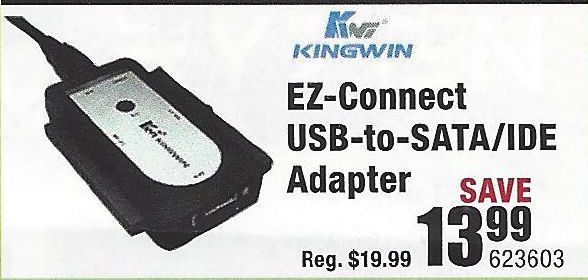
And, while you can buy a Y-connector to split the power cable into two connectors, the same can not be done for SATA DATA cable as each device needs its own data channel. So, if there is no optical drive and no second SATA connection, then you would have to buy a USB-to-SATA connector like the one pictured below and use that:
I am a volunteer and I do not work for, nor represent, HP

01-06-2020 11:17 AM - edited 01-06-2020 11:31 AM
HP Recommended
Thank you, is this hard to use Kingwin EZ-CONNECT USB TO SATA/IDE ADAPTER
Also where can i purchase it?
ok i found their website but that model adapter did not come up on there search engine??
01-06-2020 11:34 AM
HP Recommended
Is this the same thing>>>>
01-06-2020 12:32 PM
HP Recommended
I managed to get myself confused , let me get this straight, will i be able to clone my old harddrive to the ssd using this adapter???
and if i wanted to, i could just set aside the old harddrive and reinstall windows10 straight to the ssd and then not needing the adapter???
01-07-2020 04:23 PM
HP Recommended
Ok i made a full recovery on a usb 16gb. I am going to get a SSD 250gb . I guess i will have to use the sata and power cable from the old harddrive and connect it to the SSD and then reinstall with the recovery, I wont be using the old harddrive anyway, can use that maybe as a backup if i need to in the future.
01-08-2020 11:52 AM
HP Recommended
Need some help here, i put the system recovery on a usb 16gb and i bought a WD 250gb ssd. It started to recover my system bu t then a message came up saying "unable to recover your pc, the System Drive Is Too Small". Anyone know what is wrong or how i can correct this problem? Please remember this is a destop hp P2-1113W i am trying to convert to ssd. Thanks
- « Previous
-
- 1
- 2
- Next »

Be alert for scammers posting fake support phone numbers and/or email addresses on the community.
If you think you have received a fake HP Support message, please report it to us by clicking on "Flag Post".
† The opinions expressed above are the personal opinions of the authors, not of HP. By using this site, you accept the Terms of Use and Rules of Participation.


Didn't find what you were looking for?
Ask the community
† The opinions expressed above are the personal opinions of the authors, not of HP. By using this site, you accept the <a href="https://www8.hp.com/us/en/terms-of-use.html" class="udrlinesmall">Terms of Use</a> and <a href="/t5/custom/page/page-id/hp.rulespage" class="udrlinesmall"> Rules of Participation</a>.