• ×
    Information
    Need Windows 11 help?
    Check documents on compatibility, FAQs, upgrade information and available fixes.
    Windows 11 Support Center.
  • post a message
  • ×
    Information
    Need Windows 11 help?
    Check documents on compatibility, FAQs, upgrade information and available fixes.
    Windows 11 Support Center.
  • post a message
Guidelines
Join the HP Community Solve‑a‑thon | Help Others & Share Your Solutions | Live on Zoom | 2:30 PM to 2:30 AM IST | Every Wednesday Click here to know more
Check out our WINDOWS 11 Support Center info about: OPTIMIZATION, KNOWN ISSUES, FAQs, VIDEOS AND MORE.
HP Recommended
Envy 27 Recline Touchsmart k-127c
Microsoft Windows 10 (64-bit)

Every time I boot I get a blue screen that reads: "Hard Disk Error.  Please run the Hard Disk Test in System DIagnostics.  Hard Disk 2 (3F2)  F2 System Diagnostics For more information, please visit: www.hp.com/go/techcenter/startup".  I ran all of the tests on the Hardware Diagnostics menu (which took hours) and all received a "PASSED' indication.  I still got the error.  Now I just click "Exit" on the Hardware Diagnostics Menu and the normal boot process resumes and the machine runs fine.  It's just a pain to go through that on every boot.


So I replaced my hard drive with a new solid state drive, I performed a clean install of Windows 10 Pro (machine was formerly running Windows 8.1) and I flashed the BIOS to the latest version.  I still get the error.


Any suggestions on how to fix this? 

3 REPLIES 3
HP Recommended

@badaglmb,


Welcome to the HP Support Community!


I recommend you follow the steps in the below article and check if it helps.


https://support.hp.com/in-en/document/c04718479


Let me know how it goes and you have a great day!


If you wish to show appreciation for my efforts, mark my post as Accept as Solution. Your feedback counts!


Cheers!

The_Fossette
I am an HP Employee

HP Recommended

Thanks for your suggestion but that did not help.  Also, the final link for Advanced Startup Troubleshooting is broken.

HP Recommended

@badaglmb,


I recommend you restore BIOS defaults on the computer and check if it helps.


Here is how it is done.

  1. Backup and save important information on your computer, and then turn off the computer.

  2. Turn on the computer, and then click F10, until the BIOS opens.

  3. Under the Main tab, use the up and down arrow keys to select Restore Defaults.

    Figure : Restore Defaults

    Image: Restore Defaults
  4. Select Yes.

    Figure : Load Defaults

    Image: Load Defaults
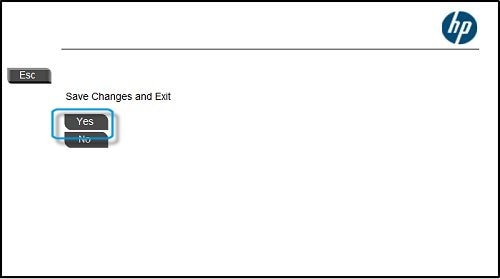
  5. Under the Main tab, use the up and down arrow keys to select Save Changes and Exit.

    Figure : Save Changes and Exit

    Image: Save Changes and Exit
  6. When prompted, click Yes to save changes and exit.

    Figure : Click Yes

    Image: Click Yes


If you continue facing the issue, I recommend you perform a system restore following the steps in the below article.


https://support.hp.com/in-en/document/c03327545


If you wish to show appreciation for my efforts, mark my post as Accept as Solution. Your feedback counts!


Cheers!

The_Fossette
I am an HP Employee

† The opinions expressed above are the personal opinions of the authors, not of HP. By using this site, you accept the <a href="https://www8.hp.com/us/en/terms-of-use.html" class="udrlinesmall">Terms of Use</a> and <a href="/t5/custom/page/page-id/hp.rulespage" class="udrlinesmall"> Rules of Participation</a>.