
-
×InformationNeed Windows 11 help?Check documents on compatibility, FAQs, upgrade information and available fixes.
Windows 11 Support Center. -
-
×InformationNeed Windows 11 help?Check documents on compatibility, FAQs, upgrade information and available fixes.
Windows 11 Support Center. -
- HP Community
- Desktops
- Desktop Operating Systems and Recovery
- Hp support assistant wont open

Create an account on the HP Community to personalize your profile and ask a question
Your account also allows you to connect with HP support faster, access a personal dashboard to manage all of your devices in one place, view warranty information, case status and more.
Check out our WINDOWS 11 Support Center info about: OPTIMIZATION, KNOWN ISSUES, FAQs, VIDEOS AND MORE.

It has been a while since anyone has replied. Simply ask a new question if you would like to start the discussion again.

03-01-2019 05:51 PM
 HP Recommended
Product: Pavilion desktop all in one
Operating System: Microsoft Windows 10 (64-bit)
I have uninstalled and reinstalled HP support assistanr 3 times but when I click on the program nothing happens. Windows and other software is all up to date. Any suggestions please,
Solved! Go to Solution.
1 ACCEPTED SOLUTION
20 REPLIES 20


03-03-2019 12:01 PM - edited 04-09-2019 10:22 AM
HP Recommended
@Cabinhook
Thank you for posting on the HP Support Community.
What is the product number of your device? Use this link to find it: http://support.hp.com/us-en/document/c03754824
(Ensure you do not share any of your personal information such as serial, phone number, email ID, etc...).
If the HP Assistant does not open, use the following steps to restore your computer to a previous date when HP Support Assistant opened properly.
In Windows, search for and open Run.
Type RSTRUI.EXE, then press Enter.
A Restore system files and settings window opens.
Figure: Restore system files and settings window

Click Next.
In the Date and Time column, select a date when HP Support Assistant opened properly.
Figure: Selecting a Date and Time
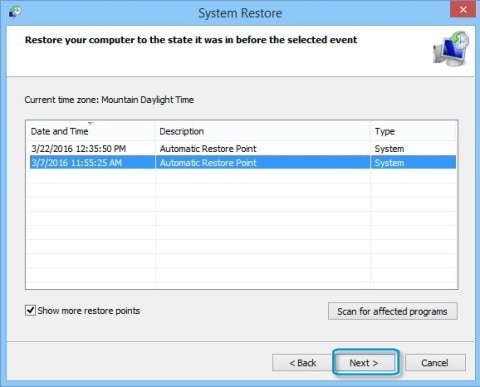
Click Next.Confirm you restore point date, then click Finish.
Figure: Clicking Finish
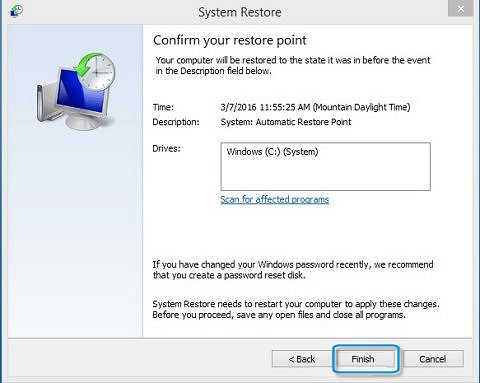
The next time you click the HP Support Assistant icon, HP Support Assistant will open.
Hope this helps! Keep me posted for further assistance.
Please click “Accept as Solution” if you feel my post solved your issue, it will help others find the solution.
ECHO_LAKE
I am an HP Employee
03-03-2019 02:51 PM
HP Recommended
Thank you for posting back.
I appreciate your efforts to try and resolve the issue. As you've performed relevant troubleshooting steps and the issue persists, I would suggest you perform a system factory reset which will reinstall the original operating system and fix the issue.
Click here to perform the system factory reset.
Keep me posted for further assistance.
ECHO_LAKE
I am an HP Employee
03-04-2019 08:43 AM
HP Recommended
I understand the difficulty with the problem. The system recovery is the last resort in order to isolate whether software or hardware related issue. If its software related issue by performing factory reset will fix the issue, if its a hardware issue the computer needs to service.
I would suggest work on it as per your convenience and please feel free to contact us here anytime you need any further assistance.
Hope this helps! Keep me posted for further assistance.
Please click “Accept as Solution” if you feel my post solved your issue, it will help others find the solution.
ECHO_LAKE
I am an HP Employee
03-07-2019 01:49 PM
HP Recommended
I would not suggest that, because after editing the registry system might become unstable, hardware stops working, or software stops working.
Clean installation of an operating system will handle major software related issues.
Keep me posted for further assistance.
ECHO_LAKE
I am an HP Employee
03-09-2019 10:29 AM - edited 03-09-2019 10:31 AM
HP Recommended
Work on it as per your convenience and please feel free to contact us here anytime you need any further assistance.
Have a great day!
ECHO_LAKE
I am an HP Employee

Be alert for scammers posting fake support phone numbers and/or email addresses on the community.
If you think you have received a fake HP Support message, please report it to us by clicking on "Flag Post".
† The opinions expressed above are the personal opinions of the authors, not of HP. By using this site, you accept the Terms of Use and Rules of Participation.


Didn't find what you were looking for?
Ask the community
† The opinions expressed above are the personal opinions of the authors, not of HP. By using this site, you accept the <a href="https://www8.hp.com/us/en/terms-of-use.html" class="udrlinesmall">Terms of Use</a> and <a href="/t5/custom/page/page-id/hp.rulespage" class="udrlinesmall"> Rules of Participation</a>.