
-
×InformationNeed Windows 11 help?Check documents on compatibility, FAQs, upgrade information and available fixes.
Windows 11 Support Center. -
-
×InformationNeed Windows 11 help?Check documents on compatibility, FAQs, upgrade information and available fixes.
Windows 11 Support Center. -
- HP Community
- Desktops
- Desktop Operating Systems and Recovery
- Re: Windows 7 installation error a required CD/DVD Driver is...

Create an account on the HP Community to personalize your profile and ask a question
Your account also allows you to connect with HP support faster, access a personal dashboard to manage all of your devices in one place, view warranty information, case status and more.
Check out our WINDOWS 11 Support Center info about: OPTIMIZATION, KNOWN ISSUES, FAQs, VIDEOS AND MORE.

It has been a while since anyone has replied. Simply ask a new question if you would like to start the discussion again.

04-29-2020 03:21 PM
 HP Recommended
Product: Pavilion DV6 6113TX
Operating System: Microsoft Windows 7 (64-bit)
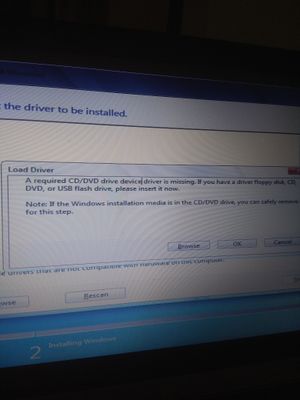
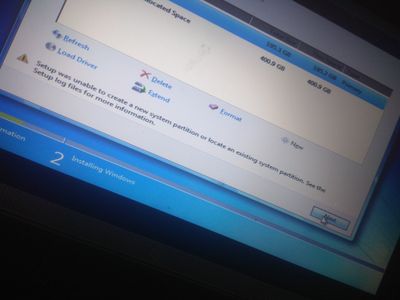
Hello there. I've formatted my laptop and now unable to open it due to this. How can I fix,? I saw tutorials on YouTube buy couldn't find any drivers. Please help
8 REPLIES 8


04-29-2020 03:52 PM
HP Recommended
Hi:
If you are using a USB flash drive to install W7, you must boot it from one of the notebook's USB 2 ports.
It will not work from a USB 3 port because W7 does not have the required USB 3 drivers to proceed any further than that error.
04-29-2020 04:30 PM
HP Recommended
You're very welcome.
See if running the diskpart utility>clean disk during the install works.
Watch this video. He does it on W10 but W7 works the same way.
04-29-2020 05:14 PM
HP Recommended
Hi:
Watch this video...you will run the same diskpart command from the setup, but use a different command.
https://www.youtube.com/watch?time_continue=1&v=zoDrOyuoi5Q&feature=emb_logo

Be alert for scammers posting fake support phone numbers and/or email addresses on the community.
If you think you have received a fake HP Support message, please report it to us by clicking on "Flag Post".
† The opinions expressed above are the personal opinions of the authors, not of HP. By using this site, you accept the Terms of Use and Rules of Participation.


Didn't find what you were looking for?
Ask the community
† The opinions expressed above are the personal opinions of the authors, not of HP. By using this site, you accept the <a href="https://www8.hp.com/us/en/terms-of-use.html" class="udrlinesmall">Terms of Use</a> and <a href="/t5/custom/page/page-id/hp.rulespage" class="udrlinesmall"> Rules of Participation</a>.