
-
×InformationNeed Windows 11 help?Check documents on compatibility, FAQs, upgrade information and available fixes.
Windows 11 Support Center. -
-
×InformationNeed Windows 11 help?Check documents on compatibility, FAQs, upgrade information and available fixes.
Windows 11 Support Center. -
- HP Community
- Desktops
- Desktop Operating Systems and Recovery
- Re: problem in resetting PC

Create an account on the HP Community to personalize your profile and ask a question
Your account also allows you to connect with HP support faster, access a personal dashboard to manage all of your devices in one place, view warranty information, case status and more.
Check out our WINDOWS 11 Support Center info about: OPTIMIZATION, KNOWN ISSUES, FAQs, VIDEOS AND MORE.

It has been a while since anyone has replied. Simply ask a new question if you would like to start the discussion again.

03-24-2018 09:51 PM
 HP Recommended
Product: pavilion 15 ab226nx
Operating System: Microsoft Windows 10 (64-bit)
i want to reset my pc and i got problem when i use "Reset Pc"
my problem is :
when i pressed on "get start" and finilzing first step 100% and then started again with black screen with hp logo and counted up to 35% and then get this massege " undoing changes " then get the light blue screen and massege was "
There Was A Problem Refreshing Your PC No Changes Were Made "
What i have to do for now please ?
accualy my pc is windows based "not DOS" so i don't know what will happend if i format my partition and i think i will lose the licence .
my windows is : windows 10 single lang. home
Solved! Go to Solution.
1 ACCEPTED SOLUTION
Accepted Solutions


03-25-2018 01:24 AM
HP Recommended
Hello @AmrHal
Thank you for posting in the HP Support forum.
No license will get deleted at all or get lost - your PC uses either BIOS key as every OEM Windows 8/8.1/10 >info< or it already has a >digital entitlement< from Microsoft for your computer. You may check if you have such an entitlement by going to Start -> Settings -> Update&Security -> Activation
For some reason the PC recovery fails. I recommend you
1) Perform hardware diagnostics (F2) to rule out hardware issues >> https://www.youtube.com/watch?v=6JXUp43ahHA
and
2) Perform clean Windows 10 installation to erase the information and restore the device to factory default condition. If your key is inside the BIOS or if you have digital entitlement, you should be able to activate Windows after reinstallation, don't you worry.
Windows reinstallation / clean installation :
- You can directly download Windows 10 ISO from MS site or download >> Media creation tool from Microsoft site, create installation DVD or installation USB and proceed with clean installation/reinstallation.
Download:
>> https://www.microsoft.com/en-us/software-download/windows10ISO
Make sure you select the proper version (64 bit / Home or Pro)
Media Creation tool will always provide you with the latest Windows version/build - now 1709 Fall Creators Update.
- When download completes, you will need to write the ISO image and boot from a bootable media. You will need a blank USB pendrive (min 4 GB capacity). Use the Media Creation tool.
When ready with the USB drive or with the DVD:
Please, shutdown the computer using the power button.
Insert the Windows USB thumdrive prepared previously
Power on the PC.
As soon as you press the power-on button, immediately start hitting the Esc button repeatedly (like tap-tap-tap).
This should open a HP Startup Menu
Choose F9 to open Boot options. Select the USB thumb drive as a boot option.
- Follow the on-screen instructions to install Windows 10. Perform clean installation/custom installation (not repair).
Delete all existing partitions and install Windows on Disc 0 Unallocated space
- After successful Windows installation, install drivers via Windows Update/Device Manager >> http://support.hp.com/us-en/document/c03330139
- Make sure Windows is Activated by going to Start > Settings > Update & Security > Windows Activation
- You may wish to stop some of the Windows Telemetry by using free tools such as Spybot AntiBeacon or DWS Lite
Hope this helps. Let me know how it goes
Your FEEDBACK is important. Use the interactive buttons below and let me know if the post helps ;
*** HP employee *** I express personal opinion only *** Joined the Community in 2013
*** HP employee *** I express personal opinion only *** Joined the Community in 2013
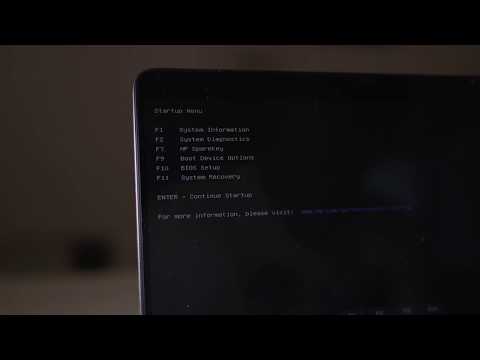
HP Laptops On Amazon BEST PRICE - https://amzn.to/3CEJDF4 HP Spectre x360 - https://amzn.to/40Z1NM4 PLEASE SUBSCRIBE IF THIS HELPS YOU - IT HELPS ME :-) Here is a very quick video on how to enter the HP Boot Menu from a HP Laptop. Step 1 - Press the power on button. Step 2 - Quickly start pressing

Arabic 64-bit 237FCBAA234166A836260DFA760F71F1211A6C573130C75D4CCDCA9D7D29F69A Arabic 32-bit 964F2D179FA13670285B8A2DB7F0CD72983E8BC5DF8554F547550486AD8AFEAB Bulgarian 64-bit 1DFC04F3EC68602B547961A5AFD3758164E0C36A6BF420C564B1B44B375E6070 Bulgarian 32-bit ...
3 REPLIES 3
03-25-2018 01:24 AM
HP Recommended
Hello @AmrHal
Thank you for posting in the HP Support forum.
No license will get deleted at all or get lost - your PC uses either BIOS key as every OEM Windows 8/8.1/10 >info< or it already has a >digital entitlement< from Microsoft for your computer. You may check if you have such an entitlement by going to Start -> Settings -> Update&Security -> Activation
For some reason the PC recovery fails. I recommend you
1) Perform hardware diagnostics (F2) to rule out hardware issues >> https://www.youtube.com/watch?v=6JXUp43ahHA
and
2) Perform clean Windows 10 installation to erase the information and restore the device to factory default condition. If your key is inside the BIOS or if you have digital entitlement, you should be able to activate Windows after reinstallation, don't you worry.
Windows reinstallation / clean installation :
- You can directly download Windows 10 ISO from MS site or download >> Media creation tool from Microsoft site, create installation DVD or installation USB and proceed with clean installation/reinstallation.
Download:
>> https://www.microsoft.com/en-us/software-download/windows10ISO
Make sure you select the proper version (64 bit / Home or Pro)
Media Creation tool will always provide you with the latest Windows version/build - now 1709 Fall Creators Update.
- When download completes, you will need to write the ISO image and boot from a bootable media. You will need a blank USB pendrive (min 4 GB capacity). Use the Media Creation tool.
When ready with the USB drive or with the DVD:
Please, shutdown the computer using the power button.
Insert the Windows USB thumdrive prepared previously
Power on the PC.
As soon as you press the power-on button, immediately start hitting the Esc button repeatedly (like tap-tap-tap).
This should open a HP Startup Menu
Choose F9 to open Boot options. Select the USB thumb drive as a boot option.
- Follow the on-screen instructions to install Windows 10. Perform clean installation/custom installation (not repair).
Delete all existing partitions and install Windows on Disc 0 Unallocated space
- After successful Windows installation, install drivers via Windows Update/Device Manager >> http://support.hp.com/us-en/document/c03330139
- Make sure Windows is Activated by going to Start > Settings > Update & Security > Windows Activation
- You may wish to stop some of the Windows Telemetry by using free tools such as Spybot AntiBeacon or DWS Lite
Hope this helps. Let me know how it goes
Your FEEDBACK is important. Use the interactive buttons below and let me know if the post helps ;
*** HP employee *** I express personal opinion only *** Joined the Community in 2013
*** HP employee *** I express personal opinion only *** Joined the Community in 2013
HP Laptops On Amazon BEST PRICE - https://amzn.to/3CEJDF4 HP Spectre x360 - https://amzn.to/40Z1NM4 PLEASE SUBSCRIBE IF THIS HELPS YOU - IT HELPS ME :-) Here is a very quick video on how to enter the HP Boot Menu from a HP Laptop. Step 1 - Press the power on button. Step 2 - Quickly start pressing
Arabic 64-bit 237FCBAA234166A836260DFA760F71F1211A6C573130C75D4CCDCA9D7D29F69A Arabic 32-bit 964F2D179FA13670285B8A2DB7F0CD72983E8BC5DF8554F547550486AD8AFEAB Bulgarian 64-bit 1DFC04F3EC68602B547961A5AFD3758164E0C36A6BF420C564B1B44B375E6070 Bulgarian 32-bit ...
03-26-2018 10:36 PM
HP Recommended
@AmrHalwrote:Perfect Solution, thanks
i format my partition and install windows 10 agian and like you said the licence still exist
thanks i appreciate it alot
You are very welcome !
Glad that this works for you.
Your FEEDBACK is important. Use the interactive buttons below and let me know if the post helps ;
*** HP employee *** I express personal opinion only *** Joined the Community in 2013
*** HP employee *** I express personal opinion only *** Joined the Community in 2013

Be alert for scammers posting fake support phone numbers and/or email addresses on the community.
If you think you have received a fake HP Support message, please report it to us by clicking on "Flag Post".
† The opinions expressed above are the personal opinions of the authors, not of HP. By using this site, you accept the Terms of Use and Rules of Participation.


Didn't find what you were looking for?
Ask the community
† The opinions expressed above are the personal opinions of the authors, not of HP. By using this site, you accept the <a href="https://www8.hp.com/us/en/terms-of-use.html" class="udrlinesmall">Terms of Use</a> and <a href="/t5/custom/page/page-id/hp.rulespage" class="udrlinesmall"> Rules of Participation</a>.