
-
×InformationNeed Windows 11 help?Check documents on compatibility, FAQs, upgrade information and available fixes.
Windows 11 Support Center. -
-
×InformationNeed Windows 11 help?Check documents on compatibility, FAQs, upgrade information and available fixes.
Windows 11 Support Center. -
- HP Community
- Desktops
- Desktop Software and How To Questions
- Omen backlight keyboard lighting, Lighting Isn't There In Om...

Create an account on the HP Community to personalize your profile and ask a question
Your account also allows you to connect with HP support faster, access a personal dashboard to manage all of your devices in one place, view warranty information, case status and more.
Check out our WINDOWS 11 Support Center info about: OPTIMIZATION, KNOWN ISSUES, FAQs, VIDEOS AND MORE.

It has been a while since anyone has replied. Simply ask a new question if you would like to start the discussion again.

7 REPLIES 7


02-19-2020 12:55 PM
 HP Recommended
Welcome to the HP Support Community!
I assure you I will try my best to get this sorted.
In order that I may provide you with an accurate solution, I will need the exact model or the product number for your computer.
Follow the steps in the below article to find the product details.
https://support.hp.com/us-en/document/c00033108
Look forward to hearing from you and you have a great day!
Take care.
Cheers!
The_Fossette
I am an HP Employee
02-20-2020 10:02 AM
HP Recommended
Thank you for the information.
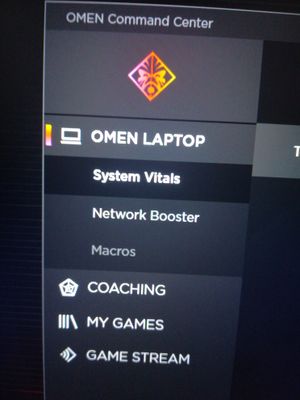
I checked the specifications of your computer and see that your computer doesn't support 4 zone lighting and that is the reason why you don't see that option in the command center.
Please refer to the below article for more information.
https://support.hp.com/in-en/document/c05387497
I hope that answers your question and you have a great day!
If you wish to show appreciation for my efforts, mark my post as Accept as Solution. Your feedback counts!
Cheers!
The_Fossette
I am an HP Employee

02-22-2020 10:29 AM
HP Recommended
Different HP Omen Models Support different Features. Not all Models will support all the Features
You can refer to the link sent earlier https://support.hp.com/in-en/document/c05387497 for list of Omen Models and Features they support
Thank you
KrazyToad
I Am An HP Employee

Be alert for scammers posting fake support phone numbers and/or email addresses on the community.
If you think you have received a fake HP Support message, please report it to us by clicking on "Flag Post".
† The opinions expressed above are the personal opinions of the authors, not of HP. By using this site, you accept the Terms of Use and Rules of Participation.


Didn't find what you were looking for?
Ask the community
† The opinions expressed above are the personal opinions of the authors, not of HP. By using this site, you accept the <a href="https://www8.hp.com/us/en/terms-of-use.html" class="udrlinesmall">Terms of Use</a> and <a href="/t5/custom/page/page-id/hp.rulespage" class="udrlinesmall"> Rules of Participation</a>.