• ×
    Information
    Need Windows 11 help?
    Check documents on compatibility, FAQs, upgrade information and available fixes.
    Windows 11 Support Center.
  • post a message
  • ×
    Information
    Need Windows 11 help?
    Check documents on compatibility, FAQs, upgrade information and available fixes.
    Windows 11 Support Center.
  • post a message
Guidelines
Does your laptop battery charge only when the laptop is turned off? Click here to view the solution
HP Recommended
OMEN by HP - 15-dc0048np
Microsoft Windows 10 (64-bit)

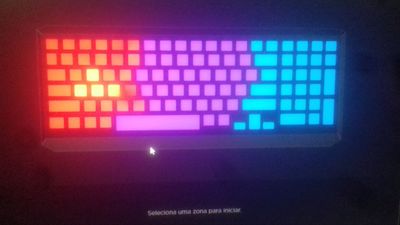
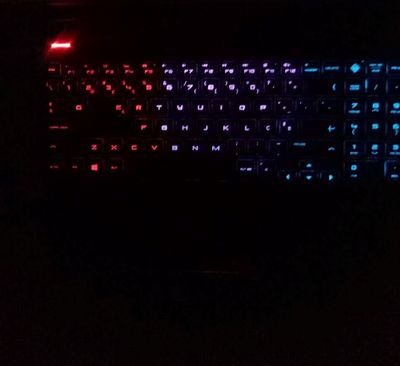
So when i bought my laptop all the colors of all  4 keyboard zones worked well, after some time when i tried to change the wasd zone colors on omen comand center even if choose the yellow color or another color only the red color worked after some more time the wasd colors stopped working till today. ( I have the latest bios version installed, i have all windows updates, i tried to reinstall omen command center and nothing work, the wasd keys work fine it is just the lighting that doesn t work). 

(Omen command center keyboard lights)

69232011_2406499889427923_4962828345386467328_n.jpg

(keyboard lights)

71235984_499855893896807_8260505081363824640_n.jpg

Sorry for bad quality.

4 REPLIES 4
HP Recommended

Hello @H0m3rS,


Just wondering, what happens when you press the keyboard backlight button a few times? 


I believe it's the F4 key on your keyboard.


I used to be an HP Expert. I no longer participate in this community.
HP Recommended

Hi, thank you for the reply, yes it is f4 and i tried to do that and all the lights turn on and off except the wasd zone, im starting to think its a physical problem or something.

HP Recommended

If the F4 button and the Omen Command Center settings are not making any difference, then its absolutely a keyboard fault.

We can ask the HP Moderators to step in and do what they do. Might take a day for a response, but they will get to you.

HP Recommended

@H0m3rS


I have brought your issue to the attention of an appropriate team within HP. They will likely request information from you in order to look up your case details or product serial number. Please look for a private message from an identified HP contact. Additionally, keep in mind not to publicly post personal information (serial numbers and case details).

If you are unfamiliar with how the Community's private message capability works, you can learn about that here.
Thank you for visiting the HP Support Community.


I work on behalf of HP
† The opinions expressed above are the personal opinions of the authors, not of HP. By using this site, you accept the <a href="https://www8.hp.com/us/en/terms-of-use.html" class="udrlinesmall">Terms of Use</a> and <a href="/t5/custom/page/page-id/hp.rulespage" class="udrlinesmall"> Rules of Participation</a>.