
-
×InformationNeed Windows 11 help?Check documents on compatibility, FAQs, upgrade information and available fixes.
Windows 11 Support Center. -
-
×InformationNeed Windows 11 help?Check documents on compatibility, FAQs, upgrade information and available fixes.
Windows 11 Support Center. -
- HP Community
- Gaming
- Gaming Notebooks
- No audio after update

Create an account on the HP Community to personalize your profile and ask a question
Your account also allows you to connect with HP support faster, access a personal dashboard to manage all of your devices in one place, view warranty information, case status and more.

It has been a while since anyone has replied. Simply ask a new question if you would like to start the discussion again.

10-11-2018 06:18 AM
 HP Recommended
Product: Omen 15
Operating System: Microsoft Windows 10 (64-bit)
Did an update to my laptop today and upon restart i had a red cross over my sound icon in the tool bar and in my device manager there was a "!" next to my sound driver, managed to manually update the driver and thought that the problem was fixed as there was no longer the red "x" on my toolbar, but this is not the case now i only have sound through my headphone port but not any through my speakers, I've done a hardware test on the speakers using the UEFI and they're working fine, just when i actually fully start up my computer there is no audio coming out of the speakers, i've also reinstalled all my drivers multiple times but this didn't help either.
Any suggestions at all would be helpful.
Regards Jethro
Solved! Go to Solution.
1 ACCEPTED SOLUTION
Accepted Solutions

10-11-2018 08:23 AM
HP Recommended
Here is a fix another user claims to have worked for him...
5 REPLIES 5
10-11-2018 08:14 AM
HP Recommended
HEllo @JethroTeal
Its a problem thats hitting lots of people lately.
Ive encountered this also with two different systems and I suspect a Windows update may be the culprit.
You able to connect a pair of headphones or ear buds and get sound?
If so, the sound card is working, its just the settings that need to be changed.
On one computer, I was able to get it to work by using the troubleshooting fix.
The default speakers were not chosen.
Go to All Settings, System, Sound.
Highlight the Speaker/Headphone in the list and click troubleshoot again.
It will look similar to this...
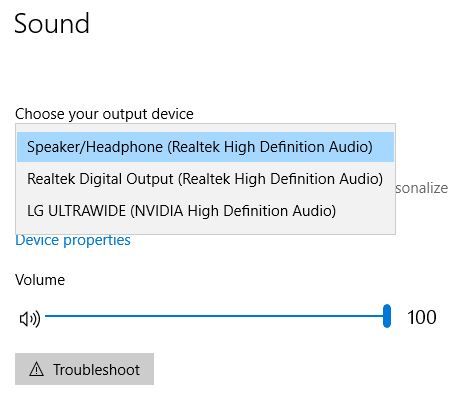
In another setup, I could not get it to reset. Finally I had to do a complete system recovery back to factory.
If I hear of another fix, I will let you know.
10-11-2018 08:23 AM
HP Recommended
Here is a fix another user claims to have worked for him...
10-12-2018 11:48 AM
HP Recommended
For anyone else...
HPs response: It was an update from Microsoft not intended for HP systems... it has been pulled.
While performing a Windows update, if you encounter issues with the audio, please uninstall the driver and manually install the latest version. The following document should be able to help.

Be alert for scammers posting fake support phone numbers and/or email addresses on the community.
If you think you have received a fake HP Support message, please report it to us by clicking on "Flag Post".
† The opinions expressed above are the personal opinions of the authors, not of HP. By using this site, you accept the Terms of Use and Rules of Participation.


Didn't find what you were looking for?
Ask the community
† The opinions expressed above are the personal opinions of the authors, not of HP. By using this site, you accept the <a href="https://www8.hp.com/us/en/terms-of-use.html" class="udrlinesmall">Terms of Use</a> and <a href="/t5/custom/page/page-id/hp.rulespage" class="udrlinesmall"> Rules of Participation</a>.