
-
×InformationNeed Windows 11 help?Check documents on compatibility, FAQs, upgrade information and available fixes.
Windows 11 Support Center. -
-
×InformationNeed Windows 11 help?Check documents on compatibility, FAQs, upgrade information and available fixes.
Windows 11 Support Center. -
- HP Community
- Gaming
- Gaming Notebooks
- Re: Omen Command Center not showing intelligent overclocking...

Create an account on the HP Community to personalize your profile and ask a question
Your account also allows you to connect with HP support faster, access a personal dashboard to manage all of your devices in one place, view warranty information, case status and more.

It has been a while since anyone has replied. Simply ask a new question if you would like to start the discussion again.

7 REPLIES 7

06-01-2020 04:29 AM
 HP Recommended
Be thankful that OCC works for you at all.
When it IS installed on my OMEN i7, it says that the CPU is a constant 70degrees C whatever the CPU load, when I know the CPU temperature is on 40ish degrees C. I cannot get ANY of the tech people here to understand the problem - they only offer ABSOLUTELY STUPID solutions with arguments that are non sequiturs.
OCC has mysteriously unistalled itself now and when I try to reinstall it, it doesn't work.
When I try a link provided by one of the so-called tech 'experts' here, I get -
We're Sorry
HP Customer Support site is temporarily unavailable.
We apologize for any inconvenience. Please check back later.
I give up. This is just sh......

06-06-2020 01:42 AM
HP Recommended
Omen laptops (or just about any other laptops) don't have overclocking as the cooling system could not handle that much heat!
Only the desktops have that feature and then, only if using an unlocked processor.
No matter how much you reinstall the OCC, its not going to give you that feature in your laptop.
I'm sorry.
06-06-2020 08:15 AM
HP Recommended
Can you point me to the ad you are reading please?
Most adds that showing those features are just talking about what the OCC is capable in general.
06-11-2020 02:18 AM
HP Recommended
Sorry for the late replies because I am really occupied with all my college work right now.
Coming to the images they are shown in Microsoft store's omen Command center page
And these options are also listed on the omen website
06-11-2020 05:33 AM
HP Recommended
No worries.
Got ya. I assume the Microsoft Store website here... https://www.microsoft.com/en-us/p/omen-command-center/9nqdw009t0t5?activetab=pivot:overviewtab
Their overview is talking about what the OCC is capable of overall. You must have a supported model to get certain features.
The HP link for an overview gives a Disclaimer at the bottom you have to click on to see... https://www.omen.com/us/en/omen-command-center.html

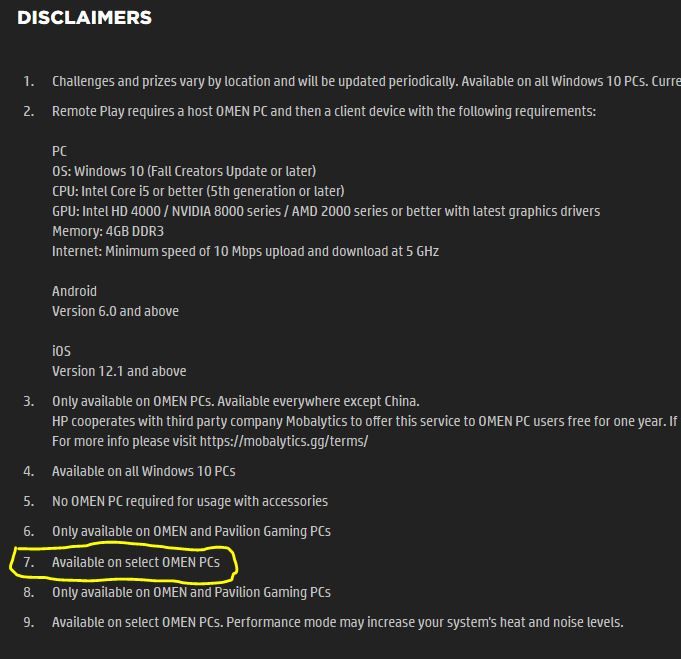
On the HP website showing the Command Center features, there is a compatibility chart showing what features are available for the various model series. Your DC1xxx series has no overclocking.
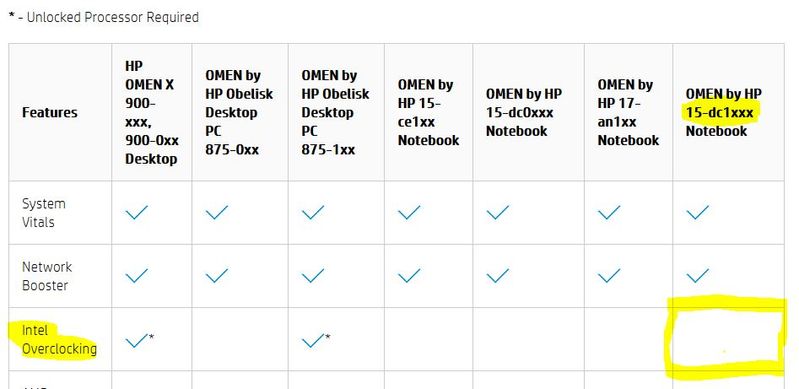
Your specs page shows you don't have an unlocked CPU. You have to have an unlocked CPU (k version) for overclocking. The Omen laptops do not come with an Intel k version. Only one model had a one that overclocked a few years ago and it proved it was not viable, the Omen X series.
The biggest key to knowing if any Intel based PC can potentially overclock is to find the K marker at the end of its CPU model number. In truth, only Desktops can handle the HEAT generated from Overclocking.
Thats about all I can offer for an explanation. Google will be your friend for further education on overclockable processors.
Reddit would be another good forum to get info and opinions on the subject.
Hope that helps. If you have other questions about your system, feel free to ask.
I am not an employee, only a volunteer.

"ELEVATE YOUR GAMING WITH OMEN GAMING HUB Maximize your performance, personalize your settings, and unlock better ways to play FEATURES: * OMEN AI: Maximize performance and minimize hassles with a single click. Provides personalized settings tailored to your unique hardware and games. * System ...

Be alert for scammers posting fake support phone numbers and/or email addresses on the community.
If you think you have received a fake HP Support message, please report it to us by clicking on "Flag Post".
† The opinions expressed above are the personal opinions of the authors, not of HP. By using this site, you accept the Terms of Use and Rules of Participation.


Didn't find what you were looking for?
Ask the community
† The opinions expressed above are the personal opinions of the authors, not of HP. By using this site, you accept the <a href="https://www8.hp.com/us/en/terms-of-use.html" class="udrlinesmall">Terms of Use</a> and <a href="/t5/custom/page/page-id/hp.rulespage" class="udrlinesmall"> Rules of Participation</a>.