• ×
    Information
    Need Windows 11 help?
    Check documents on compatibility, FAQs, upgrade information and available fixes.
    Windows 11 Support Center.
  • post a message
  • ×
    Information
    Need Windows 11 help?
    Check documents on compatibility, FAQs, upgrade information and available fixes.
    Windows 11 Support Center.
  • post a message
Guidelines
Join the HP Community Solve‑a‑thon | Help Others & Share Your Solutions | Live on Zoom | 2:30 PM to 2:30 AM IST | Every Wednesday Click here to know more
HP Recommended
Microsoft Windows 11

Hello friends, 

My PC suddenly crashes leaving a crack images and wired sound shortly after playing some games.

I noticed that when's i play games like God of war, assassin's creed Odyssey and origins and even tomb raider the crash occurs.

One weird thing though is that the PC doesn't crash whenever I play fifa 22 or GTA IV.

Please assist.


4 REPLIES 4
HP Recommended

Hello @XLR800 


Sorry to hear that you are having problems ... 


To help you I need to know the product number (p/n) of your notebook !


You will find this information on the back of your notebook printed in small alphanumeric letters.

The product number (p/n) is legally allowed information, just about the computer, no sensitive data.

It is allowed to post in public, no problem.


or


press [winkey] + r

( run command )

msinfo32

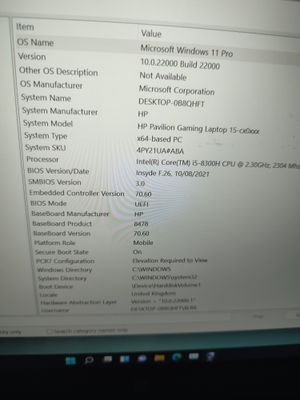
copy / paste the System SKU value

msinfo32msinfo32


Please report your results


best regards

---

Dear Community Member, please click the button [ YES ] on "Was this reply helpful?" to say Thanks and

make it easier for other people to find this type of solution by marking the reply ▶️ [ Accept as Solution ] ◀️

Do this on the post I wrote that helped solve it.

Thank you very much

             ⌨️

HP Recommended

16566844745931029854234417017722.jpg

 System SKU - 4PY21UA#ABA


any help would be appreciated

HP Recommended

Hello @XLR800 


(1) Update BIOS

HP Notebook System BIOS Update (Intel Processors)

F.27 Rev.A19.4 MBMay 16, 2022Download

HP Consumer Desktop / Notebook PC ME Firmware Update

04 Rev.A2.7 MBJul 25, 2018Download

 Why should you install the update ?

https://support.hp.com/us-en/document/ish_4123786-2338478-16

Quote: "

Updating the BIOS is recommended as standard maintenance of the computer. It can also help resolve the following issues:

  • An available BIOS update resolves a specific issue or improves computer performance.
  • The current BIOS does not support a hardware component or a Windows upgrade.
  • HP Support recommends installing a specific BIOS update.

"

(2) Install HP CoolSence

HP CoolSense Technology

2.22.2 Rev.A9.7 MBMar 21, 2018Download


(3) Shutdown

(4) Check your hardware [ on bootup ]

Using the HP PC Hardware Diagnostics (UEFI) to diagnose hardware errors ...

https://support.hp.com/id-en/document/c04499777

Watch how it works:

https://www.youtube.com/watch?v=14GKIpGPNRM&ab_channel=HPSupport


Please report your results ( Pictures, error messages ... )


best regards

---

Dear Community Member, please click the button [ YES ] on "Was this reply helpful?" to say Thanks and

make it easier for other people to find this type of solution by marking the reply ▶️ [ Accept as Solution ] ◀️

Do this on the post I wrote that helped solve it.

Thank you very much

             ⌨️

HP Recommended

Hi 

Please help.

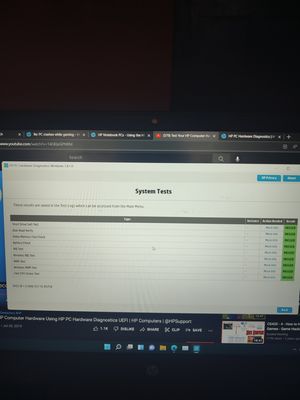
My PC seem to have no hardware problem but the

IMG_20220701_171342.jpg

 issue persists


† The opinions expressed above are the personal opinions of the authors, not of HP. By using this site, you accept the <a href="https://www8.hp.com/us/en/terms-of-use.html" class="udrlinesmall">Terms of Use</a> and <a href="/t5/custom/page/page-id/hp.rulespage" class="udrlinesmall"> Rules of Participation</a>.