• ×
    Information
    Need Windows 11 help?
    Check documents on compatibility, FAQs, upgrade information and available fixes.
    Windows 11 Support Center.
  • post a message
  • ×
    Information
    Need Windows 11 help?
    Check documents on compatibility, FAQs, upgrade information and available fixes.
    Windows 11 Support Center.
  • post a message
Guidelines
Join the HP Community Solve‑a‑thon | Help Others & Share Your Solutions | Live on Zoom | 2:30 PM to 2:30 AM IST | Every Wednesday Click here to know more
HP Recommended
Victus by HP 16.1 inch Gaming Laptop PC 16-e0000 (457S2AV)
Microsoft Windows 11

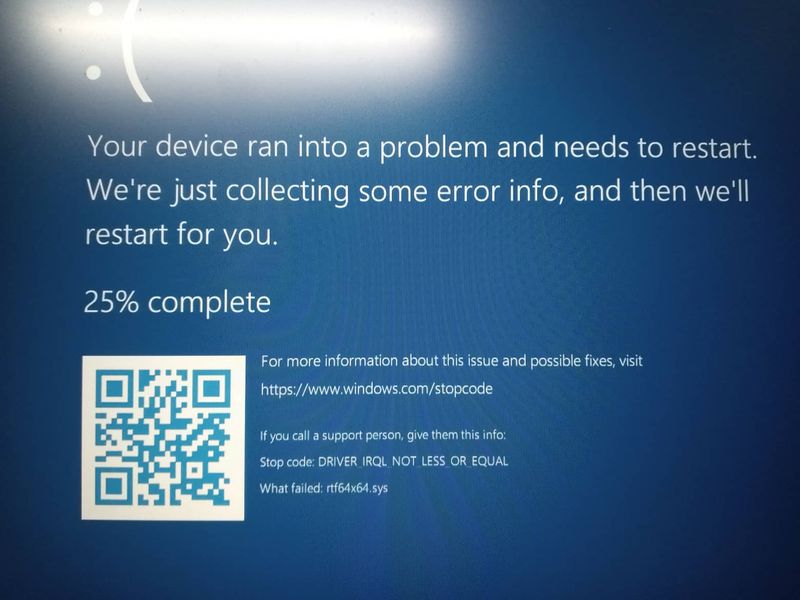
I am facing some problems with my HP Victus. Often it shows an error blue screen and the screen says, "Your device ran into a problem and needs to restart. we're just collecting some error info, and then we will restart for you."


Stop code: DRIVER_IRQL_NOT_LESS_OR_EQUALStop codeStop code

1 REPLY 1
HP Recommended

Hello @ankur_datta 

Sorry to hear that you are having problems ... I would like to help you.

The Windows file system could be corrupt or there is a hard disk error or undefined sofware or technical error.


(1) Test your hardware Using the HP PC Hardware Diagnostics (UEFI)

--->>> Perform Extensive Tests

https://support.hp.com/us-en/document/ish_2854458-2733239-16

See section <Running HP PC Hardware Diagnostics UEFI tests when Windows doesn't start>


See how it works:

https://www.youtube.com/watch?v=14GKIpGPNRM


(2) Please report your results ( error messages, take pictures )

( if serial number, device id, UUID, System Board CT Number is displayed, please blur )

† The opinions expressed above are the personal opinions of the authors, not of HP. By using this site, you accept the <a href="https://www8.hp.com/us/en/terms-of-use.html" class="udrlinesmall">Terms of Use</a> and <a href="/t5/custom/page/page-id/hp.rulespage" class="udrlinesmall"> Rules of Participation</a>.