• ×
    Information
    Need Windows 11 help?
    Check documents on compatibility, FAQs, upgrade information and available fixes.
    Windows 11 Support Center.
  • post a message
  • ×
    Information
    Need Windows 11 help?
    Check documents on compatibility, FAQs, upgrade information and available fixes.
    Windows 11 Support Center.
  • post a message
Guidelines
Join the HP Community Solve‑a‑thon | Help Others & Share Your Solutions | Live on Zoom | 2:30 PM to 2:30 AM IST | Every Wednesday Click here to know more
Common problems for INSTANT INK, HP+ PLANS: INK AND TONER
We would like to share some of the most frequently asked questions about Instant Ink. Check out this link: HP INSTANT INK, HP+ PLANS: INK AND TONER. .

HP Recommended

I have been trying to cancel my subscription for over 3 months and I cannot find a way to it.


This company has taken almost £45 for nothing at all. I would like my money back and I would like to cancel.


It should be a simple click icon Cancel subscription byt it isn't. There is just too much jargon to find anything that should be simple to find.


Thank you 

1 REPLY 1
HP Recommended

Hi @Cathy0774 


Welcome to the HP Support Community.


Thank you for posting your query.


I understand that you are facing issues with the cancellation of your Instant Ink Subscription and you are facing difficulties to cancel it. I would request you to please perform the below steps 


To pause or cancel your HP Instant Ink subscription:

  • Sign in to your HP Instant Ink account.
  • Verify the serial number by selecting Overview, and then Printer Details in the Status area.
  • Click HP Instant Ink, then Update Plan in the left menu.
  • Scroll to Plan Details.
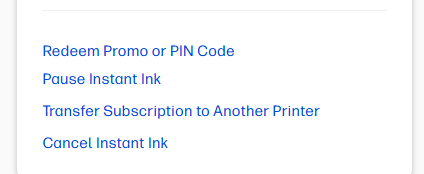
  • To cancel, click Cancel Instant Ink and then follow the prompts. When cancellation is complete, you receive an email confirmation immediately, and another at the end of the billing cycle.
  • You can continue printing with Instant Ink supplies until the end of your current billing cycle.
  • At the end of the billing cycle, you must remove the Instant Ink cartridges and install regular cartridges to continue printing. Instant Ink cartridges only work in enrolled printers.
  • Your final monthly charge comes at the end of the billing cycle.

https://support.hp.com/us-en/document/ish_3259778-1993151-16 refer the link for guidance


Take care and have an amazing day!

I'm an HP Employee.


If this reply helped resolve your issue, please select the Accept as Solution as it helps others in the community quickly find the answer they’re looking for.


And if you found this reply helpful, clicking Yes below is a great way to let us know we’re providing the support you need, as it encourages us to keep improving and sharing helpful guidance.

† The opinions expressed above are the personal opinions of the authors, not of HP. By using this site, you accept the <a href="https://www8.hp.com/us/en/terms-of-use.html" class="udrlinesmall">Terms of Use</a> and <a href="/t5/custom/page/page-id/hp.rulespage" class="udrlinesmall"> Rules of Participation</a>.