-
×InformationNeed Windows 11 help?Check documents on compatibility, FAQs, upgrade information and available fixes.
Windows 11 Support Center. -

-
×InformationNeed Windows 11 help?Check documents on compatibility, FAQs, upgrade information and available fixes.
Windows 11 Support Center. -
- HP Community
- Printers
- HP Instant Ink
- Printer ownership after all-in plan

Create an account on the HP Community to personalize your profile and ask a question
01-11-2026 09:49 AM
Hi! I'm trying to decide if the HP all-in plan is the route I want to go. My main question is about printer ownership. I'm getting mixed answers. When the plan time frame (3 years for the HP Ink Tank) is up do I actually own the printer now or do I need to send it back if I don't keep the all-in plan going after the 3 years.
Solved! Go to Solution.
Accepted Solutions
01-13-2026 05:36 AM
Hi @Bella81307
Welcome to the HP Support Community! We're here to help you get back up and running.
You do not automatically own the printer after the HP All-In Plan ends. If you cancel the plan—even after the 3‑year period for Smart Tank printers—you are required to return the printer and ink supplies to HP.
Here’s a breakdown based on HP’s official FAQ:
Printer Ownership in the HP All-In Plan
- Subscription Model: The All-In Plan is a subscription, not a purchase. You receive a printer, ink delivery, and support for a monthly fee.
- Cancellation Requirement: If you cancel after the 30‑day trial period, you must return the printer and ink supplies.
- Cancellation Fees:
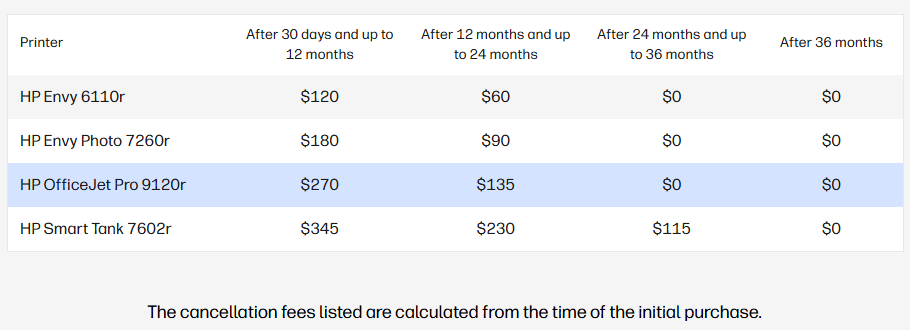
- For Smart Tank printers, cancellation fees apply if you end the plan before 36 months.
- After 36 months, cancellation fees are $0, but you still need to return the printer unless you continue the plan.
- Upgrade Option: After 3 years with a Smart Tank printer, you can upgrade to a new printer at no cost, or continue with your current one under the plan.
- No Ownership Transfer: The FAQ explicitly clarifies that the plan is not a rental or lease, but it also does not transfer ownership. The printer remains tied to the subscription.
Comparison Table

Key Takeaway
If your goal is owning the printer outright, the All-In Plan does not provide that. It’s designed as a subscription service with continuous coverage, ink delivery, and support. At the end of the plan, you either continue the subscription or return the printer.
You can read the full details directly on HP’s FAQ page here: HP All-In Plan FAQ.
If my response helped, please mark it as an Accepted Solution! ✅ It helps others and spreads support. 💙 Also, tapping "Yes" on "Was this reply helpful?" makes a big difference! Thanks! 😊
Take care, and have an amazing day!
Regards,
Hawks_Eye
I'm an HP Employee.
If this reply helped resolve your issue, please select the Accept as Solution as it helps others in the community quickly find the answer they’re looking for.
And if you found this reply helpful, clicking Yes below is a great way to let us know we’re providing the support you need, as it encourages us to keep improving and sharing helpful guidance.
01-13-2026 05:36 AM
Hi @Bella81307
Welcome to the HP Support Community! We're here to help you get back up and running.
You do not automatically own the printer after the HP All-In Plan ends. If you cancel the plan—even after the 3‑year period for Smart Tank printers—you are required to return the printer and ink supplies to HP.
Here’s a breakdown based on HP’s official FAQ:
Printer Ownership in the HP All-In Plan
- Subscription Model: The All-In Plan is a subscription, not a purchase. You receive a printer, ink delivery, and support for a monthly fee.
- Cancellation Requirement: If you cancel after the 30‑day trial period, you must return the printer and ink supplies.
- Cancellation Fees:
- For Smart Tank printers, cancellation fees apply if you end the plan before 36 months.
- After 36 months, cancellation fees are $0, but you still need to return the printer unless you continue the plan.
- Upgrade Option: After 3 years with a Smart Tank printer, you can upgrade to a new printer at no cost, or continue with your current one under the plan.
- No Ownership Transfer: The FAQ explicitly clarifies that the plan is not a rental or lease, but it also does not transfer ownership. The printer remains tied to the subscription.
Comparison Table

Key Takeaway
If your goal is owning the printer outright, the All-In Plan does not provide that. It’s designed as a subscription service with continuous coverage, ink delivery, and support. At the end of the plan, you either continue the subscription or return the printer.
You can read the full details directly on HP’s FAQ page here: HP All-In Plan FAQ.
If my response helped, please mark it as an Accepted Solution! ✅ It helps others and spreads support. 💙 Also, tapping "Yes" on "Was this reply helpful?" makes a big difference! Thanks! 😊
Take care, and have an amazing day!
Regards,
Hawks_Eye
I'm an HP Employee.
If this reply helped resolve your issue, please select the Accept as Solution as it helps others in the community quickly find the answer they’re looking for.
And if you found this reply helpful, clicking Yes below is a great way to let us know we’re providing the support you need, as it encourages us to keep improving and sharing helpful guidance.