-
×InformationNeed Windows 11 help?Check documents on compatibility, FAQs, upgrade information and available fixes.
Windows 11 Support Center. -

-
×InformationNeed Windows 11 help?Check documents on compatibility, FAQs, upgrade information and available fixes.
Windows 11 Support Center. -
- HP Community
- Printers
- HP Instant Ink
- Rollover pages

Create an account on the HP Community to personalize your profile and ask a question
11-01-2026 12:18 PM
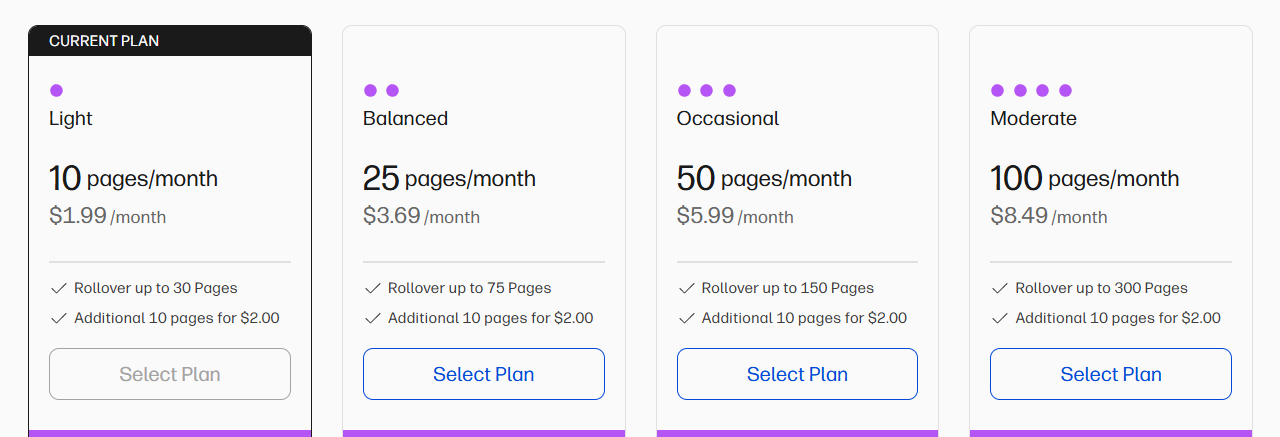
I feel it is unethical of HP to limit the number of rollover pages that you can have. If I have paid for 10 pages a month, I should be able to use all 10 pages, whether that month or any other month. Because I have 30 roll over pages, further pages not used are lost, even though the next month I might need more. Is there any way to let HP know that their print service would be more valuable if they allowed rollover pages for any unused printing with no maximum?
11-03-2026 11:44 AM
Hi @JoA97
Welcome to the HP Support Community.
Thank you for posting your query.
I understand your concern regarding the rollover page limit and how unused pages are handled under your HP Instant Ink subscription. I appreciate you sharing your feedback, and I understand how having the flexibility to carry forward all unused pages without a maximum limit could make the service more valuable.
To help us check your Instant Ink account details and assist you further, I kindly request that you share the email address registered with your HP Instant Ink account via Private Message.
Please do not share your account email or other personal information publicly on the community forum.
To access your private message, just click the little blue envelope icon on the upper right corner of your HP Community profile, next to your profile name. Alternatively, you can click on this link.
You can use this link as well:
Private Messages - HP Support Community
Take care and have an amazing day!
I'm an HP Employee.
If this reply helped resolve your issue, please select the Accept as Solution as it helps others in the community quickly find the answer they’re looking for.
And if you found this reply helpful, clicking Yes below is a great way to let us know we’re providing the support you need, as it encourages us to keep improving and sharing helpful guidance.
11-04-2026 07:27 AM
Hi @JoA97
Thank you for reponding.
I understand your concern regarding the limit on rollover pages. Please note that your current plan allows a maximum of 30 rollover pages, which will be used once your regular plan pages have been exhausted.
If you require additional pages, you may consider upgrading to a higher plan that better suits your needs.
I also appreciate your feedback and will share it with the relevant team for consideration in future plan improvements. Thank you for taking the time to share your thoughts with us.

Have a good day.
I'm an HP Employee.
If this reply helped resolve your issue, please select the Accept as Solution as it helps others in the community quickly find the answer they’re looking for.
And if you found this reply helpful, clicking Yes below is a great way to let us know we’re providing the support you need, as it encourages us to keep improving and sharing helpful guidance.