
-
×InformationNeed Windows 11 help?Check documents on compatibility, FAQs, upgrade information and available fixes.
Windows 11 Support Center. -
-
×InformationNeed Windows 11 help?Check documents on compatibility, FAQs, upgrade information and available fixes.
Windows 11 Support Center. -
- HP Community
- Printers
- HP Instant Ink
- Re: Unable to login to HP Smart App

Create an account on the HP Community to personalize your profile and ask a question
Your account also allows you to connect with HP support faster, access a personal dashboard to manage all of your devices in one place, view warranty information, case status and more.
Common problems for INSTANT INK, HP+ PLANS: INK AND TONER
We would like to share some of the most frequently asked questions about Instant Ink. Check out this link: HP INSTANT INK, HP+ PLANS: INK AND TONER. .

It has been a while since anyone has replied. Simply ask a new question if you would like to start the discussion again.

11-20-2020
03:52 PM
- last edited on
09-02-2025
08:10 AM
by
 Raj_05
 HP Recommended
Update: Issue is still persisting. Not sure why any company would ever require hardware to interface with software that goes without an update to fix the problems for weeks on end. At a bare minimum HP needs to seriously review any step in the software process that requires that a program to interact with network software in order to perform a basic local task. I am sure that your software wizards determined that this was the best way for you to maintain software control but you forgot about the customer in the process. Suggest that the HP App be renamed as the "HP Productivity Reduction App" or as an alternative the "HP Poorly Maintained but Essential for Application to Work App".
11-20-2020
04:21 PM
- last edited on
09-02-2025
08:11 AM
by
Raj_05
HP Recommended
I have spend a lot of hours and it came to my attention that HP app does not work to the point of connecting to the HP server. It just loops all day long. I don't know if there will ever be a fix for this issue but it been going on awhile now.
11-21-2020 12:42 AM
HP Recommended
I received a brand new printer yesterday that I could not setup due to this issue with the Smart app. I spent THREE HOURS trying to get help from HP Support, the majority of which I was on hold and trying to get help via chat that repeatedly disconnected. When I finally was able to speak to someone he instructed me to complete setup via my MacBook. That was over an hour long nightmare that I will not even get into!
Still having a printer in which the setup had not been completed or my free year of Instant Ink activated I decided to Google the error code. Instantly I find this thread only to realize this is not only a known issue, but one HP Support purposefully refused to acknowledge and instead wasted HOURS of my time.
When can we expect this to be fixed, considering it has been almost two weeks already?!


11-23-2020 08:18 AM
HP Recommended
@DIYdee, Welcome to the HP Support Community!
I understand. There is no TAT available as of now. However, the Engineers at HP are working to fix this issue at the earliest. You may install and use the printer by downloading the full-feature driver from HP Support site.
Keep me posted for any other assistance.
KUMAR0307
I am an HP Employee
11-28-2020
02:03 PM
- last edited on
09-02-2025
08:12 AM
by
Raj_05
HP Recommended
I am unable to login to HP app. I am hitting a "something went wrong screen" that displays the following error code -
Error Code: 0W_500_0WSID00001
I have tried all the basic troubleshooting - device restart, re-installation, installing on other devices, etc.
Is anyone aware of what that error code means? Or, how can I resolve this issue?
Please help this issue been going on for so long already.

12-01-2020
08:43 PM
- last edited on
09-02-2025
08:12 AM
by
Raj_05
HP Recommended
I cant login to the hpsmart.com site as well as from any of the Hp apps on either my laptop or my android cellphone and they have the current released version installed.
Sometime when i goto hpsmart.com and try to sign in...i get the message something went wrong and try again...but if I hit the back arrow...it is as if it only half way logged me in..it is as if my account has been simi deleted ..and yes all of my cloud services or eprint services are active
only error code i get
error code: UA_400_EB000U0100
12-02-2020
11:34 PM
- last edited on
09-02-2025
08:13 AM
by
Raj_05
HP Recommended
If you are still facing the same issue, please reach out to the HP Technical Support team in your region for further assistance.
You may create a case on the website to obtain a case number if required. Kindly watch this video to know how.
Keep me posted for any other assistance.
KUMAR0307
I am an HP Employee

12-03-2020
10:35 AM
- last edited on
09-02-2025
08:13 AM
by
Raj_05
HP Recommended
@Kumar0307 wrote:
If the issue persists, please reach out to the HP Technical Support team in your region for further assistance.
You may create a case on the website to obtain a case number if required. Kindly watch this video to know how.
Keep me posted for any other assistance.
Looks like that since my warranty is expired, I've to pay to get support on that issue
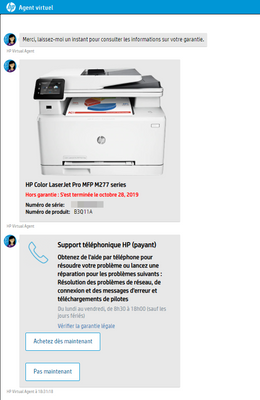
(sorry for the French text in the screenshot)

Be alert for scammers posting fake support phone numbers and/or email addresses on the community.
If you think you have received a fake HP Support message, please report it to us by clicking on "Flag Post".
† The opinions expressed above are the personal opinions of the authors, not of HP. By using this site, you accept the Terms of Use and Rules of Participation.


† The opinions expressed above are the personal opinions of the authors, not of HP. By using this site, you accept the <a href="https://www8.hp.com/us/en/terms-of-use.html" class="udrlinesmall">Terms of Use</a> and <a href="/t5/custom/page/page-id/hp.rulespage" class="udrlinesmall"> Rules of Participation</a>.