• ×
    Information
    Need Windows 11 help?
    Check documents on compatibility, FAQs, upgrade information and available fixes.
    Windows 11 Support Center.
  • post a message
  • ×
    Information
    Need Windows 11 help?
    Check documents on compatibility, FAQs, upgrade information and available fixes.
    Windows 11 Support Center.
  • post a message
Guidelines
Join the HP Community Solve‑a‑thon | Help Others & Share Your Solutions | Live on Zoom | 2:30 PM to 2:30 AM IST | Every Wednesday Click here to know more
Common problems for INSTANT INK, HP+ PLANS: INK AND TONER
We would like to share some of the most frequently asked questions about Instant Ink. Check out this link: HP INSTANT INK, HP+ PLANS: INK AND TONER. .
HP Recommended

I haven't been able to cancel my instant ink account. I keep getting sent to the site that wants me to sign up. I have tried the virtual agent and calling on the phone but can never talk to anyone. What are my options??

Harold
1 REPLY 1
HP Recommended

@hh6199


Welcome to the HP support community.


I understand that you want to cancel the instant ink account, I am glad to assist you.

Use your HP Instant Ink account to cancel your HP Instant Ink service.

  1. Sign in to hpinstantink.com/signin.

    Your HP Instant Ink account page opens.

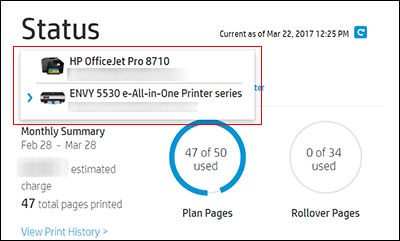
  2. In the Status area of your HP Instant Ink account page, a printer drop-down menu is available when there are multiple printers enrolled. Click the drop-down menu, and then select the printer you want to cancel.

    Clicking printer drop-down list

  3. Check the Print History or the HP ePrint address of the printer to confirm you have selected the correct printer.

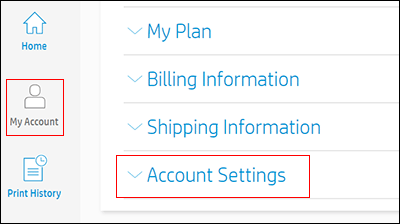
  4. Click My Account, and then click Account Settings.

  5. Click Cancel my HP Instant Ink Subscription.

    You receive an email confirmation of the cancellation. The cancellation finalizes at the end of the current billing cycle when the final charge processes successfully.

Refer to the HP support community for further assistance:- Click here


Keep me posted.

If this helps, please mark the public post as an accepted solution so that it benefits several others.

Cheers.

Sandytechy20
I am an HP Employee

† The opinions expressed above are the personal opinions of the authors, not of HP. By using this site, you accept the <a href="https://www8.hp.com/us/en/terms-of-use.html" class="udrlinesmall">Terms of Use</a> and <a href="/t5/custom/page/page-id/hp.rulespage" class="udrlinesmall"> Rules of Participation</a>.