-
×InformationNeed Windows 11 help?Check documents on compatibility, FAQs, upgrade information and available fixes.
Windows 11 Support Center. -

-
×InformationNeed Windows 11 help?Check documents on compatibility, FAQs, upgrade information and available fixes.
Windows 11 Support Center. -
- HP Community
- Printers
- LaserJet Printing
- HP 428FDN

Create an account on the HP Community to personalize your profile and ask a question
02-26-2020 08:38 AM
Hello!
A user with the nickname Panda 1964 asked a question about the scanner's operation. How long does it take to answer it?
Question text:
HP 428fdn
09-23-2019 05:33 PM
I have setup to print HP 428 through usb this printer. When I try to setup scanning software, the install fails because the printer can’t be detected. I have tried to remove and reinstall the printer and software but the same result. The HP 426 currently does not exhibit this issue. Any suggestions?
Solved! Go to Solution.
Accepted Solutions
02-26-2020 01:51 PM - edited 02-26-2020 02:00 PM
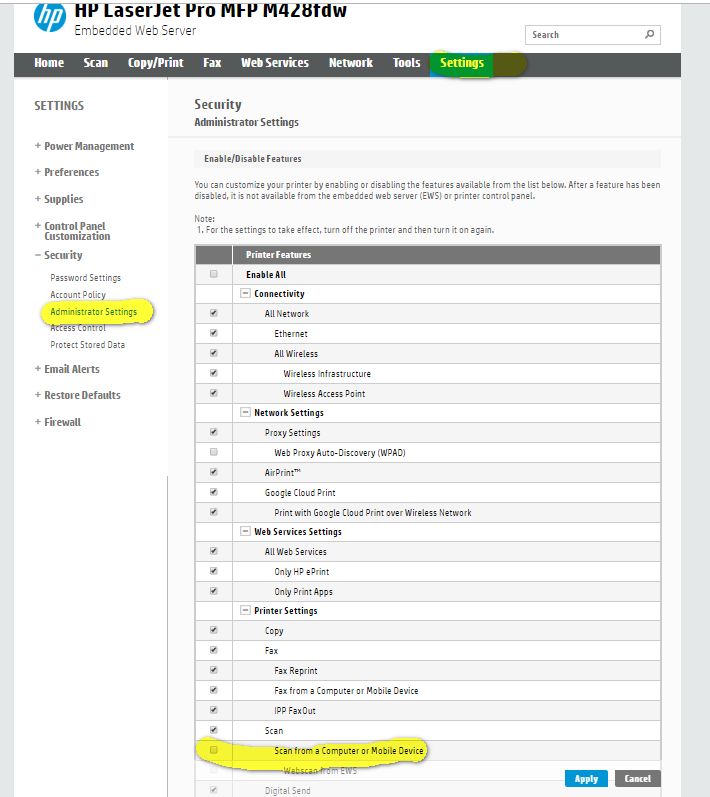
You need to ensure that the settings on the printer allow for scanning. Depending on the software you are using you need to enable either webscan or secure webscan in the network protocols and you also need to go to access control section of administrative settings and check "allow scanning from mobile or PC."
I am a volunteer, offering my knowledge to support fellow users, I do not work for HP nor speak for HP.
02-26-2020 10:13 AM
To Panda 1964: Are you using the Full Device Package software that is available on the HP website? The reason I ask is it will install both parts at the same time: scanning and printing. I suggest perhaps downloading that software package and then remove your current print driver, reboot the computer after removal, then use the Full Device Package and try reinstalling the printer that way. We have installed over 100 of these printers using USB, and have used the Full Device Package software and got scanning and printing with no issues at all.
02-26-2020 01:51 PM - edited 02-26-2020 02:00 PM
You need to ensure that the settings on the printer allow for scanning. Depending on the software you are using you need to enable either webscan or secure webscan in the network protocols and you also need to go to access control section of administrative settings and check "allow scanning from mobile or PC."
I am a volunteer, offering my knowledge to support fellow users, I do not work for HP nor speak for HP.