
-
×InformationNeed Windows 11 help?Check documents on compatibility, FAQs, upgrade information and available fixes.
Windows 11 Support Center. -
-
×InformationNeed Windows 11 help?Check documents on compatibility, FAQs, upgrade information and available fixes.
Windows 11 Support Center. -
- HP Community
- Printers
- LaserJet Printing
- Replacing document feeder rollers on m283fdw

Create an account on the HP Community to personalize your profile and ask a question
Your account also allows you to connect with HP support faster, access a personal dashboard to manage all of your devices in one place, view warranty information, case status and more.

It has been a while since anyone has replied. Simply ask a new question if you would like to start the discussion again.

04-27-2026 11:58 AM
 HP Recommended
Does anyone have detailed instructions with pictures on how to replace the document feed rollers? My printer started making a horrible plastic grinding noice so I bought the rollers and they fell apart (of course) when I pulled them out.
I do not have the blue tab on this printer. It seems to be an older model.
Thanks
Stephanie
Solved! Go to Solution.
1 ACCEPTED SOLUTION
Accepted Solutions


04-28-2026 02:54 PM
HP Recommended
Sorry to butt in but it would appear that there is some bad information circulating around. The video below shows the procedure for replacing the ADF rollers. The 283 uses the same kit as the models listed in the title so the procedure will be the same
https://www.youtube.com/watch?v=5DSjtt0ileQ
If you find the information provided useful or solves your problems, help other users find the solution easier by marking my post as an accepted solution. Clicking "yes" on "was this reply helpful" also increases the chances that this solution will help others.
I am a volunteer, offering my knowledge to support fellow users, I do not work for HP nor speak for HP.




I am a volunteer, offering my knowledge to support fellow users, I do not work for HP nor speak for HP.

Today we will be reviewing the ADF parts replacement process for the HP Color Laserjet M477 M377 M426 M281 M427 M277 ADF Maintenance Kit ADF is Acronym for automatic document feeder We will be using the M477 as our demo printer today for the installation. The procedure is similar across all the ...
3 REPLIES 3


04-28-2026 02:41 PM
HP Recommended
Hello @Stephanieshark, Welcome to the HP Support Community.
Thanks for reaching out about your query regarding the HP Color LaserJet Pro MFP M283fdw printer.
We appreciate the opportunity to assist you and are glad we could help work toward a resolution. We hope our support has been valuable.
To help us get started on resolving your issue, could you please try a few troubleshooting steps provided below so that I can assist you further?
Thank you for your detailed explanation, we completely understand how frustrating this can be, especially when parts come loose during removal.
Important clarification for your model
For the HP Color LaserJet Pro MFP M283fdw:
- The ADF (document feeder) parts are not always designed for full user disassembly
- Many internal components (rollers, gears) are part of a combined ADF assembly kit, not individual replaceable parts
Why you’re not seeing the “blue tab”
You’re absolutely right:
- Some newer/enterprise models use a blue latch/lever system
- The M283fdw (and similar series) may not have that exact mechanism, or it’s more limited
So, instructions you’re finding online may not match your exact unit
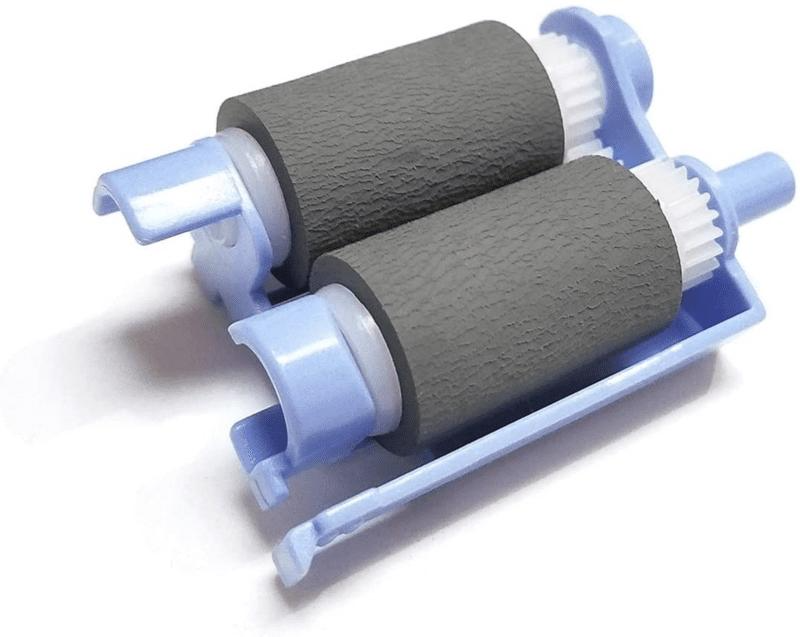
General ADF roller replacement concept (for reference)
Even though your model differs slightly, HP’s standard process is:
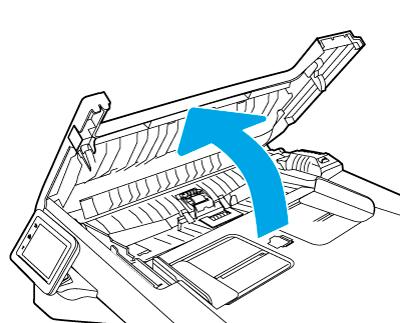
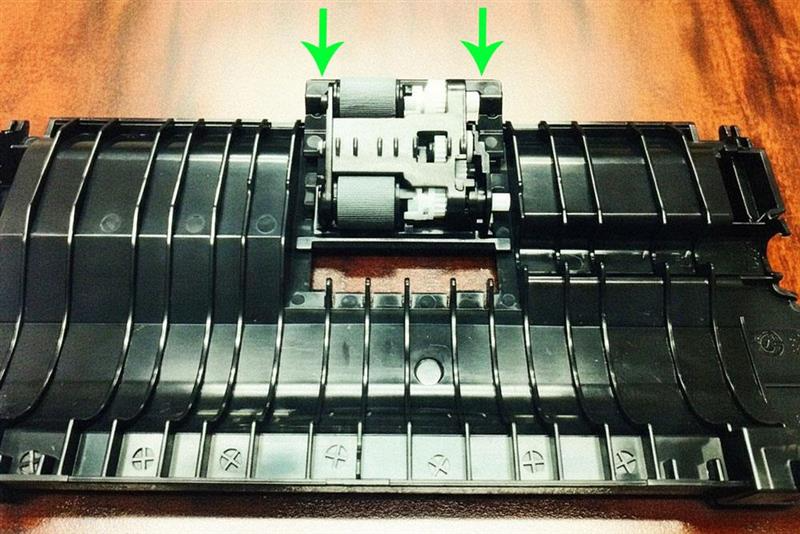
- Open the ADF jam access door
- Locate the roller assembly
- Release latch (if present) and slide the roller assembly out
- Remove separation roller from its cover
- Install new rollers and reassemble
(Very Important)
Given:
- No clear latch access
- Parts already came apart
- Risk of damaging ADF housing
We recommend not continuing manual disassembly
Instead:
- Replace the complete ADF roller/maintenance kit (if available), or
- Visit an HP Authorized Service Center
Take care and have an amazing day!
I'm an HP Employee.
If this reply helped resolve your issue, please select the Accept as Solution as it helps others in the community quickly find the answer they’re looking for.
And if you found this reply helpful, clicking Yes below is a great way to let us know we’re providing the support you need, as it encourages us to keep improving and sharing helpful guidance.
04-28-2026 02:54 PM
HP Recommended
Sorry to butt in but it would appear that there is some bad information circulating around. The video below shows the procedure for replacing the ADF rollers. The 283 uses the same kit as the models listed in the title so the procedure will be the same
https://www.youtube.com/watch?v=5DSjtt0ileQ
If you find the information provided useful or solves your problems, help other users find the solution easier by marking my post as an accepted solution. Clicking "yes" on "was this reply helpful" also increases the chances that this solution will help others.
I am a volunteer, offering my knowledge to support fellow users, I do not work for HP nor speak for HP.
I am a volunteer, offering my knowledge to support fellow users, I do not work for HP nor speak for HP.
Today we will be reviewing the ADF parts replacement process for the HP Color Laserjet M477 M377 M426 M281 M427 M277 ADF Maintenance Kit ADF is Acronym for automatic document feeder We will be using the M477 as our demo printer today for the installation. The procedure is similar across all the ...

Be alert for scammers posting fake support phone numbers and/or email addresses on the community.
If you think you have received a fake HP Support message, please report it to us by clicking on "Flag Post".
† The opinions expressed above are the personal opinions of the authors, not of HP. By using this site, you accept the Terms of Use and Rules of Participation.


Didn't find what you were looking for?
Ask the community
† The opinions expressed above are the personal opinions of the authors, not of HP. By using this site, you accept the <a href="https://www8.hp.com/us/en/terms-of-use.html" class="udrlinesmall">Terms of Use</a> and <a href="/t5/custom/page/page-id/hp.rulespage" class="udrlinesmall"> Rules of Participation</a>.