-
×InformationNeed Windows 11 help?Check documents on compatibility, FAQs, upgrade information and available fixes.
Windows 11 Support Center. -

-
×InformationNeed Windows 11 help?Check documents on compatibility, FAQs, upgrade information and available fixes.
Windows 11 Support Center. -
- HP Community
- Printers
- LaserJet Printing
- Re: black ink install error HP1102w

Create an account on the HP Community to personalize your profile and ask a question
06-13-2019 09:46 AM
I have a HP1102w printer direct wired to my laptop. Yesterday when I got to work the power was off due to outage. After an hour the power came on and I fired up my laptop. Later that day I went to print a receipt and I received an error saying to install black ink. The cartridge is new and has less than 50 sheets printed off it. I pulled the cartridge out shook it and reinstalled. Same error. I've unplugged it , did a software update and even went through on the HP print and scan Doctor several times. It wont print and has an orange blinking light on printer below the wifi button. Please help.
06-13-2019 06:03 PM
Welcome to HP support community.
Clean the electric contacts on the toner cartridge
-
Open the toner cartridge access door.
-
Remove the toner cartridge from its slot.
-
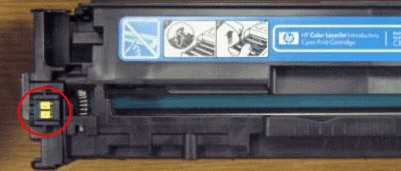
Use a lint-free cloth to wipe the toner cartridge contact (E-label) on the top left of the toner cartridge.
NOTE:
Coffee filters work well.
Figure : E-label on a toner cartridge

-
Insert the toner cartridge into its slot, and then close the toner cartridge access door.
Reset the printer
-
Turn the printer on, if it is not already on.
-
Wait until the printer is idle and silent before you continue.
-
With the printer turned on, disconnect the power cord from the rear of the printer.
-
Unplug the power cord from the wall outlet.
-
Wait at least 60 seconds.
-
Plug the power cord back into the wall outlet.
NOTE:
HP recommends connecting the printer power cord directly to the wall outlet.
-
Reconnect the power cord to the rear of the printer.
-
Turn on the printer, if it does not automatically turn on.
-
Wait until the printer is idle and silent before you proceed.
You can refer this HP document for more assistance:- Click here
Let me know how it goes.
To thank me for my efforts to help you, please mark my post as an accepted solution so that it benefits several others.
Cheers.
Sandytechy20
I am an HP Employee
06-17-2019 09:23 AM
Going thru the motions listed did not solve my issue. The ink cartridge is a genuine HP and has less than 50 on it. I would hate to have to pay another $80 for a new one when this was fine until the power went off.
06-17-2019 05:00 PM
This seems to be a hardware issue.
I request you to talk to HP support.
They might have multiple options to help you with this.
- Click on this link - https://support.hp.com/us-en/contact-hp?openCLC=true
- Select the country.
- Enter the serial of your device.
- Select the country from the drop-down.
- Click on "Show Options".
- Fill the web-form. A case number and phone number will now populate for you.
To thank me for my efforts to help you, please mark my post as an accepted solution so that it benefits several others.
Cheers.
Sandytechy20
I am an HP Employee