• ×
    Information
    Need Windows 11 help?
    Check documents on compatibility, FAQs, upgrade information and available fixes.
    Windows 11 Support Center.
  • post a message
  • ×
    Information
    Need Windows 11 help?
    Check documents on compatibility, FAQs, upgrade information and available fixes.
    Windows 11 Support Center.
  • post a message
Guidelines
Seize the moment! nominate yourself or a tech enthusiast you admire & join the HP Community Experts!
HP Recommended
1102
Microsoft Windows 7 (32-bit)

Is possiple mirror printing from

HP LaserJet Pro P1102? Is possible then how?

1 ACCEPTED SOLUTION

Accepted Solutions
HP Recommended
 
Welcome to the HP Support Forums! 🙂 I see you are interested in mirror printing with your HP LaserJet P1102. After taking a look in the Technical User Guide it is not listed as a supported feature. 
 
You would see this option under the Paper/Quality tab, see below:
 
 
You can used this workaround, which is to open up the Paint program, rotate the image 180 degree's and flip horizontally. This will reverse the image. 
 
I hope this helps, let me know the outcome. I will watch for your reply.
 
Thanks for being a part of the HP community. Please let me know if this helps resolve the issue by marking this post as "Accept as Solution". If you require further assistance let me know and I will gladly do all I can to help. If you wish to say thanks for my effort to help, click the "Thumbs up" to give me a "Kudos".
HevnLgh
I work on behalf of HP


Click the “Kudos Thumbs Up" to the left of the reply button to say “Thanks” for helping!

View solution in original post

2 REPLIES 2
HP Recommended
 
Welcome to the HP Support Forums! 🙂 I see you are interested in mirror printing with your HP LaserJet P1102. After taking a look in the Technical User Guide it is not listed as a supported feature. 
 
You would see this option under the Paper/Quality tab, see below:
 
 
You can used this workaround, which is to open up the Paint program, rotate the image 180 degree's and flip horizontally. This will reverse the image. 
 
I hope this helps, let me know the outcome. I will watch for your reply.
 
Thanks for being a part of the HP community. Please let me know if this helps resolve the issue by marking this post as "Accept as Solution". If you require further assistance let me know and I will gladly do all I can to help. If you wish to say thanks for my effort to help, click the "Thumbs up" to give me a "Kudos".
HevnLgh
I work on behalf of HP


Click the “Kudos Thumbs Up" to the left of the reply button to say “Thanks” for helping!
HP Recommended

For those who use HP Photo Creations, we added two mirror printing features in September 2016:

    1. You can now mirror any photo or graphic on your layout.
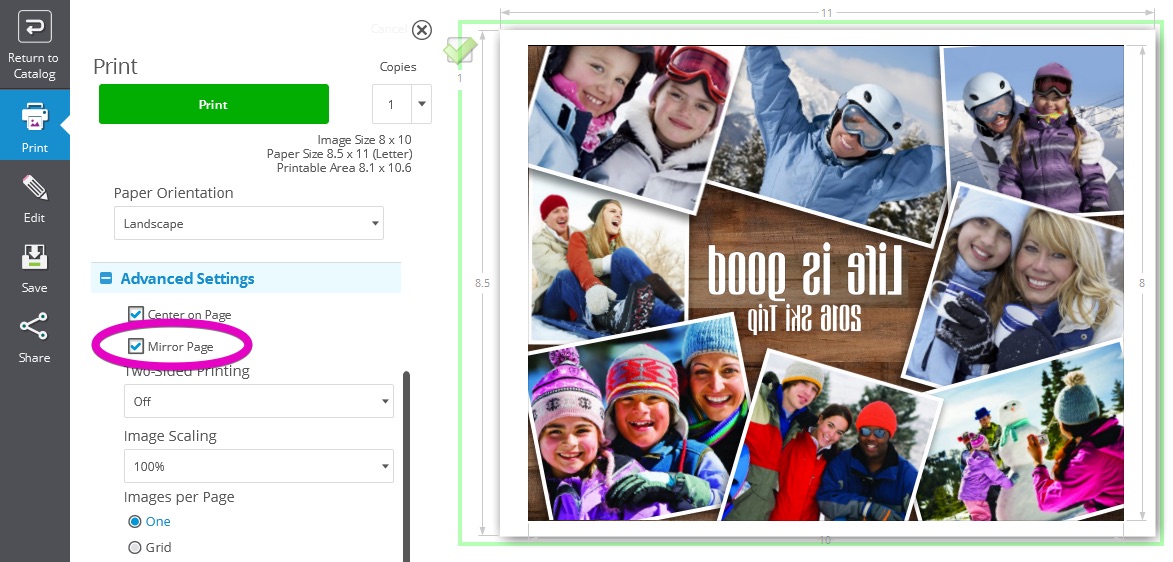
    2. Before printing, you can mirror the entire page. 

This short video shows how to mirror graphics on your layout:


This screenshot shows how to mirror the entire page by selecting "Mirror Page" in the Advanced Settings:

Mirror Page.jpg


HP Photo Creations is a free download at www.hp.com/go/hppc


Hope this helps,


RocketLife

RocketLife, developer of HP Photo Creations
† The opinions expressed above are the personal opinions of the authors, not of HP. By using this site, you accept the <a href="https://www8.hp.com/us/en/terms-of-use.html" class="udrlinesmall">Terms of Use</a> and <a href="/t5/custom/page/page-id/hp.rulespage" class="udrlinesmall"> Rules of Participation</a>.