• ×
    Information
    Need Windows 11 help?
    Check documents on compatibility, FAQs, upgrade information and available fixes.
    Windows 11 Support Center.
  • post a message
  • ×
    Information
    Need Windows 11 help?
    Check documents on compatibility, FAQs, upgrade information and available fixes.
    Windows 11 Support Center.
  • post a message
Guidelines
Join the HP Community Solve‑a‑thon | Help Others & Share Your Solutions | Live on Zoom | 2:30 PM to 2:30 AM IST | Every Wednesday Click here to know more
HP Recommended
M402n

15729212829751427850448699097823.jpg

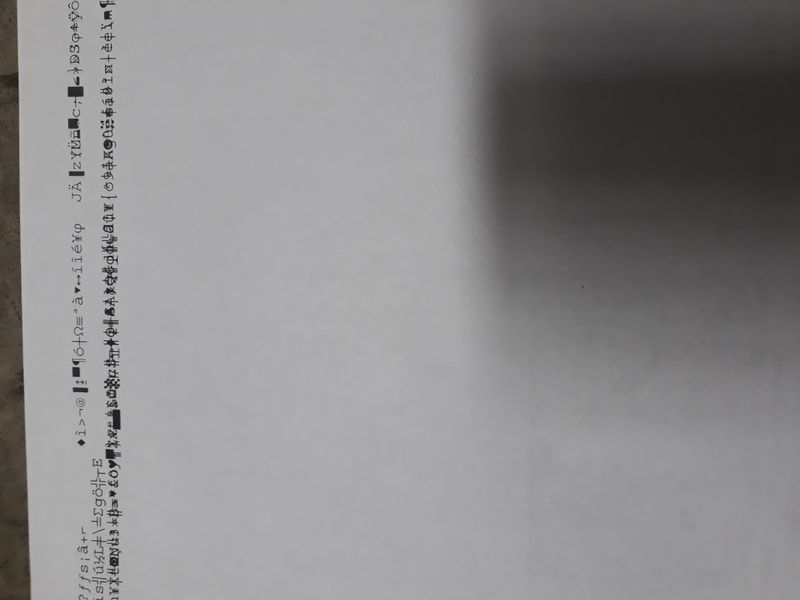
print symbols continuously. HowI tried to cancel it still printing continues. Please help to stop it.

1 ACCEPTED SOLUTION

Accepted Solutions
HP Recommended

You need to purge the print spooler queue. Google the instructions for your operating system. 99% of times this issue occurs when the wrong print driver or a corrupted print job is present. Clear the queue, delete the existing printer installation and install the correct driver. If you are using a network attached printer I suggest you use the HP Universal Print Driver V6.8.

If you find the information provided useful or solves your problems, help other users find the solution easier by marking my post as an accepted solution. Clicking "yes" on "was this reply helpful" also increases the chances that this solution will help others.
I am a volunteer, offering my knowledge to support fellow users, I do not work for HP nor speak for HP.


View solution in original post

1 REPLY 1
HP Recommended

You need to purge the print spooler queue. Google the instructions for your operating system. 99% of times this issue occurs when the wrong print driver or a corrupted print job is present. Clear the queue, delete the existing printer installation and install the correct driver. If you are using a network attached printer I suggest you use the HP Universal Print Driver V6.8.

If you find the information provided useful or solves your problems, help other users find the solution easier by marking my post as an accepted solution. Clicking "yes" on "was this reply helpful" also increases the chances that this solution will help others.
I am a volunteer, offering my knowledge to support fellow users, I do not work for HP nor speak for HP.


† The opinions expressed above are the personal opinions of the authors, not of HP. By using this site, you accept the <a href="https://www8.hp.com/us/en/terms-of-use.html" class="udrlinesmall">Terms of Use</a> and <a href="/t5/custom/page/page-id/hp.rulespage" class="udrlinesmall"> Rules of Participation</a>.