• ×
    Information
    Need Windows 11 help?
    Check documents on compatibility, FAQs, upgrade information and available fixes.
    Windows 11 Support Center.
  • post a message
  • ×
    Information
    Need Windows 11 help?
    Check documents on compatibility, FAQs, upgrade information and available fixes.
    Windows 11 Support Center.
  • post a message
Guidelines
Seize the moment! nominate yourself or a tech enthusiast you admire & join the HP Community Experts!
HP Recommended
Color Laser Jet Pro M252dw
Mac OS X 10.10 Yosemite

Why can't I select "Best" for print quality, I'm only able to select "Draft" and "Normal" ? I'm trying to print a PDF that was created with Mac Pages that only consists of text and table lines! I don't really understand why I'm unable to print that with best quality settings. Thank you!

5 REPLIES 5
HP Recommended

Hi @ppco,


Thanks for reaching out to the forums! I understand that you don't have the option to select the 'Best" quality setting. I would be happy to help you. 


Try another application to see if you have the same issue.


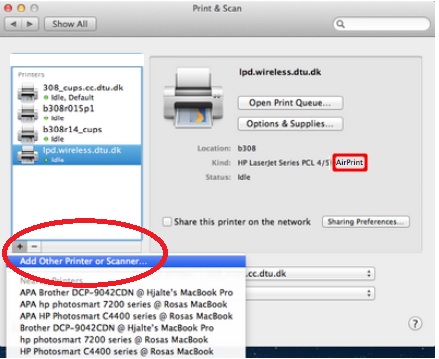
Check the driver name that is installed for the printer. Make sure it shows just the printer's name.
Click the Apple menu and then click System Preferences. Click Printers & Scanners, highlight the printer name on the left side and on the right side of the screen it should show the printer's name. (Officejet 6500)

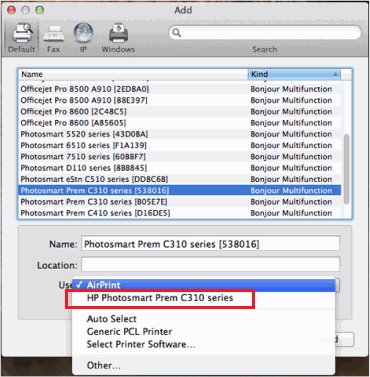
If the full printer name isn't listed correctly, delete it and add the printer name back in from the list. Click the - sign to delete the driver and then click the + sign to add the driver, might have to click the drop down to select the printer's name to add it in.


check driver name.jpg


check driver name 2.jpg


If the printer name is correct I would still Reset the Printing System on the Mac: 


Reset the Printing System:


Note: This will remove all printers in the print and Fax/Scan, any printer removed can be re-added later by clicking the plus (+) symbol.


Click the Apple icon and then click System Preferences.

Click Printers & Scanners.

Right-click (or Ctrl +click) in the left white side panel, then click Reset printing system.

Click OK to confirm the reset.

Type the correct Name and Password.

Click OK to reset the printing system.

Then click the + sign to add the driver, highlight the printer. (you might have to click the drop down to select the printer's name) Then click on the Add button.


Try changing the setting again.


If the issue is resolved and you appreciate my help, please click the "Accept as Solution" and the "Thumbs Up" buttons. Let me know how you make out. Cheers!

Gemini02

I work on behalf of HP

Click the Thumbs Up below to say “Thanks” for helping!
HP Recommended

I have the same problem and have done everything you suggest - no changes whatsoever. "Best" is still grayed out.


I tried printing from a windows-based Sony Vaio to the same printer and can select all the options (although they are different from the Mac menu printing options)

HP Recommended

are you using non-genuine HP cartridges?


When using non HP's, some features may be unavailable on a variety or printers- Best, economode, etc.

I am not a HP employee. I am a service tech on these forums researching topics and offering my best guess to aide in your troubleshooting.
HP Recommended

MEanwhile any solution for this issue? Tried everthing what is recomended here. Still greyed out... I must say the quality of this printer is "sh**" After having unsolveble problems with wifi printing the printer is now wired to router (awswome...) now I cant get the best prints out of this printer. 


If any other hints than throw this printer away and buy one from canon let me please know.


Thanks in advance 

HP Recommended

@drkosta wrote:

MEanwhile any solution for this issue? Tried everthing what is recomended here. Still greyed out... I must say the quality of this printer is "sh**" After having unsolveble problems with wifi printing the printer is now wired to router (awswome...) now I cant get the best prints out of this printer. 


If any other hints than throw this printer away and buy one from canon let me please know.


Thanks in advance 


Try totally removing and deinstalling the printer and all software.  Now go to the HP Web Site and download and install the Full Featured Software and Drivers again.  Now try.

† The opinions expressed above are the personal opinions of the authors, not of HP. By using this site, you accept the <a href="https://www8.hp.com/us/en/terms-of-use.html" class="udrlinesmall">Terms of Use</a> and <a href="/t5/custom/page/page-id/hp.rulespage" class="udrlinesmall"> Rules of Participation</a>.