• ×
    Information
    Need Windows 11 help?
    Check documents on compatibility, FAQs, upgrade information and available fixes.
    Windows 11 Support Center.
  • post a message
  • ×
    Information
    Need Windows 11 help?
    Check documents on compatibility, FAQs, upgrade information and available fixes.
    Windows 11 Support Center.
  • post a message
Guidelines
Join the HP Community Solve‑a‑thon | Help Others & Share Your Solutions | Live on Zoom | 2:30 PM to 2:30 AM IST | Every Wednesday Click here to know more
HP Recommended

When using the scan function and save it as a pdf, the colours are changed. I have tried to do some colour correction, it has no help.


the colour in preview mode is fineif saving as jpg, colours are correctif saving as pdf, it goes wrong

1 REPLY 1
HP Recommended

@SzeSze


A warm welcome to HP Forums! This is a great place to get support, find answers and tips to your technical queries.

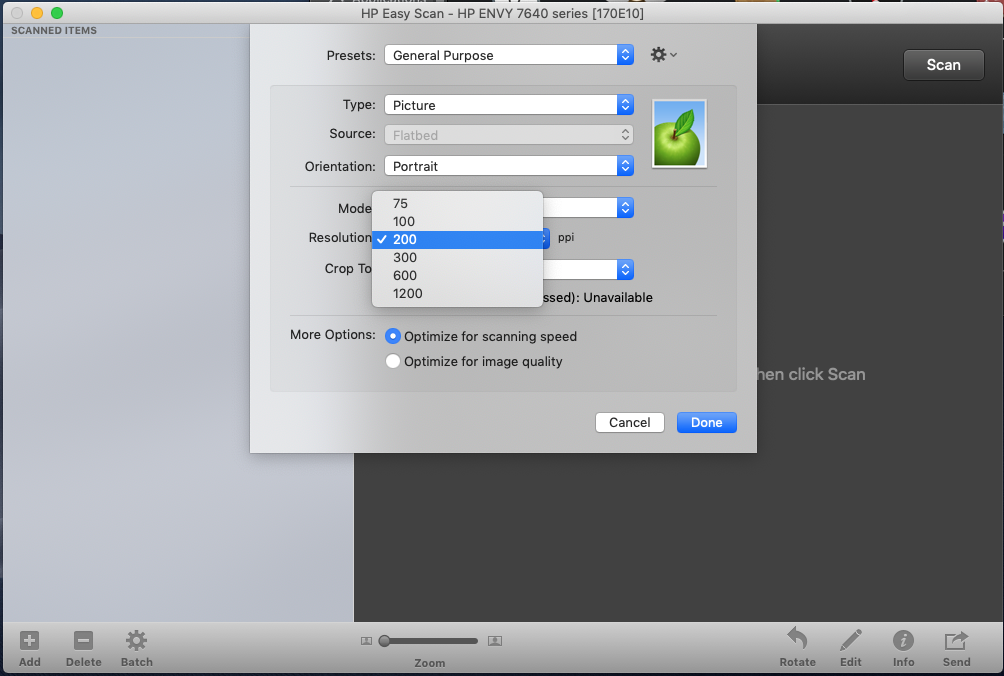
Increasing the scan resolution may resolve the issue, let's use HP Easy Scan and increase the scan resolution. Here is how to do it:

1.) Download and install HP Easy Scan from here.

2.) Open HP Easy Scan. Click Scanner and select your printer from the list.

3.) Click Presets and select Edit Settings.


4.) Click Resolution and select 300 or 600. 


5.) Click Done, then click Scan.

Let me know how it goes!


If the information I've provided was helpful, give us some reinforcement by clicking the Accepted Solution and Kudos buttons, that'll help us and others see that we've got the answers!
Have a great day!


Senan6806


I am an HP Employee

† The opinions expressed above are the personal opinions of the authors, not of HP. By using this site, you accept the <a href="https://www8.hp.com/us/en/terms-of-use.html" class="udrlinesmall">Terms of Use</a> and <a href="/t5/custom/page/page-id/hp.rulespage" class="udrlinesmall"> Rules of Participation</a>.