
-
×InformationNeed Windows 11 help?Check documents on compatibility, FAQs, upgrade information and available fixes.
Windows 11 Support Center. -
-
×InformationNeed Windows 11 help?Check documents on compatibility, FAQs, upgrade information and available fixes.
Windows 11 Support Center. -
- HP Community
- Archived Topics
- Miscellaneous Topics (Read Only)
- Re: Notebook (Laptop) Upgrade FAQ

Create an account on the HP Community to personalize your profile and ask a question
Your account also allows you to connect with HP support faster, access a personal dashboard to manage all of your devices in one place, view warranty information, case status and more.
 This topic has been archived. Information and links in this thread may no longer be available or relevant. If you have a question create a new topic by clicking here and select the appropriate board.



12-05-2014 02:24 AM
 HP Recommended
@Nate8432 wrote:
I have an hp g62 340us I'm pretty sure, and I have a 4gb 1rx8 pc3L-12800s ram stick, is it compatible with my labtop and how much ram can I run in it?
The maximum installed memory for your notebook is 8GB. The operating system has to be 64-bit for all memory above 3.25GB to be recognized and useable.
Do a web search using Google or you favorite search engine to find guaranteed compatible upgrade memory modules for your notebook. Use g62 340us upgrade memory as the key words as I did in the following URL.
Only install guaranteed compatible memory in your notebook. Do not try matching memory modules to the specifications as you have done unless you don't mind being disappointed when the notebook does not boot into Windows.
I am a volunteer forum member. If my suggestion helped you solve your issue, help others by marking that post as the accepted solution. Say thanks by clicking on the Yes button next to the "was this reply helpful?"


12-06-2014 12:53 AM - edited 12-06-2014 12:55 AM
HP Recommended
I have an HP dv7-1262us.
It's currently completely stock except for an upgrade to Windows 7.
It came with a Core 2 Duo T6400 2.00GHz 800MHz FSB but I'd like to know if it is possible to upgrade it to any of the processors listed on page 93 of the manual: http://www.hp.com/ctg/Manual/c01689926.pdf . I'm fairly sure I can't upgrade to the Core 2 Quad due to a higher TDP wattage, but would I be able to upgrade to the Core 2 Duo T9800 2.98GHz 1066MHz FSB?
Here's a snapshot of CPU-Z if that helps at all.
12-07-2014 02:33 AM
HP Recommended
Please use CPU-Z again. This time I need you to go to the mainboard tab. Make a screenshot of it and provide me with the URL as you did before with the CPU.
I need to see which Northbridge and Southbridge chipset is integrated onto the systemboard of your notebook.
I am a volunteer forum member. If my suggestion helped you solve your issue, help others by marking that post as the accepted solution. Say thanks by clicking on the Yes button next to the "was this reply helpful?"
12-08-2014 01:09 AM
HP Recommended
The Intel Core2 DuoT9800 should work without any issues. It has the same lithography (45nm) and thermal power (35W) as the CPU that is currently installed. Both CPUs are supported by the BIOS.
I am a volunteer forum member. If my suggestion helped you solve your issue, help others by marking that post as the accepted solution. Say thanks by clicking on the Yes button next to the "was this reply helpful?"
12-09-2014 12:51 AM
HP Recommended
@Camaro94 wrote:Does the differing FSB make a difference in the compatibility at all? Or will the faster FSB of the T9800 just give my computer just a little more of a boost?
That is indeed a possibility. Unfortunately, I do not have access to specs of the systemboard, so I can't state yes with absolute certainty. I do know that the CPU has been tested on the systemboard at HP quality labs, so it is a go for you.
I am a volunteer forum member. If my suggestion helped you solve your issue, help others by marking that post as the accepted solution. Say thanks by clicking on the Yes button next to the "was this reply helpful?"
12-17-2014 05:27 PM
HP Recommended
Hi all -thanks for this helpful thread!
Just bought an x360 13.3 2 in one: http://store.hp.com/webapp/wcs/stores/servlet/us/en/pdp/Laptops/hp-pavilion-13-a010dx-x360-convertib...
Got a really good deal on it and for our needs, it fits. However, was a downgrade from my last laptops's specs a bit and I'm noticing it. Slower to open, slower to load, etc. Went through most of the optimization for 8.1 and within the browsers but haven't seen too much improvement.
Question:
I'm planning to do at least one upgrade. From my research it seems as if adding an SSD will produce better improvement than swapping the 4gb stick to an 8gb stick. Is this accurate? (And have heard for this model is it a much easier swap hardware wise...people have said the memory is impossible to get to?) Price is the same so just wanted some suggestions on which one makes more sense to do over the other.
If that is accurate - is this model # suggestion from Crucial correct?
Crucial MX100 128GB SATA 6Gb/s 2.5" Internal SSD
Thanks in advance!
12-18-2014 04:32 AM - edited 12-18-2014 04:35 AM
HP Recommended
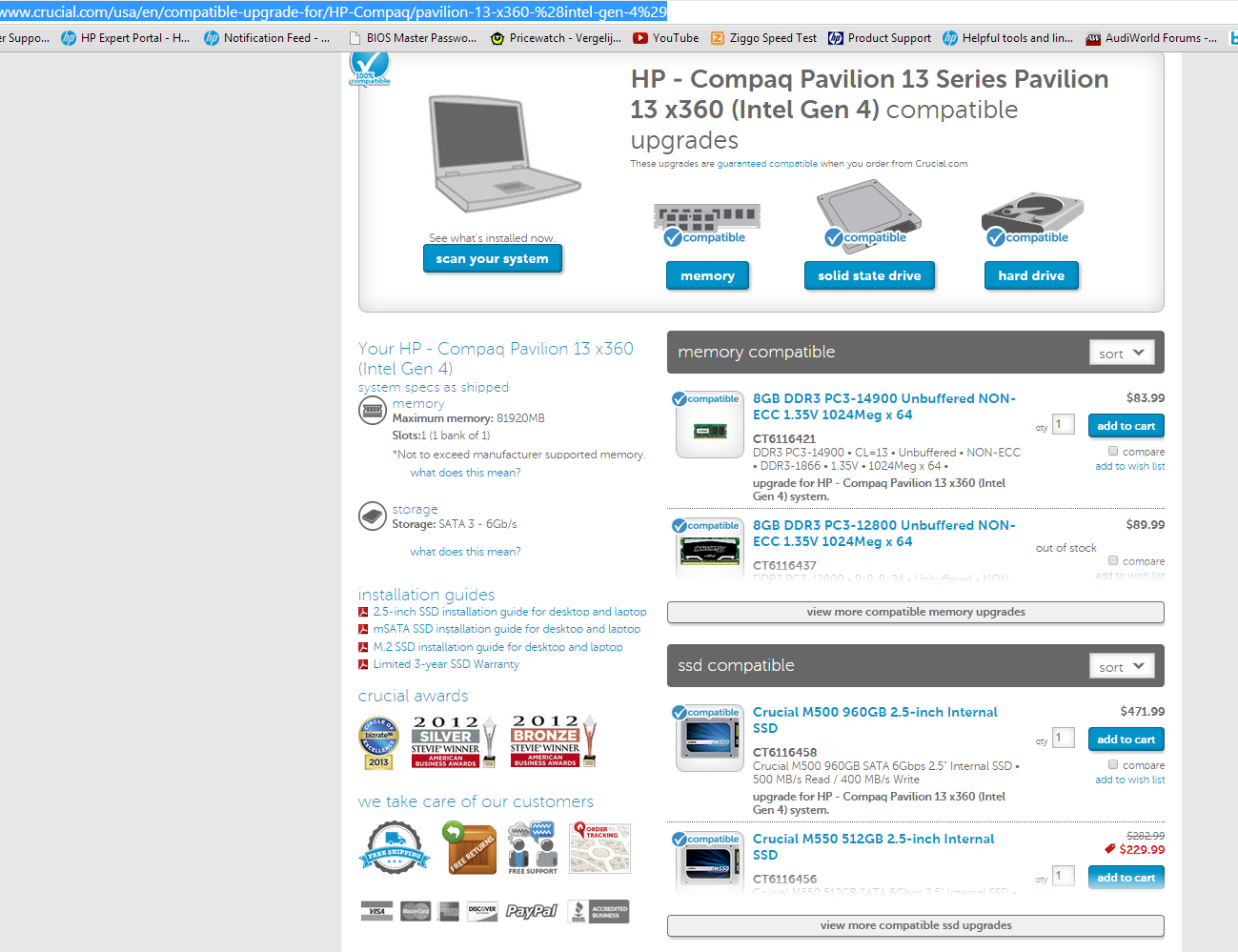
Yes. An upgrade to an SSD is the best one to add real performance to your notebook. I highly recommend 256GB storage capacity and higher if you can afford it.The following image shows Crucial's recommendations.
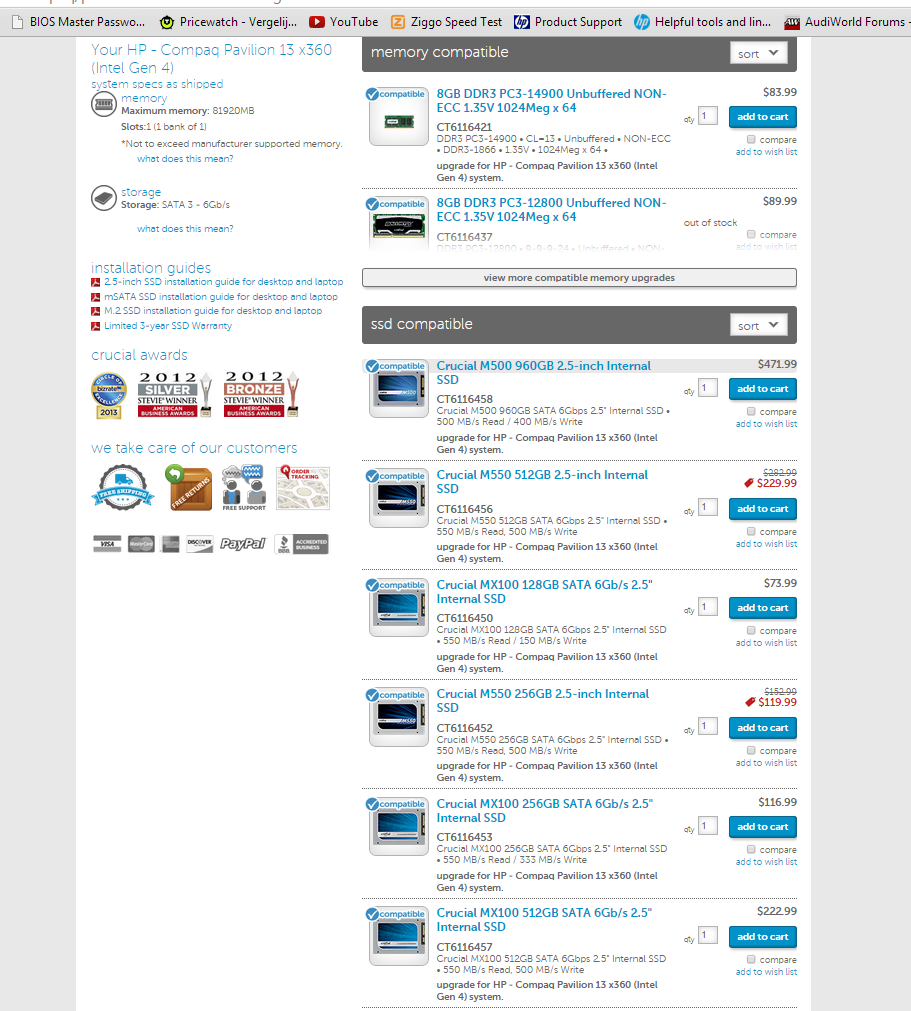
And a few more SSD recommendations by Crucial. The MX100 is viable.
I am a volunteer forum member. If my suggestion helped you solve your issue, help others by marking that post as the accepted solution. Say thanks by clicking on the Yes button next to the "was this reply helpful?"
This topic has been archived. Information and links in this thread may no longer be available or relevant. If you have a question create a new topic by clicking here and select the appropriate board.
† The opinions expressed above are the personal opinions of the authors, not of HP. By using this site, you accept the Terms of Use and Rules of Participation.


Didn't find what you were looking for?
Ask the community
† The opinions expressed above are the personal opinions of the authors, not of HP. By using this site, you accept the <a href="https://www8.hp.com/us/en/terms-of-use.html" class="udrlinesmall">Terms of Use</a> and <a href="/t5/custom/page/page-id/hp.rulespage" class="udrlinesmall"> Rules of Participation</a>.