
-
×InformationNeed Windows 11 help?Check documents on compatibility, FAQs, upgrade information and available fixes.
Windows 11 Support Center. -
-
×InformationNeed Windows 11 help?Check documents on compatibility, FAQs, upgrade information and available fixes.
Windows 11 Support Center. -
- HP Community
- Archived Topics
- Miscellaneous Topics (Read Only)
- Re: Urgent query

Create an account on the HP Community to personalize your profile and ask a question
Your account also allows you to connect with HP support faster, access a personal dashboard to manage all of your devices in one place, view warranty information, case status and more.
 This topic has been archived. Information and links in this thread may no longer be available or relevant. If you have a question create a new topic by clicking here and select the appropriate board.

04-22-2017 05:43 AM
 HP Recommended
Product: Hp OMEN Ax001tx
Operating System: Microsoft Windows 10 (64-bit)
My laptop is HP omen ax001tx(Gaming Laptop). Specs are i7-6700HQ, 4GB DDR4 RAM( 1 slot is unused), 4GB NVIDIA DDR5 960M Graphics.
What is the maximum RAM upto which i can upgrade this laptop.
Is 4GB+4GB is good option or 4GB+8GB??
In which case i will get the maximum performance?
What is the maximum RAM upto which i can upgrade this laptop.
Is 4GB+4GB is good option or 4GB+8GB??
In which case i will get the maximum performance?
8 REPLIES 8


04-23-2017 05:43 AM - edited 04-23-2017 05:46 AM
HP Recommended
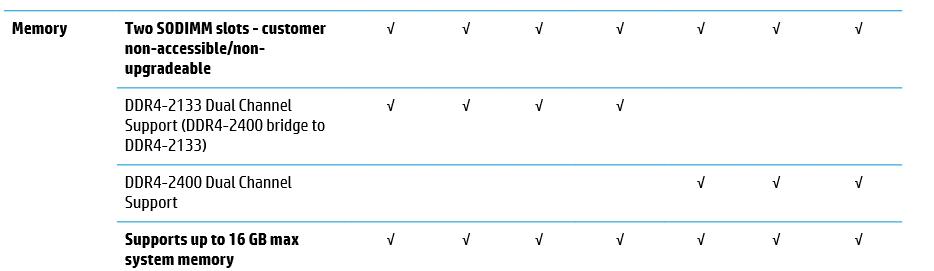
Your link http://h10032.www1.hp.com/ctg/Manual/c05357609 says 16 GB MAX, just an FYI. Does that mean the HP manual is wrong and these units can take 32 GB?
04-23-2017 08:02 AM - edited 04-23-2017 10:12 AM
HP Recommended
Sure, 8GB will help a lot.
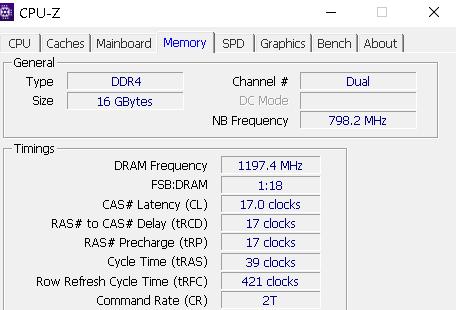
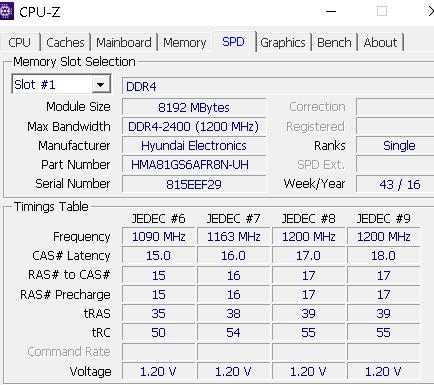
My HP Omen 17.3 came with 12 GB, one 4GB and one 8GB. You should get the same brand and specs for the second stick, to make sure it is DUAL CHANNEL. You can get the Manufacturer and Specs with CPU-Z if you don't want to open the laptop to find out.
Note: The whole bottom of the laptop has to come off to get to the memory. That voids your warranty if you damage anything, from my reading of this forum.
Example below is from my HP Omen 17-w053dx
04-23-2017 08:24 AM - edited 04-23-2017 08:26 AM
HP Recommended
I just told you. Download and install CPU-Z. It will tell you whether or not it is DUAL CHANNEL. I showed you in the picture where it says DUAL. You may not HAVE to use the same brand. Some MB's say you do. But the following are the requirements.
https://en.wikipedia.org/wiki/Multi-channel_memory_architecture#Dual-channel_architecture
Modules rated at different speeds can be run in dual-channel mode, although the motherboard will then run all memory modules at the speed of the slowest module. Some motherboards, however, have compatibility issues with certain brands or models of memory when attempting to use them in dual-channel mode.
For this reason, it is generally advised to use identical pairs of memory modules, which is why most memory manufacturers now sell "kits" of matched-pair DIMMs. Several motherboard manufacturers only support configurations where a "matched pair" of modules are used. A matching pair needs to match in:
- Capacity (e.g. 1024 MiB). Certain Intel chipsets support different capacity chips in what they call Flex Mode: the capacity that can be matched is run in dual-channel, while the remainder runs in single-channel.
- Speed (e.g. PC5300). If speed is not the same, the lower speed of the two modules will be used. Likewise, the higher latency of the two modules will be used.
- Same CAS Latency (CL) or Column Address Strobe.
- Number of chips and sides (e.g. two sides with four chips on each side).
- Matching size of rows and columns.
04-23-2017 10:06 AM
HP Recommended
Hi, I'm not sure where my first reply went, but I will try again.
I showed you a utility that will show if your memory is running DUAL CHANNEL or not. CPU-Z
Here is a link to wikipedia regarding DUAL CHANNEL memory
Some motherboards, however, have compatibility issues with certain brands or models of memory when attempting to use them in dual-channel mode.
For this reason, it is generally advised to use identical pairs of memory modules, which is why most memory manufacturers now sell "kits" of matched-pair DIMMs. Several motherboard manufacturers only support configurations where a "matched pair" of modules are used. A matching pair needs to match in:
- Capacity (e.g. 1024Â MiB). Certain Intel chipsets support different capacity chips in what they call Flex Mode: the capacity that can be matched is run in dual-channel, while the remainder runs in single-channel.
- Speed (e.g. PC5300). If speed is not the same, the lower speed of the two modules will be used. Likewise, the higher latency of the two modules will be used.
- Same CAS Latency (CL) or Column Address Strobe.
- Number of chips and sides (e.g. two sides with four chips on each side).
- Matching size of rows and columns.
Dual-channel architecture is a technology implemented on motherboards by the motherboard manufacturer and does not apply to memory modules. Theoretically any matched pair of memory modules may be used in either single- or dual-channel operation, provided the motherboard supports this architecture.

From Wikipedia, the free encyclopedia In the fields of digital electronics and computer hardware, multi-channel memory architecture is a technology that increases the data transfer rate between the DRAM memory and the memory controller by adding more channels of communication between them ...
04-24-2017 05:13 PM - edited 04-24-2017 05:19 PM
HP Recommended
@pl100, welcome back to the forum.
From reading the specs in your original post, it appears from the first sentence that the memory is non-upgradeable by customer.





I am not an HP Employee!!
Intelligence is God given. Wisdom is the sum of our mistakes!!
This topic has been archived. Information and links in this thread may no longer be available or relevant. If you have a question create a new topic by clicking here and select the appropriate board.
† The opinions expressed above are the personal opinions of the authors, not of HP. By using this site, you accept the Terms of Use and Rules of Participation.


Didn't find what you were looking for?
Ask the community
† The opinions expressed above are the personal opinions of the authors, not of HP. By using this site, you accept the <a href="https://www8.hp.com/us/en/terms-of-use.html" class="udrlinesmall">Terms of Use</a> and <a href="/t5/custom/page/page-id/hp.rulespage" class="udrlinesmall"> Rules of Participation</a>.