• ×
    Information
    Need Windows 11 help?
    Check documents on compatibility, FAQs, upgrade information and available fixes.
    Windows 11 Support Center.
  • post a message
  • ×
    Information
    Need Windows 11 help?
    Check documents on compatibility, FAQs, upgrade information and available fixes.
    Windows 11 Support Center.
  • post a message
Guidelines
Seize the moment! nominate yourself or a tech enthusiast you admire & join the HP Community Experts!
Check some of the most frequent questions about Instant Ink: HP INSTANT INK, HP+ PLANS: INK AND TONER.


Check out our WINDOWS 11 Support Center info about: OPTIMIZATION, KNOWN ISSUES, FAQs AND MORE.
HP Recommended
OfficeJet 7110
Android 9.0 Pie

Hello.


[First of all, this community webpage is so glitchy. If I select the wrong categorie, It just get stuck, and also, I can't even find the right categorie in the list.

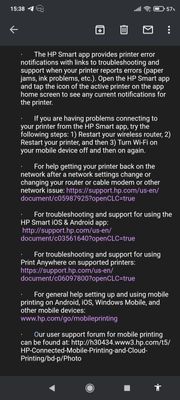
Also when they tell you in their App feedback e-mail to go on the support page for Android, etc... It leads you to a 404 error page.

I don't get how so many things can go wrong, seriously, just check your links/troubleshoot your things.]


Screenshot_2022-03-24-15-38-40-516_com.google.android.gm.jpg


My problem is :

I can't connect to my HP Smart account.


I CAN connect my HP Smart account on Google Chrome (on my phone).

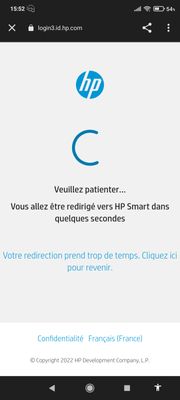
But when I try to connect to my account on the app, it opens a chrome tab... And says "the redirection takes too long".


Screenshot_2022-03-24-15-52-27-207_com.android.chrome.jpg


And when I try to get help, it just tells me "did you forget your connexion infos ?" Or "maybe check if your internet works well ?"

(Virtual Agent 👎)

And like...

Those don't help me at all. Not 1% of help provided here.


So, what am I supposed to do.

Apparently other people have that problem of "redirection takes too long"...

What should we do ?

1 REPLY 1
HP Recommended

Hi,

Thanks for using the HP Support Community.


This resource may be useful to help resolve the issue:

https://youtu.be/PznIYq0VO0o


Hope that helps!

I am an HP Employee. Although I am speaking for myself and not for HP.
Click Helpful = Yes to say Thank You.
Question / Concern Answered, Click "Accept as Solution"
Click on the link to subscribe and get the latest video uploads: https://goo.gl/y4Rcn1 Remember to like and share the video if you know of friends that would find this useful. Click on the bell so you will not miss out on any new videos. This tutorial shows how to resolve the sign in error on HP ...
† The opinions expressed above are the personal opinions of the authors, not of HP. By using this site, you accept the <a href="https://www8.hp.com/us/en/terms-of-use.html" class="udrlinesmall">Terms of Use</a> and <a href="/t5/custom/page/page-id/hp.rulespage" class="udrlinesmall"> Rules of Participation</a>.