• ×
    Information
    Need Windows 11 help?
    Check documents on compatibility, FAQs, upgrade information and available fixes.
    Windows 11 Support Center.
  • post a message
  • ×
    Information
    Need Windows 11 help?
    Check documents on compatibility, FAQs, upgrade information and available fixes.
    Windows 11 Support Center.
  • post a message
Guidelines
Join the HP Community Solve‑a‑thon | Help Others & Share Your Solutions | Live on Zoom | 2:30 PM to 2:30 AM IST | Every Wednesday Click here to know more
Check some of the most frequent questions about Instant Ink: HP INSTANT INK, HP+ PLANS: INK AND TONER.


Check out our WINDOWS 11 Support Center info about: OPTIMIZATION, KNOWN ISSUES, FAQs AND MORE.
HP Recommended
Ink Tank Wireless 415
macOS 10.13 High Sierra

I forget the printer Password and the adminiustrator is blocked

1 REPLY 1
HP Recommended


@moiseswcasa,

Thanks for reaching out to the HP Support community!


Let us try resetting the printer's network configuration and connecting the printer back to the network. This might reset the administrator password.

Follow the steps below: 


Step 1: Reset the Printer's network settings.

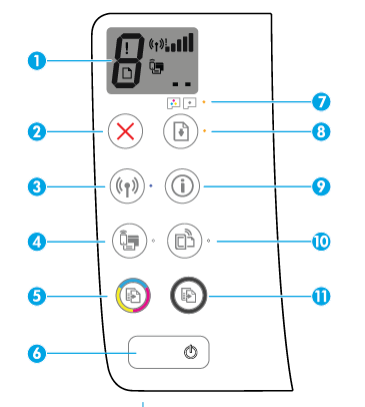
            On the control panel, press and hold the Wireless Button(3) & Cancel Button(2) together for 3-5 seconds. 


The Network settings would be reset. (Wireless light will start flashing)


Step 2: Connect the printer back to the network using the HP Smart App.

             HP Smart app icon

  • Go to 123.hp.com, type your printer model, and then follow the on-screen instructions to download and install the app.
  • Open the HP Smart app, and then add the printer to your network.
  • For setting up a new printer, click Printers, select Set up a new printer and then follow the on-screen instructions to complete the setup.
  • Check if this resets the administrator password.


Let me know if this works.


Please click “Accept as Solution” if you feel my post solved your issue, it will help others find the solution.

Click the “KudosThumbs Up" on the bottom right to say “Thanks” for helping.


ATHARVA_GP
I am an HP Employee

† The opinions expressed above are the personal opinions of the authors, not of HP. By using this site, you accept the <a href="https://www8.hp.com/us/en/terms-of-use.html" class="udrlinesmall">Terms of Use</a> and <a href="/t5/custom/page/page-id/hp.rulespage" class="udrlinesmall"> Rules of Participation</a>.