• ×
    Information
    Need Windows 11 help?
    Check documents on compatibility, FAQs, upgrade information and available fixes.
    Windows 11 Support Center.
  • post a message
  • ×
    Information
    Need Windows 11 help?
    Check documents on compatibility, FAQs, upgrade information and available fixes.
    Windows 11 Support Center.
  • post a message
Guidelines
Seize the moment! nominate yourself or a tech enthusiast you admire & join the HP Community Experts!
Check some of the most frequent questions about Instant Ink: HP INSTANT INK, HP+ PLANS: INK AND TONER.


Check out our WINDOWS 11 Support Center info about: OPTIMIZATION, KNOWN ISSUES, FAQs AND MORE.
HP Recommended
HP 9018
Microsoft Windows 10 (64-bit)

HP 9018 frozen blue screen code 04304661 with offline status. Tried USB connection straight to router too. Connecting to computer

5 REPLIES 5
HP Recommended

@dvesneske


Welcome to the HP support community.


Meanwhile:- 


Perform a power reset

  1. Turn on the printer, if it is not already on.
  2. Wait until the printer is idle and silent before you continue.
  3. With the printer turned on, disconnect the power cord from the rear of the printer.
  4. Wait at least 30 seconds.
  5. Plug back the power cable straight to a wall outlet and printer without any surge protector.
  6. Turn on the printer.

Use HP Print and Scan Doctor to check connectivity

Download HP Print and Scan Doctor.

  1. Run HPPSdr.exe from the download location on your computer.

  2. Once HP Print and Scan Doctor opens, click Start, and then select your printer.

    • If your printer is not in the list, turn it off and on, and then click Retry.

    • If there is a connection problem, follow the instructions in HP Print and Scan Doctor.

  3. If a screen prompts you to turn on printer updates, click Yes.

  4. If a screen prompts you to make your printer the default printer, click Yes.

  5. Try to print.

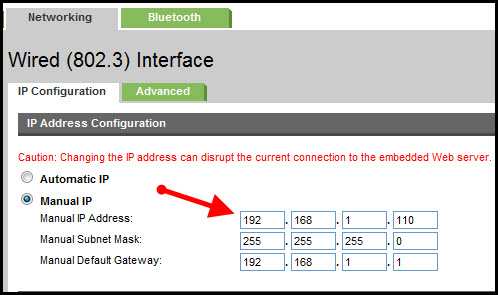
Assign a manual IP address and that should fix the issue.

A Network Configuration Page lists important network settings such as network status and the printer IP address.

  1. Load plain white paper in the input tray.

  2. From the home screen on the printer control panel, swipe down to open the Dashboard, and then touch the Wireless icon  or Ethernet icon  to display the network status screen.

  3. Touch Print Details to print the network configuration page.

  4. Alternatively, from the home screen on the printer control panel, swipe down to open the Dashboard, and then touch the Setup icon .

  5. Swipe up on the display, and then touch Reports.

  6. Touch Network Configuration Page.


Setting a Static IP Address

Once you know your printer’s IP address from the page you printed, entering it is pretty easy. Here’s what you do:

HP Printer Static IP Address

  1. Run your Web browser.
  2. In the Web browser’s address bar, type the IP address of your printer and press Enter. Assuming you entered the right address, the HP printer control panel should appear.
  3. Click the Networking tab.
  4. Under Connections, click Wireless.
  5. Under IP Address Configuration, click Manual IP.
  6. Enter the IP address, subnet mask, and default gateway in the appropriate boxes.
  7. Click Apply.

You can refer this HP document for more assistance:- Click here


Let me know how it goes.

To thank me for my efforts to help you, please mark my post as an accepted solution so that it benefits several others.

Cheers.

Sandytechy20
I am an HP Employee

HP Recommended

Unfortunately, the firmware that HP has posted on their website is defective and has been breaking several printers. You're not the only one. At this time, HP has not given us an official response on how it will be resolved, but if your printer is still under warranty, I would suggest calling them directly, and please post any updates here.

HP Recommended

@dvesneske


This looks like a hardware issue.


Please reach out to the HP Support in your region regarding the service options for your printer.


Hope this helps!


Please click “Accepted Solution” if you feel my post solved your issue, it will help others find the solution. Click the “Kudos/Thumbs Up" on the bottom right to say “Thanks” for helping!

TEJ1602
I am an HP Employee

HP Recommended

I called HP support, I got disconnected after thirty minutes of talking to an agent. Calling back now.

HP Recommended

@HiImDannyGanz


No worries 🙂 Do let us know if you need further assistance.


Cheers!

TEJ1602
I am an HP Employee

† The opinions expressed above are the personal opinions of the authors, not of HP. By using this site, you accept the <a href="https://www8.hp.com/us/en/terms-of-use.html" class="udrlinesmall">Terms of Use</a> and <a href="/t5/custom/page/page-id/hp.rulespage" class="udrlinesmall"> Rules of Participation</a>.