• ×
    Information
    Need Windows 11 help?
    Check documents on compatibility, FAQs, upgrade information and available fixes.
    Windows 11 Support Center.
  • post a message
  • ×
    Information
    Need Windows 11 help?
    Check documents on compatibility, FAQs, upgrade information and available fixes.
    Windows 11 Support Center.
  • post a message
Guidelines
Join the HP Community Solve‑a‑thon | Help Others & Share Your Solutions | Live on Zoom | 2:30 PM to 2:30 AM IST | Every Wednesday Click here to know more
Check some of the most frequent questions about Instant Ink: HP INSTANT INK, HP+ PLANS: INK AND TONER.


Check out our WINDOWS 11 Support Center info about: OPTIMIZATION, KNOWN ISSUES, FAQs AND MORE.
HP Recommended
9010 All in one
Microsoft Windows 10 (64-bit)

In the HP app, is there a way to name the printers? I have more than one of the same printer and without looking at the specific code it is difficult to tell them apart quickly. 

3 REPLIES 3
HP Recommended

@JGHam 


Rats.

Sometimes the answer is No.


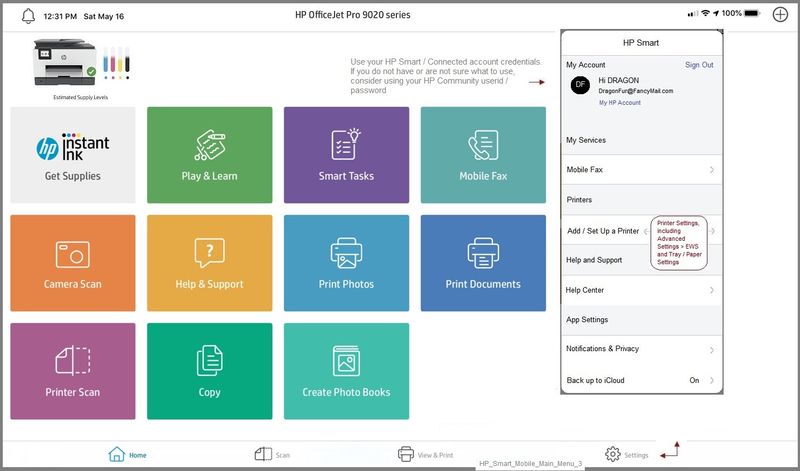
The mobile version of the HP Smart app lets you rename printer(s).

Easy.  I'll post the image how-to file if you like.


If HP Smart for Windows supports renaming the printer(s), I have yet to find it.


I did just send some Feedback (button on the lower left when you open the main menu) and requested , if it is possible, that the feature be added.  A polite request might work - these always have a chance, at least.


About the only thing you can do (as far as I know) is remember the position of printer 1 and printer 2 on the main menu and know which one is which.  You can also, of course, check inside the Settings but Meh - that entirely misses the point.


If I run across anything, I will post back.


Thank you for participating in our HP Community.

We are a world community of volunteers dedicated to supporting HP technology

Click Thumbs Up to say Thank You.

Answered? Click "Accept as Solution" to help others find it.


Dragon-Fur

HP Recommended

Thanks. The mobile app tip was helpful!

HP Recommended

@JGHam 


You are welcome.


Example for those reading - HP Smart Mobile App - Rename Printer

HP_Smart_Mobile_Main_Menu_3HP_Smart_Mobile_Main_Menu_3


HP_Smart_Mobile_Rename_Printer_1HP_Smart_Mobile_Rename_Printer_1


Thank you for participating in our HP Community.

We are a world community of volunteers dedicated to supporting HP technology

Click Thumbs Up to say Thank You.

Answered? Click "Accept as Solution" to help others find it.


Dragon-Fur

† The opinions expressed above are the personal opinions of the authors, not of HP. By using this site, you accept the <a href="https://www8.hp.com/us/en/terms-of-use.html" class="udrlinesmall">Terms of Use</a> and <a href="/t5/custom/page/page-id/hp.rulespage" class="udrlinesmall"> Rules of Participation</a>.