• ×
    Information
    Need Windows 11 help?
    Check documents on compatibility, FAQs, upgrade information and available fixes.
    Windows 11 Support Center.
  • post a message
  • ×
    Information
    Need Windows 11 help?
    Check documents on compatibility, FAQs, upgrade information and available fixes.
    Windows 11 Support Center.
  • post a message
Guidelines
Join the HP Community Solve‑a‑thon | Help Others & Share Your Solutions | Live on Zoom | 2:30 PM to 2:30 AM IST | Every Wednesday Click here to know more
Check some of the most frequent questions about Instant Ink: HP INSTANT INK, HP+ PLANS: INK AND TONER.


Check out our WINDOWS 11 Support Center info about: OPTIMIZATION, KNOWN ISSUES, FAQs AND MORE.
HP Recommended
Officejet Pro 8600

Hello,  I'm trying to change the email address for my printer in the HP app.  And when I go to "My Printers"  my printer is not there. I tried adding my printer and it says to use the claim code to add the printer. I've printed off the info page as per directions but there is no claim code.


2 REPLIES 2
HP Recommended

I've actually connected my printer but I can't change the email

HP Recommended

Hi @Epiccmh


Welcome to the HP Support Community. I'd be happy to assist you with the email address. 


Please try these steps -


1.) Sign in to HP Smart.

If you have not set up an HP account, go to Set Up an HP Smart Website Account.

2.) Select your printer, if necessary.

3.) Scroll down to the ePrint settings, and then click ePrint Address, if necessary.

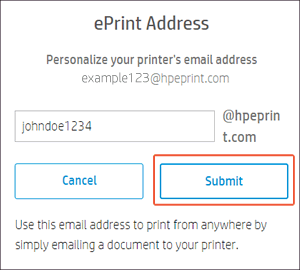
4.) Type the address you want use, and then click Submit.


Clicking Submit to change an HP ePrint email address


5.) If the address is not available, type a different address, and then click Submit.

6.) Inform any other users of the new HP ePrint email address.


For more information, go to Manage HP ePrint Access for Additional Users


You may also refer to this document - HP Printers - Change Your HP ePrint Email Address


Hope this helps! Keep me posted. 


Please click “Accept as Solution” if you feel my post solved your issue, it will help others find the solution.

Click the “Kudos, Thumbs Up" on the bottom right to say “Thanks” for helping!


Have a great day! 

Asmita
I am an HP Employee

† The opinions expressed above are the personal opinions of the authors, not of HP. By using this site, you accept the <a href="https://www8.hp.com/us/en/terms-of-use.html" class="udrlinesmall">Terms of Use</a> and <a href="/t5/custom/page/page-id/hp.rulespage" class="udrlinesmall"> Rules of Participation</a>.