-
×InformationNeed Windows 11 help?Check documents on compatibility, FAQs, upgrade information and available fixes.
Windows 11 Support Center. -

-
×InformationNeed Windows 11 help?Check documents on compatibility, FAQs, upgrade information and available fixes.
Windows 11 Support Center. -
- HP Community
- Printers
- Mobile Printing & Cloud Printing
- PRINTING B&W

Create an account on the HP Community to personalize your profile and ask a question
05-04-2020 01:25 PM
@GregD03, Welcome to HP Support Community!
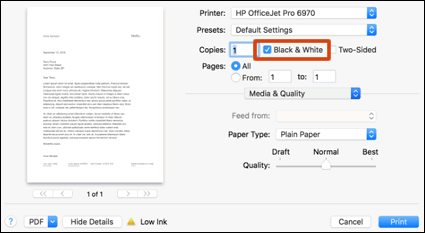
To print in black and white, select the Black & White option from the print settings.
NOTE:Some HP printers must have some ink of each color available to print and to perform periodic servicing tasks. This helps prevent issues such as printhead clogs and poor print quality. There is no way to bypass this feature.
Print in black and white
Change the print settings to print black and white documents and photos. Available print settings and menu locations vary by printer model, driver type, and the app you are printing from.
-
Open the document or photo you want to print, click File, click Print, and then click Show Details, if necessary.
-
Select Black & White on the main dialog. The Presets menu also includes black and white options.

-
To use less black ink, click Media & Quality in the unnamed print options menu at the center of the dialog, and then move the Quality slider to Draft.
-
Click Print.
-
To create a new preset based on the selected print settings, click the Presets menu, and then select Save Current Settings as Preset.
I hope that answers your concern adequately. Let me know!
Please click “Accepted Solution” if you feel my post solved your issue, it will help others find the solution. Click the “Kudos/Thumbs Up" on the bottom right to say “Thanks” for helping!
TEJ1602
I am an HP Employee
05-09-2020 11:41 AM - edited 05-09-2020 11:41 AM
This is in response to your private message.
ensure that the printer is up to date with its firmware and Mac is up to date with its software. If you are unsure you may use the links below to update the printer firmware and Mac software:
Remove and add the printer
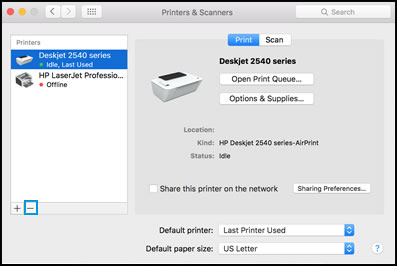
Click the Apple menu, and then select System Preferences.
Depending on your operating system version, click Print & Fax, Print & Scan, or Printers & Scanners.
Click the name of your printer, click the Minus sign
, and then delete the printer.

Click the Plus sign
, and then click Add Printer or Scanner.
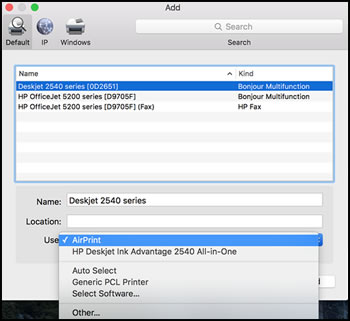
Click the Use or Print Using box, and then select AirPrint

Click Add to add the printer to the list.
Try to print.
Keep me posted for further assistance.
Please click “Accepted Solution” if you feel my post solved your issue, it will help others find the solution. Click the “Kudos/Thumbs Up" on the bottom right to say “Thanks” for helping!
TEJ1602
I am an HP Employee