-
×InformationNeed Windows 11 help?Check documents on compatibility, FAQs, upgrade information and available fixes.
Windows 11 Support Center. -

-
×InformationNeed Windows 11 help?Check documents on compatibility, FAQs, upgrade information and available fixes.
Windows 11 Support Center. -
- HP Community
- Printers
- Mobile Printing & Cloud Printing
- Recurring Printer Error

Create an account on the HP Community to personalize your profile and ask a question
11-12-2019 08:59 AM
My HP OfficeJet Pro 6968 has for the past week repeatedly said, “Printer Error. There is a problem with the printer. Turn the printer Off, then On.” I do this daily, sometimes multiple times daily. The printer comes back, but then quickly reverts to the error message.
11-14-2019 05:22 PM
@SKGssi Welcome to HP Community!
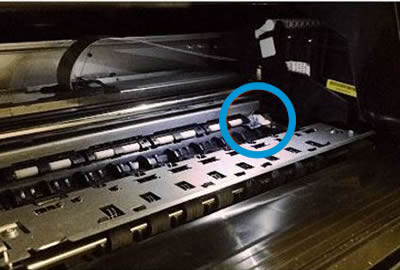
I suggest you check for obstructions in the carriage path
Clear obstructions from the carriage area inside the printer.
-
With the printer on, disconnect the power cord from the rear of the printer.
-
Open the door to access the carriage inside of the printer.
-
Look in the carriage path for debris such as crumpled paper or dislodged labels, and then remove any that you find.

-
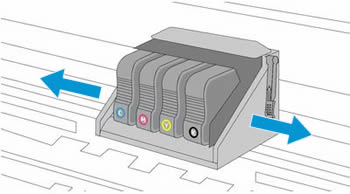
Use your hand to move the carriage to each side, making sure it moves freely. If the carriage is stalled or docked to one side of the printer and you cannot move it, continue with these steps.

-
Close the carriage access door.
-
Reconnect the power cord to the rear of the printer, and then turn the printer on.
If the error persists, continue to the next step.
Step 2: Reset the printer
Reset the printer to recover from printer failures.
-
With the printer turned on, disconnect the power cord from the printer.
-
Unplug the power cord from the power source.
-
Wait 60 seconds.
-
Reconnect the power cord to a wall outlet and to the printer.
NOTE:
HP recommends plugging the printer directly into a wall outlet.
-
Turn the printer on.
Keep me posted, as I (Or a trusted colleague) shall follow-up on this case to ensure the concern has been addressed,
And your device is up and running again, only in case you don't get back to us, first!
That said, If the information I've provided was helpful, give us some reinforcement by clicking the solution and kudos buttons,
That'll help us, and others see that we've got the answers!
Good Luck.
Riddle_Decipher
I am an HP Employee
Learning is a journey, not a destination.
Let's keep asking questions and growing together.