
-
×InformationNeed Windows 11 help?Check documents on compatibility, FAQs, upgrade information and available fixes.
Windows 11 Support Center. -
-
×InformationNeed Windows 11 help?Check documents on compatibility, FAQs, upgrade information and available fixes.
Windows 11 Support Center. -
- HP Community
- Printers
- Mobile Printing & Cloud Printing
- Unable to modify paper size using IPad, Pages and HP printer

Create an account on the HP Community to personalize your profile and ask a question
Your account also allows you to connect with HP support faster, access a personal dashboard to manage all of your devices in one place, view warranty information, case status and more.
Check some of the most frequent questions about Instant Ink: HP INSTANT INK, HP+ PLANS: INK AND TONER.
Check out our WINDOWS 11 Support Center info about: OPTIMIZATION, KNOWN ISSUES, FAQs AND MORE.

It has been a while since anyone has replied. Simply ask a new question if you would like to start the discussion again.

12-22-2023 08:37 AM
 HP Recommended
I’m attempting to change the paper size for a document to 5.5 x 8.5. I am utilizing an iPad, the Pages program and an HP printer. I have set the paper size for the document settings and saved the values but the printer continues to print as though it were 8.5 x 11 paper.
Solved! Go to Solution.
1 ACCEPTED SOLUTION
Accepted Solutions


12-22-2023 09:06 AM
HP Recommended
Welcome to the HP Community --
It is generally required that the Paper Size & Type - Tray and Paper - be selected / set at the printer before the content is opened for print.
For example, HP Smart works this way.
Tray and Paper -- used to adjust / set the paper size and type -- is available using your browser (and the printer's IP address) or from withing HP Smart.
Reminder
The paper size must be supported as a standard size or -- depending on the printer -- perhaps as a Custom size at the printer control panel or within EWS.
=================================
Printer - Tray and Paper
Depending on the printer model, the information might be checked on the touch-screen Printer Control Panel.
EWS > HP Document / How-to
Use the HP printer Embedded Web Server (EWS)
NOTE: Find printer IP address
Section Open the EWS over a local network orientation
EWS – Tray and Paper Management
Open your Browser > Type / enter the Printer IP address into URL / Address bar
Tab Settings > Preferences > Tray and Paper (Management)
Select / Adjust settings for Paper Size / Type
Model Dependent: Advanced section
Click Apply to save changes
Tray and Paper – Paper Size / Paper Type / Paper Weight
Reminder
HP Smart Mobile might require that paper size / type is rechecked / adjusted before the content is opened for print.
Paper Size, Type, and Weight loaded in the printer tray must be supported for use in that tray.
EWS provides access and control to check / adjust Tray and Paper Settings.
Notes
Depending on the printer model, the Printer Control Panel might provide access to Paper Size / Type settings immediately after the paper is (re)loaded into the appropriate printer intake tray.
Trays
- If the printer lacks a second tray, all paper / types are supported in the single available tray.
- Printers that include a Photo Tray generally restrict the paper sizes and paper type supported in that tray.
Custom size?
If EWS does not allow setting the paper size or size “Custom”,
If the printer includes a touch display printer control panel,
Look for the setting for “Custom” in the Printer Control Panel after (re)loading the paper to be used
NOTE: Not available for all printers
What?
Paper Size, Type, and Weight must be appropriate for the tray in which that paper is to be used.
General Example - EWS - Tray and Paper
Note: Illustration (left side) does not represent a DeskJet printer setup
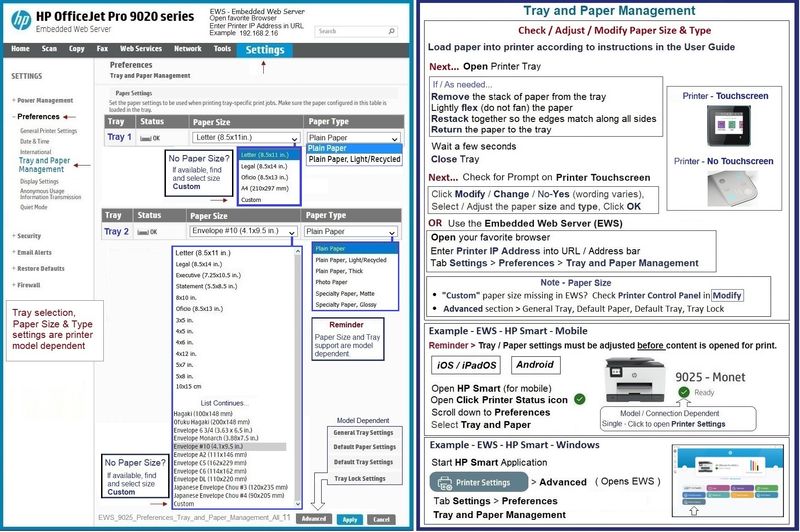
Example - HP Smart - Mobile - Settings (Tray and Paper)

General Example - HP Smart - Mobile - PDF Print

=+=+=+=+=+=+=+=+=+=+=+=+=+=+=+=+=+=+=+=+=+=
References / Resources
HP Printer Home Page - References and Resources
Learn about your Printer - Solve Problems
“Things that are your printer”
When the website support page opens, Select (as available) a Category > Topic > Subtopic
NOTE: Content depends on device type and Operating System
Categories: Alerts, Troubleshooting, Ink & Paper, HP Software / Drivers / Firmware Updates , Setup & User Guides, Product Specifications, Account & Registration, Warranty & Repair
Open
Enter the device type and model name of your HP product
Thank you for participating in the HP Community --
People who own, use, and support HP devices.
Click Yes to say Thank You
Question / Concern Answered, Click my Post "Accept as Solution"
Dragon-Fur

3 REPLIES 3
12-22-2023 09:06 AM
HP Recommended
Welcome to the HP Community --
It is generally required that the Paper Size & Type - Tray and Paper - be selected / set at the printer before the content is opened for print.
For example, HP Smart works this way.
Tray and Paper -- used to adjust / set the paper size and type -- is available using your browser (and the printer's IP address) or from withing HP Smart.
Reminder
The paper size must be supported as a standard size or -- depending on the printer -- perhaps as a Custom size at the printer control panel or within EWS.
=================================
Printer - Tray and Paper
Depending on the printer model, the information might be checked on the touch-screen Printer Control Panel.
EWS > HP Document / How-to
Use the HP printer Embedded Web Server (EWS)
NOTE: Find printer IP address
Section Open the EWS over a local network orientation
EWS – Tray and Paper Management
Open your Browser > Type / enter the Printer IP address into URL / Address bar
Tab Settings > Preferences > Tray and Paper (Management)
Select / Adjust settings for Paper Size / Type
Model Dependent: Advanced section
Click Apply to save changes
Tray and Paper – Paper Size / Paper Type / Paper Weight
Reminder
HP Smart Mobile might require that paper size / type is rechecked / adjusted before the content is opened for print.
Paper Size, Type, and Weight loaded in the printer tray must be supported for use in that tray.
EWS provides access and control to check / adjust Tray and Paper Settings.
Notes
Depending on the printer model, the Printer Control Panel might provide access to Paper Size / Type settings immediately after the paper is (re)loaded into the appropriate printer intake tray.
Trays
- If the printer lacks a second tray, all paper / types are supported in the single available tray.
- Printers that include a Photo Tray generally restrict the paper sizes and paper type supported in that tray.
Custom size?
If EWS does not allow setting the paper size or size “Custom”,
If the printer includes a touch display printer control panel,
Look for the setting for “Custom” in the Printer Control Panel after (re)loading the paper to be used
NOTE: Not available for all printers
What?
Paper Size, Type, and Weight must be appropriate for the tray in which that paper is to be used.
General Example - EWS - Tray and Paper
Note: Illustration (left side) does not represent a DeskJet printer setup
Example - HP Smart - Mobile - Settings (Tray and Paper)
General Example - HP Smart - Mobile - PDF Print
=+=+=+=+=+=+=+=+=+=+=+=+=+=+=+=+=+=+=+=+=+=
References / Resources
HP Printer Home Page - References and Resources
Learn about your Printer - Solve Problems
“Things that are your printer”
When the website support page opens, Select (as available) a Category > Topic > Subtopic
NOTE: Content depends on device type and Operating System
Categories: Alerts, Troubleshooting, Ink & Paper, HP Software / Drivers / Firmware Updates , Setup & User Guides, Product Specifications, Account & Registration, Warranty & Repair
Open
Enter the device type and model name of your HP product
Thank you for participating in the HP Community --
People who own, use, and support HP devices.
Click Yes to say Thank You
Question / Concern Answered, Click my Post "Accept as Solution"
Dragon-Fur
12-26-2023 07:06 AM
HP Recommended
Dragon-Fur, thank you for your reply. It was very helpful and it worked like a charm. I was attempting to change the paper size by forcing it with the Pages software rather than doing it directly at the HP software level at the printer instead. Days of frustration was solved with your assistance. Thank you.
12-26-2023 07:14 AM
HP Recommended
Excellent -
You are welcome.
EWS, beyond Tray and Paper, is a great resource.
Happy Printing!
Thank you for participating in the HP Community --
People who own, use, and support HP devices.
Click Yes to say Thank You
Question / Concern Answered, Click my Post "Accept as Solution"
Dragon-Fur

Be alert for scammers posting fake support phone numbers and/or email addresses on the community.
If you think you have received a fake HP Support message, please report it to us by clicking on "Flag Post".
† The opinions expressed above are the personal opinions of the authors, not of HP. By using this site, you accept the Terms of Use and Rules of Participation.


Didn't find what you were looking for?
Ask the community
† The opinions expressed above are the personal opinions of the authors, not of HP. By using this site, you accept the <a href="https://www8.hp.com/us/en/terms-of-use.html" class="udrlinesmall">Terms of Use</a> and <a href="/t5/custom/page/page-id/hp.rulespage" class="udrlinesmall"> Rules of Participation</a>.