-
×InformationNeed Windows 11 help?Check documents on compatibility, FAQs, upgrade information and available fixes.
Windows 11 Support Center. -

-
×InformationNeed Windows 11 help?Check documents on compatibility, FAQs, upgrade information and available fixes.
Windows 11 Support Center. -
- HP Community
- Notebooks
- Notebook Audio
- Re: Headphone audio jack

Create an account on the HP Community to personalize your profile and ask a question
11-14-2018 04:18 PM
I have had the hp spectre 360 for a year now and i just never decided to check out the problem but since the first time i used it, the headphone jack didn't work properly. When i plug in my earbuds my left one does not project the sound as loud as the right one. The left side is significantly lower than the right side. I know that my earbuds aren't the problem since they work with every other device i have. I have also used different earbuds and they all seem to work fine until i connect them to my laptop.
11-16-2018 01:00 PM
Welcome to HP Forums,
This is a great place to get support, find answers and tips to your technical queries.
To provide you with an accurate solution, I'll need a few more details:
Have you tried updating the Audio drivers or BIOS?
Did you try any troubleshooting steps on your own?
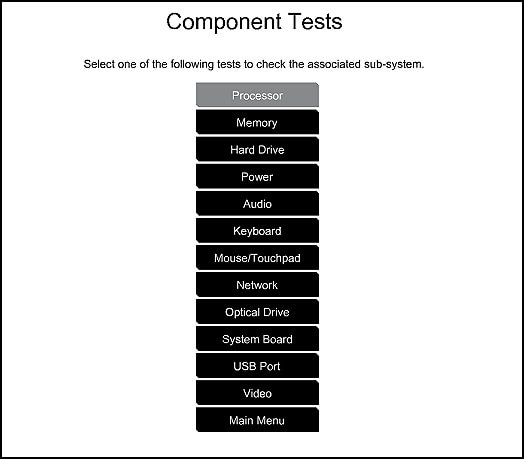
Use the following steps to open the Component Tests menu and and run the Audio test.
-
Hold the power button for at least five seconds to turn off the computer.
-
Turn on the computer and immediately press Esc repeatedly, about once every second. When the menu appears, press the F2 key.
-
On the main menu, click Component Tests.
-
The Component Tests menu displays.
Your Component Tests menu might be different, depending on the components installed on your computer.

-
Audio Test - The Audio Playback Test checks that the audio device is functioning properly. During the test, a few music notes are played in sequence and then repeated. This test takes one minute to complete.
To run the test, click Audio, and then click Run once. Choose either the speakers or the headphones. When asked, enter the number of notes you heard.
If the hardware test passes, update the BIOS and Audio driver using this link: https://support.hp.com/in-en/drivers
Keep me posted, how it goes!
Have a great day!
Cheers:)
Raj1788
I am an HP Employee