• ×
    Information
    Need Windows 11 help?
    Check documents on compatibility, FAQs, upgrade information and available fixes.
    Windows 11 Support Center.
  • post a message
  • ×
    Information
    Need Windows 11 help?
    Check documents on compatibility, FAQs, upgrade information and available fixes.
    Windows 11 Support Center.
  • post a message
Guidelines

Featured blog article:

Check out our WINDOWS 11 Support Center info about: OPTIMIZATION, KNOWN ISSUES, FAQs, VIDEOS AND MORE.
HP Recommended

@User_envy1- I appreciate the information you've provided, that said, I'll need the product number or name as well, so that I know which device you are referring to?

Please make use of the link I've shared to get the details I need.

Good luck!

Riddle_Decipher

I am an HP Employee

Learning is a journey, not a destination.
Let's keep asking questions and growing together.

Unlock the Debutant's Badge at Level 5

Reach Level 5 and you'll be eligible to add the Debutant's Badge to your profile.

Debutant's BadgeHow to add it:
1. Go to My Settings.
2. Select Personal → Personal Information.
3. Righ-Click on the badge to "copy image address"
4. Paste it under Signature and save changes.
HP Recommended

Product number: 3S099PA#ACJ

HP Envy ba0xx

HP Recommended

@User_envy1- Thank you for the details,

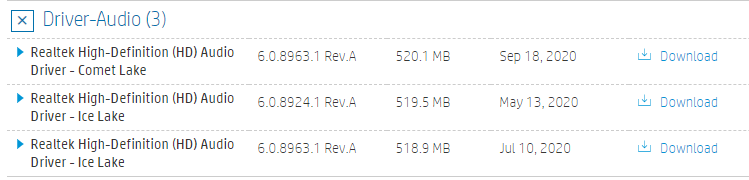
I went through the HP website and there's no update available for OCT 2020 as of yet, may I know which software you've updated?


Keep us posted,

If you would like to thank us for our efforts to help you, 

Give us a virtual high-five by clicking the 'Thumbs Up' icon below, followed by clicking on the "Accept as solution" on this post, 

Have a great day!

Riddle_Decipher

I am an HP Employee

Learning is a journey, not a destination.
Let's keep asking questions and growing together.

Unlock the Debutant's Badge at Level 5

Reach Level 5 and you'll be eligible to add the Debutant's Badge to your profile.

Debutant's BadgeHow to add it:
1. Go to My Settings.
2. Select Personal → Personal Information.
3. Righ-Click on the badge to "copy image address"
4. Paste it under Signature and save changes.
HP Recommended

please help to resolve my sound issue 

sound not work 

HP Recommended

May I know which update was performed?

HP Recommended

Hi, try to reinstall OS using HP Cloud Recovery Tool.

† The opinions expressed above are the personal opinions of the authors, not of HP. By using this site, you accept the <a href="https://www8.hp.com/us/en/terms-of-use.html" class="udrlinesmall">Terms of Use</a> and <a href="/t5/custom/page/page-id/hp.rulespage" class="udrlinesmall"> Rules of Participation</a>.
-->