
-
×InformationNeed Windows 11 help?Check documents on compatibility, FAQs, upgrade information and available fixes.
Windows 11 Support Center. -
-
×InformationNeed Windows 11 help?Check documents on compatibility, FAQs, upgrade information and available fixes.
Windows 11 Support Center. -
- HP Community
- Notebooks
- Notebook Audio
- Speaker/Sound & Mic issues

Create an account on the HP Community to personalize your profile and ask a question
Your account also allows you to connect with HP support faster, access a personal dashboard to manage all of your devices in one place, view warranty information, case status and more.
Check out our WINDOWS 11 Support Center info about: OPTIMIZATION, KNOWN ISSUES, FAQs, VIDEOS AND MORE.

It has been a while since anyone has replied. Simply ask a new question if you would like to start the discussion again.

08-26-2020 09:44 AM
 HP Recommended
When using this laptop the speakers/microphone will suddenly stop working. We have 3 HP laptops - all less than a month old - bought for school - and this happens with all. It has happened both in Zoom and Google Classroom. When this happens the computer will lock and will need to be manual shut down. Once restarted the issue has usually resolved for the short-term. We have done all updates and continue to have this problem. In addition, one of the laptops will make a loud buzzing sound which will only stop when computer is shut down.
10 REPLIES 10


08-29-2020 05:29 AM
HP Recommended
Welcome to HP Community
I have gone through your Post and would like to help
To assist you better please provide me with the product model or the product number
You can refer to this Link: hp.care/2bygf7l for help in locating the Product Number.
Meantime I suggest you download and run the HP Support Assistant from this Link: https://www8.hp.com/us/en/campaigns/hpsupportassistant/hpsupport.html?jumpid=va_r602_us/en/any/psg/p...
HPSA will automatically search for all the latest drivers for your Notebook
-
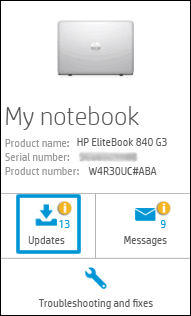
Click My devices in the top menu, and then click Updates in the My PC or My notebook pane.
-
Click Check for updates and messages to scan for new updates.

-
Review the list of updates. Updates with a yellow information icon are recommended. Updates with a blue information icon are optional.
-
Click the update name for a description, version number, and file size.
-
Select the box next to any updates you want to install, and then click Download and install.
Also ensure Windows is up to date.
Select the Start button, and then go to Settings > Update & security > Windows Update , and select Check for updates. If Windows Update says your device is up to date, you have all the updates that are currently available
Keep me posted how it goes
Thank you and have a wonderful day 😊
If the information I've provided was helpful, give us some reinforcement by clicking the "Solution Accepted" on this Post and it will also help other community members with similar issue.
KrazyToad
I Am An HP Employee
08-31-2020 08:15 AM
HP Recommended
We have run the assistant and check for updates daily on top of that.
I have 2 laptops - HP Envy x360 Laptop - Product number 9TY28UA#ABA
I have 1 laptop - HP Envy x 360 Laptop - Product number 9HZ86UA#ABA
The AMD sound card appears to be the issue of all 3 (best we can tell). Whenever we update the laptops and restart them - the issue will be resolved for a little while but always happens again.

08-31-2020 03:47 PM
HP Recommended
I recommend you run the audio troubleshooter and it will automatically find and fix the audio issues on the computer.
Here is how it is done.
- Launch Troubleshooting by typing and clicking “Troubleshooting” in Windows search.
- Click on "Playing Audio".
- Follow the on-screen instructions.
Let me know how it goes and you have a great day!
If you wish to show appreciation for my efforts, mark my post as Accept as Solution. Your feedback counts!
Cheers!
Stay Home – Stay Safe
The_Fossette
I am an HP Employee
09-03-2020 07:01 AM
HP Recommended
The audio troubleshooter does not fix the issue. It gives a message about being unable to start the Windows audio service. When I check the device manager it shows a problem with the AMD Audio Device. The only thing that seems to temporarily solve the issue is downloading new drivers from the AMD support site. Even then, it only solves the issue temporarily. The issue pops up again within a day or two.
09-03-2020 10:25 AM - edited 09-03-2020 10:29 AM
HP Recommended
I have exactly the same problem with audio and speaker issues on an hp envy x360 laptop. Yesterday was the speaker buzzing issue and today was no sound at all. When I run The audio troubleshooter, it hangs for a long time then I get a crash/error screen. This only happens on zoom calls, not while doing other tasks.
09-03-2020 02:29 PM
HP Recommended
This is an issue with the drivers. At this point I suggest you perform a System Recovery and then run the Windows & HPSA updates again
Link: https://support.hp.com/in-en/document/c04758961
KrazyToad
I Am An HP Employee
09-04-2020 08:30 AM - edited 09-04-2020 08:35 AM
HP Recommended
This is a brand new out of the box pc, why would a system recovery fix anything? Is there a direct link to the proper audio driver anywhere for a reinstall? The support assistant did not find any updates to install.
09-04-2020 12:24 PM
HP Recommended
If it is a brand new System and the issue persists please contact HP Support in your Region
1) Click on this link - www.hp.com/contacthp/
2) Select your product type below.
3) Enter the serial of your device.
4) Select the country from the drop-down.
5) Select the chat or get phone number options based on your preferences.
6) Fill the web-form and proceed further.
Thank you
KrazyToad
I Am An HP Employee

Be alert for scammers posting fake support phone numbers and/or email addresses on the community.
If you think you have received a fake HP Support message, please report it to us by clicking on "Flag Post".
† The opinions expressed above are the personal opinions of the authors, not of HP. By using this site, you accept the Terms of Use and Rules of Participation.


Didn't find what you were looking for?
Ask the community
† The opinions expressed above are the personal opinions of the authors, not of HP. By using this site, you accept the <a href="https://www8.hp.com/us/en/terms-of-use.html" class="udrlinesmall">Terms of Use</a> and <a href="/t5/custom/page/page-id/hp.rulespage" class="udrlinesmall"> Rules of Participation</a>.