-
×InformationNeed Windows 11 help?Check documents on compatibility, FAQs, upgrade information and available fixes.
Windows 11 Support Center. -

-
×InformationNeed Windows 11 help?Check documents on compatibility, FAQs, upgrade information and available fixes.
Windows 11 Support Center. -
- HP Community
- Notebooks
- Notebook Boot and Lockup
- Re: Device doesn't reboot after doing a 'restart'

Create an account on the HP Community to personalize your profile and ask a question
01-31-2018 01:36 AM
Hi all
I have a HP Pavilion X2 10-n100na tablet/laptop running Windows 10 Home (v1709) - this problem has recently started occurring, possibly after the update to 1709.
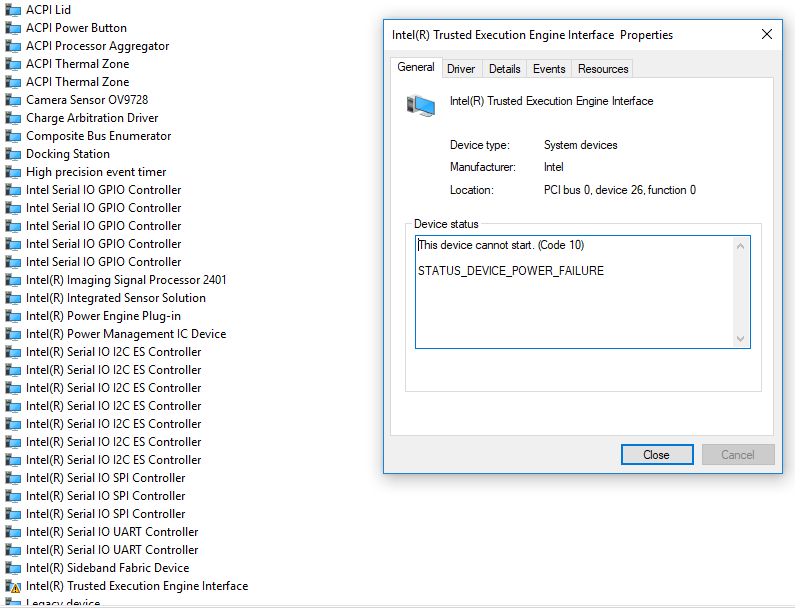
If i do a restart, either following an update for example or using the on-screen 'power' button the PC shuts down but doesn't restart. I've looked at various forums, some of which blame newer drivers for Intel Management Engine Interface. However, when I checked, I don't have Intel MEI on my computer. I do have Intel Trusted Execution Engine Interface which has a yellow triangle showing next to it in Device Manager - see below
I suppose my questions are:
1 - should I have Intel MEI installed (and if so, how)?
2 - what does Intel TXT do and is it likely to be linked to my restart problems?
If neither of the above are relevant, does anyone have any ideas for resolving this, beyond completely reinstalling/repairing Windows - I've already done those - or messing about with the BIOS which was suggested to me elsewhere and which I'm very reluctant to do.
Thanks in advance for any help anyone can give.
Solved! Go to Solution.
Accepted Solutions
02-01-2018 09:11 AM
Welcome to HP Support Forums. A really great platform for posting all your questions and finding solutions.
I understand that when you restart your computer it shuts down instead of restarting.
I suggest you download the Chipset Driver and the latest BIOS from Here
If the issue persists, please contact our Phone Support and our Support Engineers should be able to Remote into your Notebook and sort this out.
Step 1. Open link: www.hp.com/contacthp/
Step 2. Enter Product number or select to auto detect
Step 3. Scroll down to "Still need help? Complete the form to select your contact options"
Step 4. Scroll down and click: HP contact options - click on Get phone number and phone number appear.
Thank you. 🙂
If the information I've provided was helpful, give us some reinforcement by clicking the "Solution Accepted" and "Kudos" Buttons.
KrazyToad
I Am An HP Employee
02-01-2018 09:11 AM
Welcome to HP Support Forums. A really great platform for posting all your questions and finding solutions.
I understand that when you restart your computer it shuts down instead of restarting.
I suggest you download the Chipset Driver and the latest BIOS from Here
If the issue persists, please contact our Phone Support and our Support Engineers should be able to Remote into your Notebook and sort this out.
Step 1. Open link: www.hp.com/contacthp/
Step 2. Enter Product number or select to auto detect
Step 3. Scroll down to "Still need help? Complete the form to select your contact options"
Step 4. Scroll down and click: HP contact options - click on Get phone number and phone number appear.
Thank you. 🙂
If the information I've provided was helpful, give us some reinforcement by clicking the "Solution Accepted" and "Kudos" Buttons.
KrazyToad
I Am An HP Employee
02-01-2018 04:22 PM
I'm glad you were able to get this sorted out. Please do visit our HP Forums and drop us a Message anytime you need help.
Thank you. 🙂
KrazyToad
I Am An HP Employee