• ×
    Information
    Need Windows 11 help?
    Check documents on compatibility, FAQs, upgrade information and available fixes.
    Windows 11 Support Center.
  • post a message
  • ×
    Information
    Need Windows 11 help?
    Check documents on compatibility, FAQs, upgrade information and available fixes.
    Windows 11 Support Center.
  • post a message
Guidelines
Join the HP Community Solve‑a‑thon | Help Others & Share Your Solutions | Live on Zoom | 2:30 PM to 2:30 AM IST | Every Wednesday Click here to know more
HP Recommended
15-f272wm
Microsoft Windows 10 (32-bit)

My wifes computer fell and it shut down. When we restart is the hp symbol comes up then says please wait and it shows the date and time but that is it. She cant get to log in or anything. Then the stuff on the screen goes away and comes back then goes away again. Please we need your help. I hope all her information isn't gone.

1 REPLY 1
HP Recommended

@Bajanfitness 

Sorry, but I don't have very good news for you ...

Laptops are not designed to survive falls, and when that happens, almost always, the hard drive is damaged beyond repair.

IF you are fortunate, only the files needed to boot and run Windows got damaged, and your other stuff is OK.


IF the drive has failed, there is nothing you can do to fix it.

Your best bet for recovering data now is to do the following:
1) Remove the hard drive from the old PC
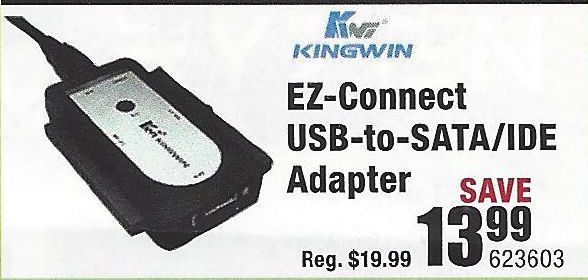
2) Purchase a USB-to-Hard Driver adapter kit (like the one illustrated below)

USB-Drive-Adapter.jpg

3) Connect the old drive to a working PC using that adapter
4) Try to retrieve the files and folders you want to save from the old drive and copy them to the new PC.

If this does not work, then you need to do the following:
1) Download and install this utility on a working PC http://www.majorgeeks.com/news/story/recover_data_in_3_steps_with_minitool_power_data_recovery_free_...
2) Run the data recovery utility to see what can be retrieved from the old drive.

If that tool does not find what you need, an alternative is Recuva http://www.piriform.com/recuva

And, if that does not work well, the best tool out there is this one, but only the trial version is free http://www.file-recovery.com/


I am a volunteer and I do not work for, nor represent, HP
† The opinions expressed above are the personal opinions of the authors, not of HP. By using this site, you accept the <a href="https://www8.hp.com/us/en/terms-of-use.html" class="udrlinesmall">Terms of Use</a> and <a href="/t5/custom/page/page-id/hp.rulespage" class="udrlinesmall"> Rules of Participation</a>.