• ×
    Information
    Need Windows 11 help?
    Check documents on compatibility, FAQs, upgrade information and available fixes.
    Windows 11 Support Center.
  • post a message
  • ×
    Information
    Need Windows 11 help?
    Check documents on compatibility, FAQs, upgrade information and available fixes.
    Windows 11 Support Center.
  • post a message
Guidelines
Join the HP Community Solve‑a‑thon | Help Others & Share Your Solutions | Live on Zoom | 2:30 PM to 2:30 AM IST | Every Wednesday Click here to know more
HP Recommended
pavillion notebook15-ba018ax
Microsoft Windows 10 (64-bit)

Can someone please help me I'm stuck st cant find bootable device after system kept restarting when I corrected changes made by my friendly hacker stalker.. after attempting restore or reset on device from troubleshooting my lappy stopped process half way and restarted but the last time it went to cant find bootable device.

After changing bios and hardware check pass I got half way thru win 7 installation and was told cant find drivers. And I dont know where to look or if they are there still but I tried win xp and finished not 30 seconds be4 message flashed machine has to shut down to protect itself.??

So I downloaded drivers for my p.c and read up that I need to change the boot startup bios options again but I dont know the correct package to try win7 from usb bootable flash type package with correct installer shi cant access a comp that works I only have my phone and I've been trying to get it all in one step by step process.

Can anyone help me or has my ex the hack succeeded in yet another expensive brick. ? ??

1 REPLY 1
HP Recommended

@StormeyBeecooln

According to the specs I could find, your model PC came with Win10 preinstalled, so most likely, since HP does not supply Win7 drivers for the new Win10 PCs, forcing Win7 onto it is not going to work.

What you could do is start afresh with a clean install of Win10.  That would allow you to reformat the drive and that would remove all trace of the garbage your "hacker" put on it.  But, that would also remove all the files and data in the process.

---------------------------------------------------

If you need to save the data before doing that, then follow these steps for doing data recovery:

1) Remove the hard drive from the old PC
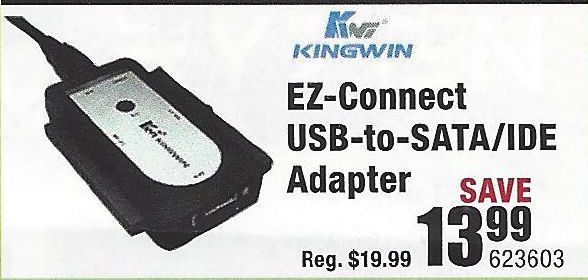
2) Purchase a USB-to-Hard Driver adapter kit (like the one illustrated below)

 USB-Drive-Adapter.jpg

3) Connect the old drive to a working PC using that adapter
4) Try to retrieve the files and folders you want to save from the old drive and copy them to the new PC.

If this does not work, then you need to do the following:
1) Download and install this utility on a working PC http://www.majorgeeks.com/news/story/recover_data_in_3_steps_with_minitool_power_data_recovery_free_...
2) Run the data recovery utility to see what can be retrieved from the old drive.

If that tool does not find what you need, an alternative is Recuva http://www.piriform.com/recuva

And, if that does not work well, the best tool out there is this one, but only the trial version is free http://www.file-recovery.com/

------------------------------------------------------------

Once you have the data recovery done, you can proceed with installing a new copy of Win10.


Go to this link and follow the directions for creating Win10 installation media on a USB stick:  https://www.microsoft.com/en-us/software-download/windows10


Once you have that, re-insert the drive back into the PC, insert the USB stick into the PC, and reboot it.  It should load the Windows installer automatically.


IF it does not, then press the F9 key repeatedly while rebooting and when the Boot Device menu appears, select the USB drive.


I am a volunteer and I do not work for, nor represent, HP
† The opinions expressed above are the personal opinions of the authors, not of HP. By using this site, you accept the <a href="https://www8.hp.com/us/en/terms-of-use.html" class="udrlinesmall">Terms of Use</a> and <a href="/t5/custom/page/page-id/hp.rulespage" class="udrlinesmall"> Rules of Participation</a>.