• ×
    Information
    Need Windows 11 help?
    Check documents on compatibility, FAQs, upgrade information and available fixes.
    Windows 11 Support Center.
  • post a message
  • ×
    Information
    Need Windows 11 help?
    Check documents on compatibility, FAQs, upgrade information and available fixes.
    Windows 11 Support Center.
  • post a message
Guidelines
Join the HP Community Solve‑a‑thon | Help Others & Share Your Solutions | Live on Zoom | 2:30 PM to 2:30 AM IST | Every Wednesday Click here to know more
Common problems for Battery
We would like to share some of the most frequently asked questions about: Battery Reports, Hold a charge, Test and Calibrating Battery . Check out this link: Is your notebook plugged in and not charging?
HP Recommended
15-bs112ne

Am trying to Install an SSD and M.2 on my 15-bs112ne i just want to know whats the maximum M.2 Pcie and SSD configuration.

3 REPLIES 3
HP Recommended


@He45J

Welcome to HP Forums,

Let's get straight to it!


Did you happen to check the service and maintenance guide?

(Click here to check if you haven't done it, yet)


Here's the SSD configuration approved by HP: (Under Page. 3 of product description)


eMMC configurations (not for Intel Pentium Silver N5000/Celeron N4000 processors):
● 128 GB


M.2 SATA-3 configurations (value) (not for Intel Pentium Silver N5000/Celeron N4000 processors):
● 256 GB
● 128 GB


M.2 SATA-3 configurations (TLC) (not for Intel Pentium Silver N5000/Celeron N4000 processors):
● 512 GB
● 256 GB
● 128 GB


Dual storage configurations (Intel Core processors only)
● 256 GB Value SSD + 1 TB HDD
● 128 GB Value SSD + 1 TB HDD 
 

Let me know how that pans out,

If you feel I was helpful, simply click on Accept as Solution to help the community grow,

That said, I will have someone follow-up on this to ensure you've been helped,

Just in case you don't get back to us within 24 - 48hrs, and have a good day, ahead.

Riddle_Decipher
I am an HP Employee


Learning is a journey, not a destination.
Let's keep asking questions and growing together.
HP Recommended

Hi,

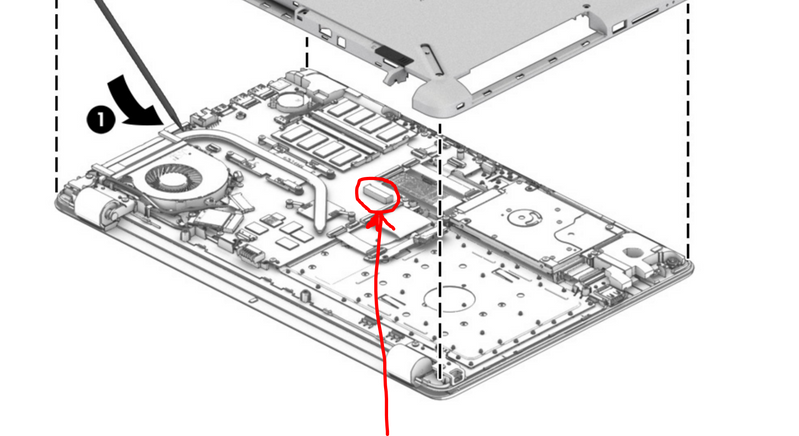
First, your PC will not support an M2 PCIe NVMe SSD. I will only support a M2 SATA3 SSD. However before buying an M2 drive, I would check if the M2 slot is present on motherboard. Sometimes HP notebooks which did not come with M2 SSD are missing the physical slot on the motherboard. On page 45 of service manual you can see the steps to remove bottom cover to take a look.

http://h10032.www1.hp.com/ctg/Manual/c05493257


M2 slotM2 slot

If the slot is present you can use an M2 SATA3 SSD such as the M2 Samsung 860 evo. If the slot is not present you can replace the mechanical drive in your PC with a 2.5" SSD such as the 2.5" Samsung 860evo.

The speed will be the same for both drives. So the easiest would be to buy a large SSD and on ly replace the 2,5" Mechanical drive.

Let me know if you need further help,

David


Please click on thumbs up for thanks

Please click on accept as solution if answered your question

HP Recommended

Dual storage configurations (Intel Core processors only)
● 256 GB Value SSD + 1 TB HDD
● 128 GB Value SSD + 1 TB HDD 


After posting this I found the service and maintenance guide, and understood that the motherboard supports  M.2 SATA-3 not nvme but the confusing part is it says for duel storage it will support 256gb with 1tb. i got a TLC  M,2 Sata 512gb and got a 1 terra SSD and my laptop booted and read both drives my question is now, will it support 1 terra M.2 Sata with 1 terra ssd


thank you 

all

† The opinions expressed above are the personal opinions of the authors, not of HP. By using this site, you accept the <a href="https://www8.hp.com/us/en/terms-of-use.html" class="udrlinesmall">Terms of Use</a> and <a href="/t5/custom/page/page-id/hp.rulespage" class="udrlinesmall"> Rules of Participation</a>.