
-
×InformationNeed Windows 11 help?Check documents on compatibility, FAQs, upgrade information and available fixes.
Windows 11 Support Center. -
-
×InformationNeed Windows 11 help?Check documents on compatibility, FAQs, upgrade information and available fixes.
Windows 11 Support Center. -
- HP Community
- Notebooks
- Notebook Hardware and Upgrade Questions
- Re: Add a SSD disk on Pavillion DV7 6199sl

Create an account on the HP Community to personalize your profile and ask a question
Your account also allows you to connect with HP support faster, access a personal dashboard to manage all of your devices in one place, view warranty information, case status and more.
Common problems for Battery
We would like to share some of the most frequently asked questions about: Battery Reports, Hold a charge, Test and Calibrating Battery . Check out this link: Is your notebook plugged in and not charging?

It has been a while since anyone has replied. Simply ask a new question if you would like to start the discussion again.

12-19-2017 04:10 AM
 HP Recommended
Product: Pavillion DV7 6199sl
Operating System: Microsoft Windows 7 (64-bit)
I have a HP pavillion DV7 6199sl, I would like to know if there is the space in the notebook for a second HHD. I would like to install one between SSD 850 PRO SATA III 2.5 pollici or SSD 850 EVO SATA III 2.5 pollici. Is it possible? do I need some specific kit, cable or other?
thank you
Sergio
Solved! Go to Solution.
1 ACCEPTED SOLUTION



8 REPLIES 8

12-19-2017 04:27 AM
HP Recommended
There is only space for a single hard disk in your notebook.
The Samsung 850 EVO 2.5 inch version is a good option.
You could consider removind the optical drive and replacing **bleep** with a third party adapter for a hard disk. They can be found at Amazon.com.
I am a volunteer forum member. If my suggestion helped you solve your issue, help others by marking that post as the accepted solution. Say thanks by clicking on the Yes button next to the "was this reply helpful?"


12-19-2017 04:50 AM - edited 12-19-2017 04:51 AM
HP Recommended
Sorry to quibble but the dv7s do have dual 2.5 inch bays. You can add a second hard drive using a cable from newmodeus.com:
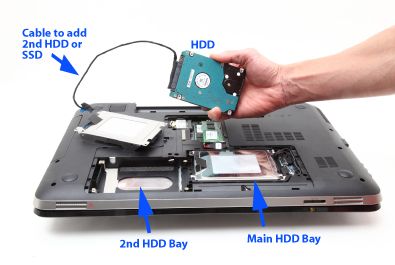
@erico not sure what you wrote to get bleeped.


12-19-2017 05:21 AM - edited 12-19-2017 05:30 AM
HP Recommended
I don't mind a quibble. If you can find something I didn't see or didn't find , it is still in everyone's best interest.
I wrote optical drive.
HP's MSL does not show a second hard disk bay.

I am a volunteer forum member. If my suggestion helped you solve your issue, help others by marking that post as the accepted solution. Say thanks by clicking on the Yes button next to the "was this reply helpful?"
12-25-2017 02:10 AM
HP Recommended
Windows 7 does not have native drivers for SATA, unlike Windows 8,8.1 and Windows 10.
You should make a slipstreamed installer that already had the SATA drivers .
I am a volunteer forum member. If my suggestion helped you solve your issue, help others by marking that post as the accepted solution. Say thanks by clicking on the Yes button next to the "was this reply helpful?"
12-25-2017 03:53 PM
HP Recommended
Yes you need to slipstream in the SATA RAID Intel Rapid Storage drivers or do an F6 install with those drivers on a thumb drive. Your laptop because it has 2 disks runs the storage controller in RAID mode and Windows 7 does not natively have that driver in the installer.
You need f6flpy.zip and extract it onto a thumb drive.

Be alert for scammers posting fake support phone numbers and/or email addresses on the community.
If you think you have received a fake HP Support message, please report it to us by clicking on "Flag Post".
† The opinions expressed above are the personal opinions of the authors, not of HP. By using this site, you accept the Terms of Use and Rules of Participation.


Didn't find what you were looking for?
Ask the community
† The opinions expressed above are the personal opinions of the authors, not of HP. By using this site, you accept the <a href="https://www8.hp.com/us/en/terms-of-use.html" class="udrlinesmall">Terms of Use</a> and <a href="/t5/custom/page/page-id/hp.rulespage" class="udrlinesmall"> Rules of Participation</a>.