• ×
    Information
    Need Windows 11 help?
    Check documents on compatibility, FAQs, upgrade information and available fixes.
    Windows 11 Support Center.
  • post a message
  • ×
    Information
    Need Windows 11 help?
    Check documents on compatibility, FAQs, upgrade information and available fixes.
    Windows 11 Support Center.
  • post a message
Guidelines
Join the HP Community Solve‑a‑thon | Help Others & Share Your Solutions | Live on Zoom | 2:30 PM to 2:30 AM IST | Every Wednesday Click here to know more
Common problems for Battery
We would like to share some of the most frequently asked questions about: Battery Reports, Hold a charge, Test and Calibrating Battery . Check out this link: Is your notebook plugged in and not charging?
HP Recommended

Hi,

I have about 2 year old HP Folio 9480m laptop.

It has 8GB DDR3 RAM, 500GB HDD (i5).

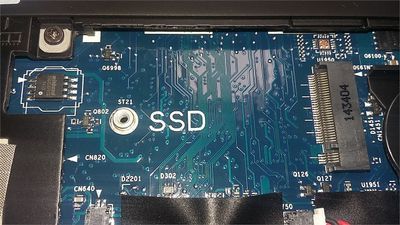
I want to add additional SSD into it.

The photo on the SSD is attached. The SSD slot is for smaller SSD about 42mm. 


Additional SSD slot in my HP Folio 9480mAdditional SSD slot in my HP Folio 9480m

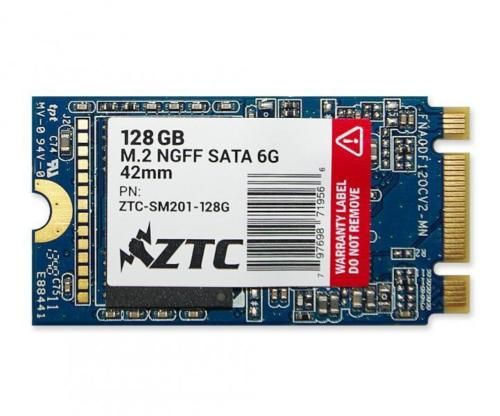
When checked online (ebay, amazon, and some other websites) I came across 2242mm; ZTC 128GB M.2 NGFF SATA 6G

SSD.....


https://www.ebay.com/itm/128GB-ZTC-Armor-42mm-M-2-NGFF-6G-SSD-Solid-State-Disk-ZTC-SM201-128G/331754...

ZTC 128GB M.2 NGFF SATA 6G.jpg

Now, If you notice, the pins on the SSD have M and B key, the SSD slot on the laptop just has M key.


My questions is the, the SSD shown above will fit in the SSD slot?


Any help on this will be appreciated.


Regards,

 MS


1 ACCEPTED SOLUTION

Accepted Solutions
HP Recommended

Yes no problem. All M.2 slots have just two chambers like that but a three pronged B + M key will fit fine; the system just knows one of the leads will not be present as it would be with  the PCIe/NVME disks that are "M" key only. 


I checked the manual and indeed it calls for a SATA M.2 2242 form factor. Glad you found one. Good job. Yes, it will work fine for you. 


Just for the record this was the part offered by HP.


Solid-state drive (SSD), M.2: 120-GB, M.2 769712-001


There are a few places offering that part but at very high prices. 


If this is "the Answer" please click "Accept as Solution" to help others find it. 

View solution in original post

3 REPLIES 3
HP Recommended

Yes no problem. All M.2 slots have just two chambers like that but a three pronged B + M key will fit fine; the system just knows one of the leads will not be present as it would be with  the PCIe/NVME disks that are "M" key only. 


I checked the manual and indeed it calls for a SATA M.2 2242 form factor. Glad you found one. Good job. Yes, it will work fine for you. 


Just for the record this was the part offered by HP.


Solid-state drive (SSD), M.2: 120-GB, M.2 769712-001


There are a few places offering that part but at very high prices. 


If this is "the Answer" please click "Accept as Solution" to help others find it. 

HP Recommended

Thanks for the super fast response.


Can I install 256 GB SSD instead of 128? 256GB is little pricer than the one I found out on ebay.

What is your advise?


Regards,

MS

HP Recommended

Yes. There is no capacity limit as long as it is the SATA type M.2. 

† The opinions expressed above are the personal opinions of the authors, not of HP. By using this site, you accept the <a href="https://www8.hp.com/us/en/terms-of-use.html" class="udrlinesmall">Terms of Use</a> and <a href="/t5/custom/page/page-id/hp.rulespage" class="udrlinesmall"> Rules of Participation</a>.