-
×InformationNeed Windows 11 help?Check documents on compatibility, FAQs, upgrade information and available fixes.
Windows 11 Support Center. -

-
×InformationNeed Windows 11 help?Check documents on compatibility, FAQs, upgrade information and available fixes.
Windows 11 Support Center. -
- HP Community
- Notebooks
- Notebook Hardware and Upgrade Questions
- Arrow buttons don't work?

Create an account on the HP Community to personalize your profile and ask a question
04-03-2019 11:27 AM
All of my keyboard works....except for the arror buttons (up, down, left, right).
YES I tried reinstalling keyboard drivers. No sucess there.
Any clue how to fix this problem?
04-04-2019 04:01 PM
Welcome to the HP Support Community!
Use HP PC Hardware Diagnostics to complete functional test of the keyboard and identify any problems with the hardware.
-
Download the latest version of HP PC Hardware Diagnostics.
-
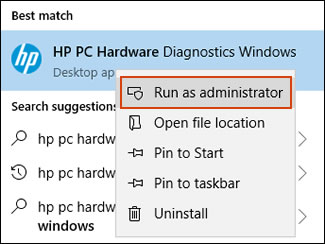
In Windows, search for and right-click HP PC Hardware Diagnostics for Windows, and then select Run as administrator.

-
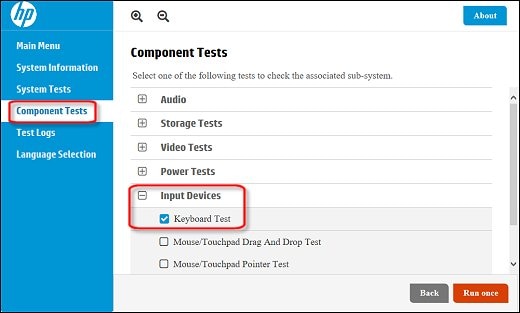
Click Component Tests, click Input Devices, and then select the Keyboard Test.

-
Click Run once to begin the test.
The test ends when you complete the tasks or after 3 minutes.
Let me know how it goes and you have a great day!
If you wish to show appreciation for my efforts, mark my post as Accept as Solution. Your feedback counts!
Cheers!
The_Fossette
I am an HP Employee
04-04-2019 04:02 PM
Welcome to the HP Support Community!
Use HP PC Hardware Diagnostics to complete functional test of the keyboard and identify any problems with the hardware.
NOTE:Bluetooth devices are not currently supported.
-
Download the latest version of HP PC Hardware Diagnostics.
-
In Windows, search for and right-click HP PC Hardware Diagnostics for Windows, and then select Run as administrator.

-
Click Component Tests, click Input Devices, and then select the Keyboard Test.

-
Click Run once to begin the test.
The test ends when you complete the tasks or after 3 minutes.
Let me know how it goes and you have a great day!
If you wish to show appreciation for my efforts, mark my post as Accept as Solution. Your feedback counts!
Cheers!
The_Fossette
I am an HP Employee
04-06-2019 09:43 AM
I recommend you contact support as it looks like a hardware issue.
Here is how you can get in touch with tech support.
1)Click on this link – www.hp.com/contacthp/
2)Select the product type.
3)Enter the serial number of your device or select let HP detect your product option.
4)Select the country from the drop-down.
5)You should see the HP phone support number or Chat option listed.
Cheers!
The_Fossette
I am an HP Employee