• ×
    Information
    Need Windows 11 help?
    Check documents on compatibility, FAQs, upgrade information and available fixes.
    Windows 11 Support Center.
  • post a message
  • ×
    Information
    Need Windows 11 help?
    Check documents on compatibility, FAQs, upgrade information and available fixes.
    Windows 11 Support Center.
  • post a message
Guidelines
Seize the moment! nominate yourself or a tech enthusiast you admire & join the HP Community Experts!
Common problems for Battery
We would like to share some of the most frequently asked questions about: Battery Reports, Hold a charge, Test and Calibrating Battery . Check out this link: Is your notebook plugged in and not charging?
HP Recommended
hp 17-ca1065cl
Microsoft Windows 10 (64-bit)

The backlit keyboard willmonly stay on for 30 seconds before it shuts the lights off.  How to make it stay on all the time?

1 REPLY 1
HP Recommended

@TPUSE


I reviewed your post and I understand that want to keep the backlight always on.


Don’t worry, I assure you I will try my best to get this sorted.


If the backlight stays on for only a few seconds, the backlight timeout setting might need configuring in the BIOS.

NOTE: 

If there is not a setting for the backlight timing in the BIOS, this behavior might not be supported on the notebook. Check your notebook model's product support documentation to confirm support.

Your BIOS version and screens might vary.

  1. Restart the notebook, and then immediately press the F10 repeatedly until the BIOS opens.

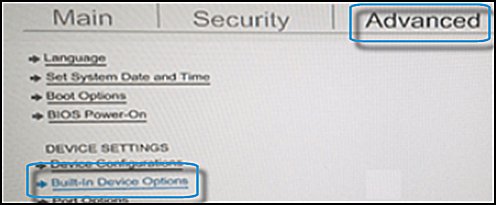
  2. When the BIOS opens, use the arrow keys to navigate to the Advanced tab.

  3. Navigate to Built-in Device Options, and then press Enter.

    The Advanced tab showing Built-in Device Option highlighted

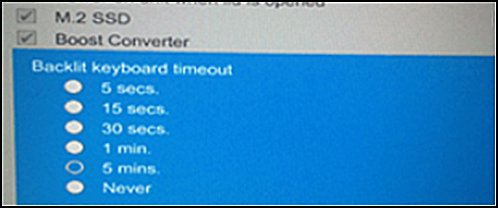
  4. In the Built-in Device Options, select Backlit keyboard timeout.

  5. Press the spacebar to open the keyboard backlight settings, and then select the timeout setting you want.

    NOTE: If you select Never, the backlight remains on which could quickly drain the notebook battery power.

    Backlit keyboard timeout options

Let me know how it goes and you have a great day!


P.S: Welcome to the HP Support Community 😊


If you wish to show appreciation for my efforts, mark my post as Accept as Solution. Your feedback counts!


Cheers!

Stay Home – Stay Safe

The_Fossette
I am an HP Employee

† The opinions expressed above are the personal opinions of the authors, not of HP. By using this site, you accept the <a href="https://www8.hp.com/us/en/terms-of-use.html" class="udrlinesmall">Terms of Use</a> and <a href="/t5/custom/page/page-id/hp.rulespage" class="udrlinesmall"> Rules of Participation</a>.