-
×InformationNeed Windows 11 help?Check documents on compatibility, FAQs, upgrade information and available fixes.
Windows 11 Support Center. -

-
×InformationNeed Windows 11 help?Check documents on compatibility, FAQs, upgrade information and available fixes.
Windows 11 Support Center. -
- HP Community
- Notebooks
- Notebook Hardware and Upgrade Questions
- Battery and accessories issue

Create an account on the HP Community to personalize your profile and ask a question
04-05-2020 06:09 AM
My HP Probook 450 G4 battery is discharging while it is still turned off. Diagnostic tool in hp assistant shows battery is OK. But why this is drained when not used? Also sometimes the touch pad stops responding and keyboard malfunctions(especially caps lock and C button), but it resolves spontaneously after some restarts. Please help!
04-05-2020 08:06 AM
With regards to the battery drain, it is normal for a battery to drain a little even when it is not in use and a batteries ability to hold a charge decreases over time. For example, when not in use, it might need to support your clock, USB port charging, etc...
- You can click this link for instructions how to Test and Calibrate your Battery
Follow the steps to calibrate your battery - note that it may take a while to complete the procedure.
- The maximum charge capacity of every battery decreases over time and with use. The rate at which this capacity decreases can vary depending on product configuration, product model, operating system, type of software used, power management settings, and other factors.
- You may check these articles to improve your battery life (in general):
>> https://support.hp.com/us-en/document/c01297640
>> https://www.howtogeek.com/224501/how-to-improve-battery-life-with-windows-10s-new-power-settings/
- Please, shutdown the computer using the power button (pressed and hold for a few seconds until PC powers off)
- Power the computer back on.
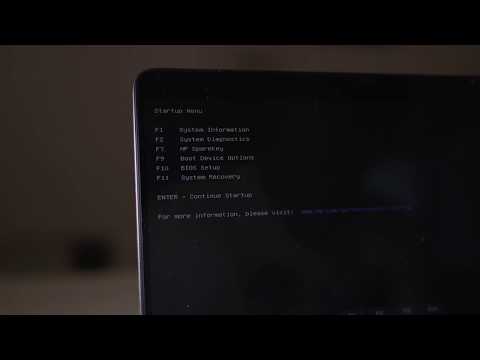
As soon as you press the power-on button, immediately begin hitting the Esc button (like tap-tap-tap) before any logo appears. This should open a HP Startup Menu >> https://www.youtube.com/watch?v=GSN0qzXayUY
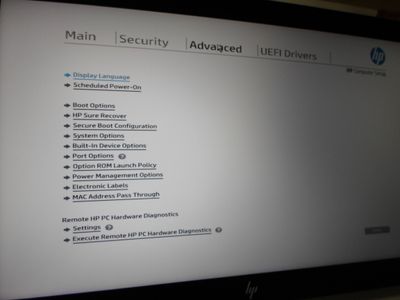
- Choose F10 to open your BIOS/UEFI. Follow the on-screen instructions to go
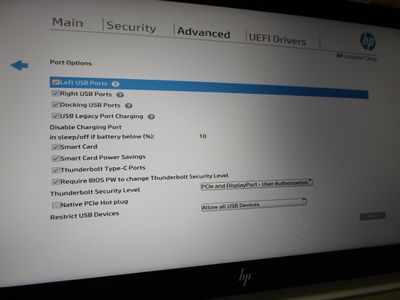
Here, you can increase the percentage to like 50% to disable port charging when in sleep mode or off mode
Advanced tab > Port options
you may also disable/uncheck port charging
Hope this helps.
*** HP employee *** I express personal opinion only *** Joined the Community in 2013
04-21-2020 12:48 AM - edited 04-21-2020 01:04 AM
- Thank you. I never use USB port for charging other devices & I turn the laptop off from windows shutdown option, still my battery level drops nearly 1% per day when kept unused. Is it normal?
- Can you guide me about the keyboard and touchpad problems as mentioned in the question?