-
×InformationNeed Windows 11 help?Check documents on compatibility, FAQs, upgrade information and available fixes.
Windows 11 Support Center. -

-
×InformationNeed Windows 11 help?Check documents on compatibility, FAQs, upgrade information and available fixes.
Windows 11 Support Center. -
- HP Community
- Notebooks
- Notebook Hardware and Upgrade Questions
- Battery won't charge above 90%, Calibration failed.

Create an account on the HP Community to personalize your profile and ask a question
07-23-2020 10:37 PM
Hey,
My battery won't charge above 90% and laptop abruptly shuts down at any point below 50% battery.
After 72%, it starts a weird cycle of charging /plugged, not charging and then finally stops at around 88-90%.
I tried all the methods listed on the forum,
- Uninstalling ACPI battery control driver and restarting.
- Removing the battery and pressing the power button for a few seconds.
- Updating the BIOS.
- Calibrating (not properly, see below)
The HP support assistant says The Battery needs Calibration, The Procedure to do that as I understand is,
- Charge to 100%
- Discharge completely
- Charge again to 100%
But apparently I can't do so because of the fact that I can't charge Laptop to 100% at the first place, it stops at 90%, neither can I discharge it fully, it shuts down at about 18-19% without any warning.
But I still tried it by charging laptop to 90% and then discharging followed by charging again, which again stopped at 90%.
The Full charge capacity is still 63% of the original capacity (see report below).
I need to know whether to replace the battery or not.
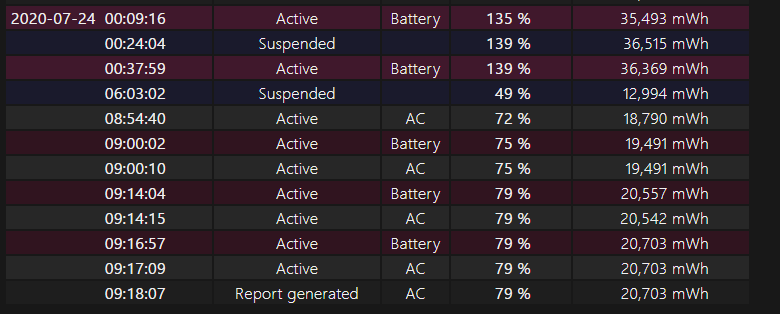
After I tried Calibration, the following report was generated,
Also, the full charge capacity was almost stable a week ago, almost constant then it started fluctuating (see picture below)
Current estimate of battery life based on all observed drains since OS install : 4:36:22, design capacity : 7:19:47
Please inform whether it is the right time to replace the battery, given the fact that battery is 2 years 4 months old, but laptop is no more than 1 year and 10 months old, which means battery was not used even for full 2 years.
Thanks.
07-26-2020 01:05 PM
I reviewed your post and I understand that the battery is not getting charged beyond 90%.
Don’t worry, I assure you I will try my best to get this sorted.
I recommend you restore the BIOS defaults following the steps in the below article and check if it helps.
https://support.hp.com/in-en/document/c04831065
Let me know how it goes and you have a great day!
P.S: Welcome to the HP Support Community 😊
If you wish to show appreciation for my efforts, mark my post as Accept as Solution. Your feedback counts!
Cheers!
Stay Home – Stay Safe
The_Fossette
I am an HP Employee
07-27-2020 02:07 PM
@The_Fossette
Thanks for replying, are you sure about BIOS reset, I have updated my BIOS several times in the past 2 years, almost every time there was an upgrade available, and with BIOS reset there is a possibility of landing in a deeper trouble.
Is there some other method?