
-
×InformationNeed Windows 11 help?Check documents on compatibility, FAQs, upgrade information and available fixes.
Windows 11 Support Center. -
-
×InformationNeed Windows 11 help?Check documents on compatibility, FAQs, upgrade information and available fixes.
Windows 11 Support Center. -
- HP Community
- Notebooks
- Notebook Hardware and Upgrade Questions
- Re: Compaq fan not detected

Create an account on the HP Community to personalize your profile and ask a question
Your account also allows you to connect with HP support faster, access a personal dashboard to manage all of your devices in one place, view warranty information, case status and more.
Common problems for Battery
We would like to share some of the most frequently asked questions about: Battery Reports, Hold a charge, Test and Calibrating Battery . Check out this link: Is your notebook plugged in and not charging?

It has been a while since anyone has replied. Simply ask a new question if you would like to start the discussion again.

05-10-2019 08:44 PM
 HP Recommended
Product: Compaq Presario CQ57
Operating System: Microsoft Windows 7 (32-bit)
I recently launched the HP hardware diagnostics on my laptop. I was confused when the program showed no fan connected under the system information tab.
The fan is audible to me ( I think working well ) but not detected by the system. The system sometimes even shuts down due to lack of cooling. Please help me out .😥
6 REPLIES 6


05-11-2019 01:04 AM
HP Recommended
Hi,
Can you give the exact model or product number of your CQ57 as there are many series and each series will have many models.
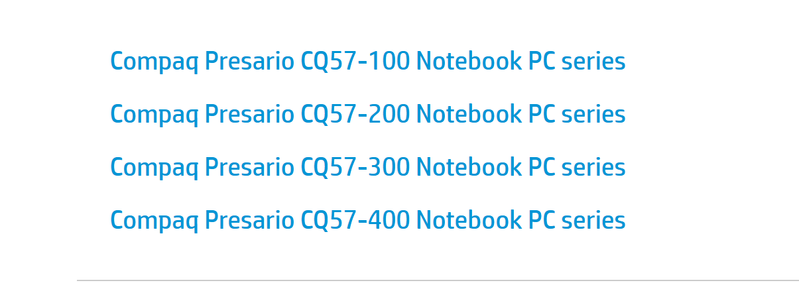
Here is link to support page showing how to find it:
https://support.hp.com/my-en/document/c00033108
Let me know,
David
06-02-2019 01:55 AM - edited 06-02-2019 02:00 AM
HP Recommended

OK. Are you getting errors at startup about the fan?
What you can do is replace the fan or even the whole heatsink/fan assembly and at the same time put some new quality thermal paste on the CPU.
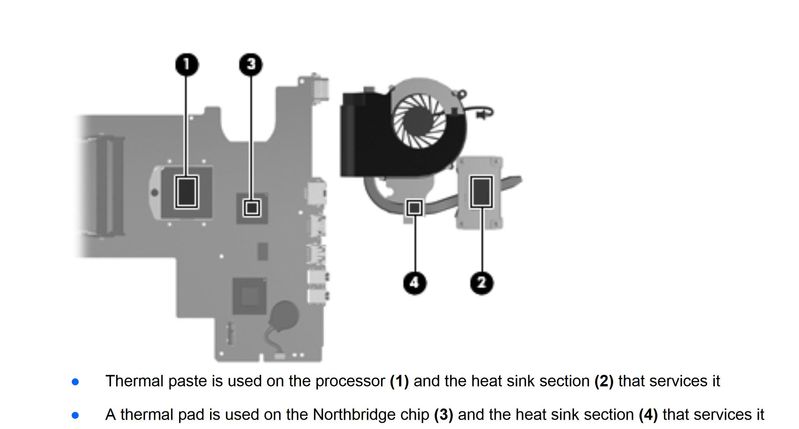
The part number for the fan (and heatsink) is 646181-001
You can try finding with online search with part number
Examples
https://www.ebay.com/sch/i.html?_from=R40&_trksid=m570.l1313&_nkw=646181-001&_sacat=0
https://www.amazon.in/s?k=646181-001&ref=nb_sb_noss
On page 76 of the service manual, you can see the steps to replace the fan/heatsink. Yours is the "Intel Pentium processor and a graphics subsystem with UMA video memory"
http://h10032.www1.hp.com/ctg/Manual/c03137362
Let me know if you need further help,
David
Please click on thumbs up for thanks
Please click on accept as solution if answered your question
Edit:
Just wanted to add you need to clean off the old thermal paste from the CPU and heatsink with a lintfree cloth and some alcohol You can use Arctic MX4 or similar. You will also most likely need to replace the thermal pad on the other chip, so you will need a thermal pad.
06-02-2019 04:35 AM
HP Recommended
Sorry David ,
I dont see any error message regarding the fan. (during bootup)
|| Can you please tell how can I judge my fan using the hp tools?
\\ I dont understand why you asked me to get my fan replaced?
Thanks David 🙂 🙂
06-02-2019 11:11 AM
HP Recommended
Hi,
The fan is not detected by HP diagnostics but it must be detected by the system or you would get an error code at startup. Check in BIOS if POST error stop codes is maybe turned off.
If your PC is shutting down because of heat, you will need to clean the fan and most likely replace the fan, thermal material which would probably give some new life to the cooling system.
Regards,
David

Be alert for scammers posting fake support phone numbers and/or email addresses on the community.
If you think you have received a fake HP Support message, please report it to us by clicking on "Flag Post".
† The opinions expressed above are the personal opinions of the authors, not of HP. By using this site, you accept the Terms of Use and Rules of Participation.


Didn't find what you were looking for?
Ask the community
† The opinions expressed above are the personal opinions of the authors, not of HP. By using this site, you accept the <a href="https://www8.hp.com/us/en/terms-of-use.html" class="udrlinesmall">Terms of Use</a> and <a href="/t5/custom/page/page-id/hp.rulespage" class="udrlinesmall"> Rules of Participation</a>.