• ×
    Information
    Need Windows 11 help?
    Check documents on compatibility, FAQs, upgrade information and available fixes.
    Windows 11 Support Center.
  • post a message
  • ×
    Information
    Need Windows 11 help?
    Check documents on compatibility, FAQs, upgrade information and available fixes.
    Windows 11 Support Center.
  • post a message
Guidelines
Webcam Not Working? Advanced Fixes for HP Notebooks! Click here to view the instructions!
Common problems for Battery
We would like to share some of the most frequently asked questions about: Battery Reports, Hold a charge, Test and Calibrating Battery . Check out this link: Is your notebook plugged in and not charging?
HP Recommended
HP 2000-299WM NOTEBOOK PC
Microsoft Windows 7 (64-bit)

I wanted to watch a movie on my laptop this weekend and the DVD player wouldn't work. I even tried listening to a music CD, to no avail. Usually you can hear the disc spinning, but it does nothing. 

I tried to remove the drivers, then restart. This is what it read as an error;

[U][B][I]HP CDDV DW SN-208BB

PLEASE CONSULT WITH YOUR DEVICE MAUFACTURER FOR ASSISTANCE GETTING THIS DEVICE INSTALLED."[/U][/B][/I]

Can anyone help me get my DVD player working again?

Thank You!

"

2 REPLIES 2
HP Recommended

PLEASE CONSULT WITH YOUR DEVICE MAUFACTURER FOR ASSISTANCE GETTING THIS DEVICE INSTALLED."

Does this mean that I need to contact HP?

HP Recommended

@BlueOvalFitter


Welcome to HP support community.


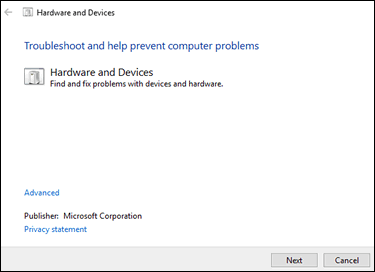
Run the Hardware and Devices troubleshooter

  1. In Windows, search for and open Find and fix problems with devices.

    Hardware and devices troubleshooter in Windows 10

  2. Click Next to start the troubleshooter.

  3. Follow the instructions to fix any problems found, and then test a disc in the drive.

Test the drive for a hardware failure

  1. Turn off the computer.

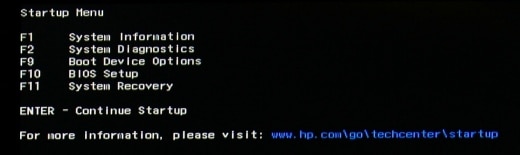
  2. Press the power button to turn on the computer, and then immediately press the Esc key repeatedly until the Startup Menu opens.

    Startup Menu

  3. Press F2 to open the HP PC Hardware Diagnostics UEFI.

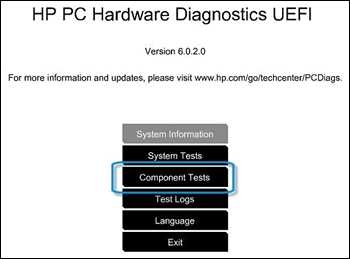
  4. Click Component Tests.

    Selecting Component Tests from the main menu

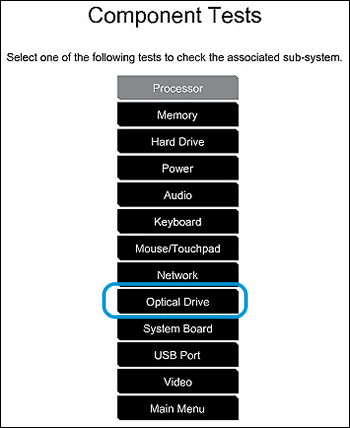
  5. Click Optical Drive, and then run all the available tests. Have a working CD or DVD available to complete the tests. Each test takes 1 to 2 minutes to run.

    Selecting Optical Drive in the Component Tests menu

  6. Follow any instructions to resolve any issues found, and then test a disc in the drive.

Refer this HP document for more assistance:- Click here


Let me know how it goes.

To thank me for my efforts to help you, please mark my post as an accepted solution so that it benefits several others.

Cheers.

Sandytechy20
I am an HP Employee

† The opinions expressed above are the personal opinions of the authors, not of HP. By using this site, you accept the <a href="https://www8.hp.com/us/en/terms-of-use.html" class="udrlinesmall">Terms of Use</a> and <a href="/t5/custom/page/page-id/hp.rulespage" class="udrlinesmall"> Rules of Participation</a>.