• ×
    Information
    Need Windows 11 help?
    Check documents on compatibility, FAQs, upgrade information and available fixes.
    Windows 11 Support Center.
  • post a message
  • ×
    Information
    Need Windows 11 help?
    Check documents on compatibility, FAQs, upgrade information and available fixes.
    Windows 11 Support Center.
  • post a message
Guidelines
Webcam Not Working? Advanced Fixes for HP Notebooks! Click here to view the instructions!
Common problems for Battery
We would like to share some of the most frequently asked questions about: Battery Reports, Hold a charge, Test and Calibrating Battery . Check out this link: Is your notebook plugged in and not charging?
HP Recommended
HP 15s dr1000tx
Microsoft Windows 11

The down Arrow doesn't work and sometimes it's malfunction like auto scrolling the page , I have read in Quora about this issue as many has the same problem, they do change keyboards a lott , and I have a laptop which Is one year old I used it so least times it's like almost brand new, after updating windows 11, I noticed the keyboard malfunction with so many keys and finally I fixed every buttons by seeing YouTube assist videos on windows 11 keyboard and then all keys working except the down arrow key , It seems HP have some Software  compatibility issue with Microsoft . Please kindly help me a fix , I tried many ways to fix but it doesn't work 

1 REPLY 1
HP Recommended

@Arun222

Thank you for posting on the HP Support Community.
 

Don't worry as I'll be glad to help,

I appreciate your efforts to try and resolve the issue. Use HP PC Hardware Diagnostics to complete a functional test of the keyboard and identify any problems with the hardware.

NOTE: Bluetooth devices are not currently supported.
  1. Download the latest version of HP PC Hardware Diagnostics.

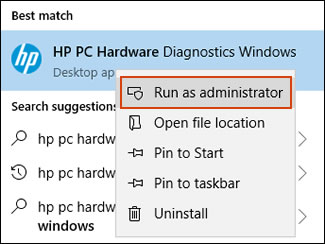
  2. In Windows, search for and right-click HP PC Hardware Diagnostics for Windows, and then select Run as administrator.

    Run HP PC Hardware Diagnostics Windows as an administrator

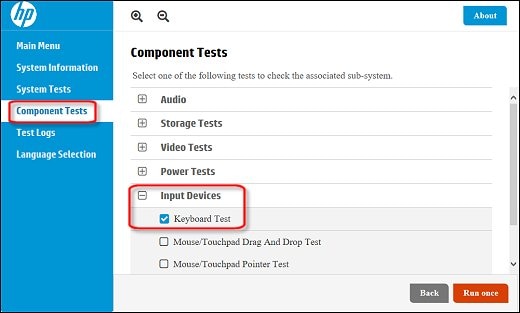
  3. Click Component Tests, click Input Devices and then select the Keyboard Test.

    Running the Keyboard Test

  4. Click Run once to begin the test.

    The test ends when you complete the tasks or after 3 minutes.

For more information about using the HP PC Hardware Diagnostics for Windows, go to HP PCs - Testing for Hardware Failures.


Hope this helps! Keep me posted for further assistance.
Please click “Accept as Solution” if you feel my post solved your issue, it will help others find the solution. Click the “Kudos, Thumbs Up" on the bottom right to say “Thanks” for helping!

ECHO_LAKE
I am an HP Employee

† The opinions expressed above are the personal opinions of the authors, not of HP. By using this site, you accept the <a href="https://www8.hp.com/us/en/terms-of-use.html" class="udrlinesmall">Terms of Use</a> and <a href="/t5/custom/page/page-id/hp.rulespage" class="udrlinesmall"> Rules of Participation</a>.