-
×InformationNeed Windows 11 help?Check documents on compatibility, FAQs, upgrade information and available fixes.
Windows 11 Support Center. -

-
×InformationNeed Windows 11 help?Check documents on compatibility, FAQs, upgrade information and available fixes.
Windows 11 Support Center. -
- HP Community
- Notebooks
- Notebook Hardware and Upgrade Questions
- G6 with and A8 cpu

Create an account on the HP Community to personalize your profile and ask a question
12-26-2018 08:03 AM
Hi i have a amd G6 1232sa with an amd a8 1.6ghz quad cpu I'm pretty sure that this isn't stock. Can anybody confirm this.?
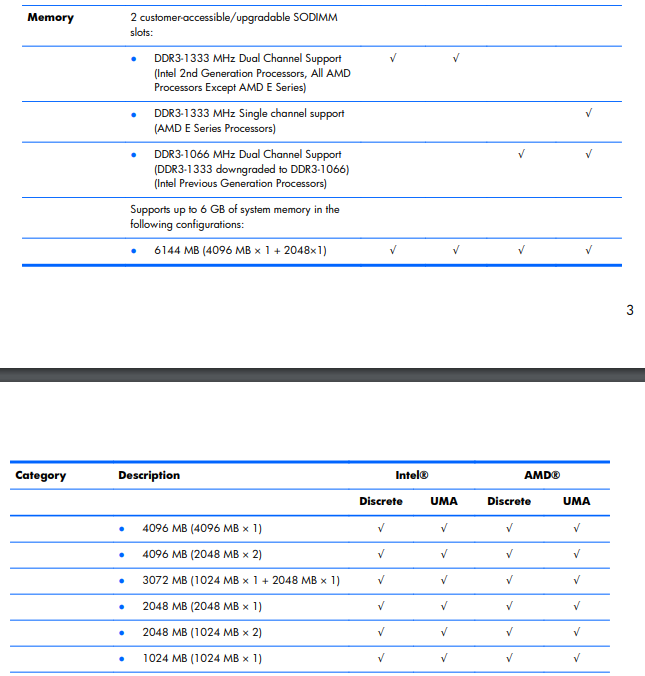
Also it has 4gb of ram i would like to upgrade this to 6gb . Can I do this with one 2gb stick and one 4gb stick as i presume it currently has two 2gb sticks of ram..
Thanks
12-27-2018 09:21 AM
Welcome to the HP Forums 🙂 I would like to take a moment and thank you for using this forum, it is a great place to find answers. For you to have the best experience on the HP forum, you could also visit our HP Forums Guide for First Time Here? Learn How to Post and More. I see from your post that you need information and assistance related to your HP Pavilion G6 Notebook. Don't worry we'll work together to help you find a solution.
I did go through the Product specifications of your PC and found that your PC is shipped with 1.8 GHz AMD Dual-Core E2-3000M APU with Radeon HD 6380G Dual Graphics - Processor and 4 GB DDR3 Memory installed on your PC.
Please go through the Maintenance and service guide of your notebook, You can upgrade your memory to 6 GB DDR3.
For the part numbers, please go to Chapter 3 - Illustrated parts catalog page number 25
Memory modules (1066 MHz, DDR3)
● 4 GB PC3 10600 1333 MHz shared 621569-001
● 2 GB PC3 10600 1333 MHz shared 621565-001
Regarding the CPU, please go through the chapter 1 and for the part numbers - Please go through the Chapter 3. Illustrated Parts Catalog - page number 23.
Please note these parts which are listed here are the ones which are tested and compatible on your PC.
If you wish to try other parts you can try it at your own discretion, HP Doesn't recommend any upgrade/downgrade of any hardware parts or software that is bundled with the product. It may affect the manufacturer's warranty and performance.
Alternatively, You could replace the part on your own, use the HP Partsurfer to identify the part: Click here & order it via the HP Parts store (Click here).
Note: In case if you're not able to find these parts on our HP website, these parts numbers are universal and you can find them through online retailers such as eBay and Amazon.
Let me know if this helps!
Have a great day ahead! 🙂
If I have helped you resolve the issue, feel free to give me a virtual high-five by clicking the 'Thumbs Up' icon below,
Followed by clicking on "Accept as Solution" from the drop-down menu on the upper right corner.
Jeet_Singh
I am an HP Employee